

If a drive suddenly shows as Unallocated or a partition has vanished, do not create a new volume or format it. The partition table, a small map at the start of the disk, is usually what is damaged. Your files are often still there.
Key takeaways
- Unallocated means Windows cannot find a valid partition table, not that the disk is empty.
- Do not click New Simple Volume, Initialize or Format. They overwrite the structures needed for recovery.
- Causes include a power cut, a bad shutdown, a virus, a failing drive or a deleted partition.
- If the drive also clicks or is slow, the fault may be physical. Stop and ask a lab.
- If the drive is healthy, software or a lab can rebuild the partition and read the files.
In this guide
- What Unallocated really means
- Common causes
- What to do first
- When it is not just a partition problem
- How a lab recovers it
- Cost and time
- What to note before you contact a lab
- How to prevent it next time
- Frequently asked questions
Written by the Recovea lab team, Porur, Chennai. Last reviewed 18 November 2026.
What Unallocated really means
A disk is divided into partitions, and a small table at the start of the disk records where each one begins and ends. If that table is damaged or deleted, Windows shows the whole space as Unallocated, as if the disk were new. The partitions and their files still exist; the computer just does not know where they are. Disk Management then offers to create a new volume, and creating one writes a new table and file system over the old structures.
Common causes
- A power cut or the drive being removed during a write.
- Deleting a partition by mistake in Disk Management or while installing an operating system.
- A virus or a faulty partition tool.
- Bad sectors or a failing drive at the start of the disk.
- A damaged external enclosure board.
Unallocated drive: what it means
What you see, likely cause and the safe next step
stop careful safe
What an Unallocated drive is telling you.
What to do first
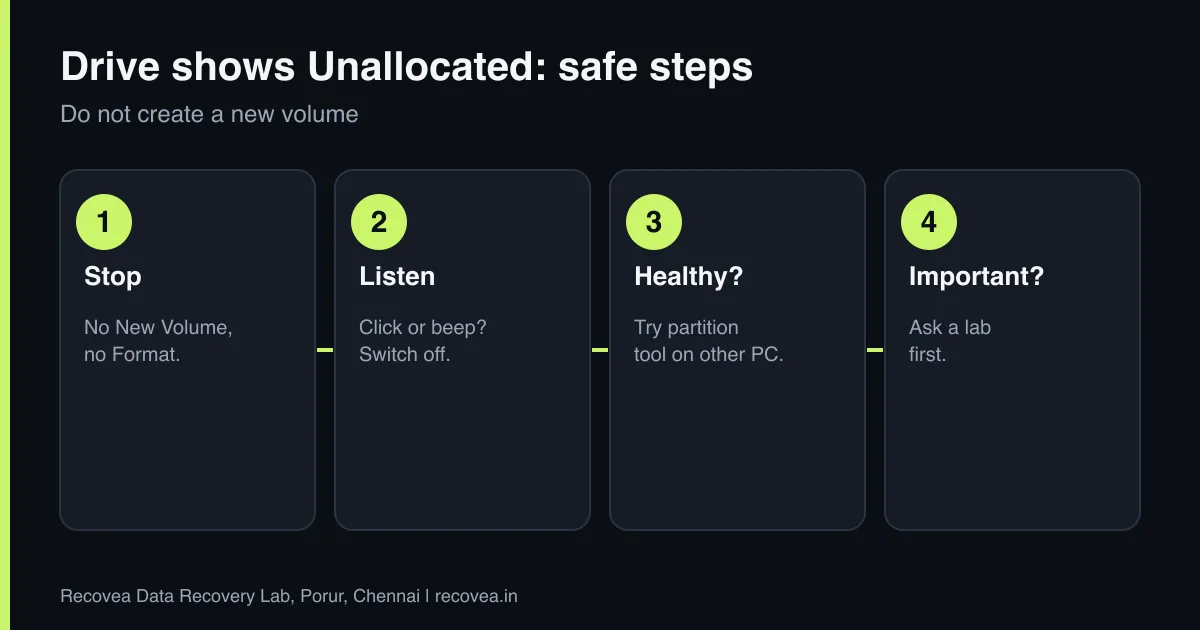
- Stop. Do not create, format, extend or initialise anything.
- Check whether the drive is detected in the BIOS and by the same name in Disk Management.
- Listen: if it clicks, beeps or grinds, switch it off and read the guides on clicking and grinding.
- If the drive is silent and healthy, you may try a partition-recovery tool installed on another drive.
- If the files matter, ask a lab before you try several tools.
When it is not just a partition problem
An Unallocated disk that is also very slow, freezes the computer or shows errors usually has bad sectors or weak heads. Running tools that scan the whole disk again and again can finish off a weak drive. In those cases we make an image of the drive first with hardware that handles bad sectors, then find the partitions in the image. Read about bad sectors and CHKDSK.
Ask our experts: free diagnosis. Send us a message on WhatsApp and we reply within 30 minutes during working hours (Monday to Saturday, 10:30 to 20:00). Recovery starts from ₹990, physical and complex cases are quoted individually after diagnosis, and if we cannot recover your data, you do not pay.
Chat on WhatsApp | Call +91 79046 79817 | Ask D, free diagnosis
How a lab recovers it
The engineer checks the drive’s health, images it if needed, and scans the image for the lost partition and file system. Once the structure is found, files are read with their names and folders where possible, and verified before delivery. If the file system is damaged too, files are carved out by type. See the RAW guide for the related case of a drive that asks to format.
Unallocated disk: safe decisions
Follow the arrows and stop at the first YES
Does Disk Management show Unallocated space?
If no, go to the next question
Do not create a New Volume.
Does the drive click or vanish?
If no, go to the next question
Hardware fault. Switch it off.
Is the data important?
If no, go to the next question
Scan from another drive or ask a lab.
Only the letter is missing: assign a letter.
Safe decisions for an unallocated disk.
Cost and time
Diagnosis is free. Logical cases are often done in 24 to 72 hours after we receive the drive, with some taking 7 to 15 working days. Recovery starts from ₹990, physical or complex cases are quoted individually after diagnosis, and if we cannot recover your data, you do not pay.
What to note before you contact a lab
A few details help the engineer diagnose faster and quote more accurately. Write down the drive brand, model and capacity (printed on the label), how old it is, what happened just before the problem began (a drop, a power cut, a Windows update, a noise), and which files matter most. If it is an external drive, note whether the enclosure has a separate power adapter. Do not worry if you do not know all of this: the free diagnosis fills in the rest. Keep the drive in an anti-static bag or a padded box until it reaches us.
How to prevent it next time
Hard drives are mechanical, and every one will fail eventually. The only real protection is a second copy of what matters. Follow the 3-2-1 idea: three copies, on two different kinds of storage, with one stored somewhere else (a cloud service or a drive at another location). Do not move a laptop or external drive while it is running, use the right power supply for external drives, and replace any drive that starts to make new noises, freezes on certain files or shows errors. Test your backup sometimes by restoring one file.
Ask our experts: free diagnosis. Send us a message on WhatsApp and we reply within 30 minutes during working hours (Monday to Saturday, 10:30 to 20:00). Recovery starts from ₹990, physical and complex cases are quoted individually after diagnosis, and if we cannot recover your data, you do not pay.
Chat on WhatsApp | Call +91 79046 79817 | Ask D, free diagnosis
Frequently asked questions
Is my data gone if the drive shows Unallocated?
Usually not. The partition table is often damaged but the data remains. Do not create a new volume.
Can I recover a deleted partition with software?
Often, if the drive is healthy. Install the software on another drive and save recovered files elsewhere.
What if I already created a new volume?
Stop writing. Recovery is still possible in many cases, but ask a lab before you do anything else.
Why did my external drive become unallocated?
A bad disconnection, a power fault or a failing enclosure board are common causes.
How much does it cost?
Diagnosis is free; recovery starts from ₹990 and complex cases are quoted after diagnosis.
Related guides and services
- Hard drive shows RAW or asks to format
- Bad Sectors and CHKDSK: Help or Data Loss?
- Hard drive not detected in Windows or BIOS: 7 checks
- Deleted a Folder or Emptied Recycle Bin?
- Hard disk data recovery in Chennai
- External hard drive recovery
Recovea is a data recovery lab at 2nd Floor, Plot No-4, Thiraviyam Nagar 1st Street, Sai Nagar, Porur, Chennai 600116. We accept drives by pickup or courier from anywhere in India.
