

If Windows says “You need to format the disk before you can use it”, do not click Format. A RAW drive usually has a damaged file system, not missing data. The files are very often still on the drive, and the right first step is to leave it exactly as it is.
Key takeaways
- RAW means Windows cannot read the drive’s file system. It does not mean the data is gone.
- Clicking Cancel is always safe. Formatting, initialising and repair tools can make recovery harder.
- Check that the drive is stable. If it clicks or disconnects, it has a hardware fault and needs a lab.
- Labs copy the drive first and rebuild the file system from the copy, so your original is never changed.
- File names and folders often come back when the file system can be rebuilt.
In this guide
- What RAW means
- What causes a RAW drive
- Do this now
- Why formatting makes it worse
- How recovery works
- Free tools: when they help and when they do not
- SD cards, pen drives and Mac drives
- Cost and time
- Frequently asked questions
Written by the Recovea lab team, Porur, Chennai. Last reviewed 16 November 2026.
What RAW means
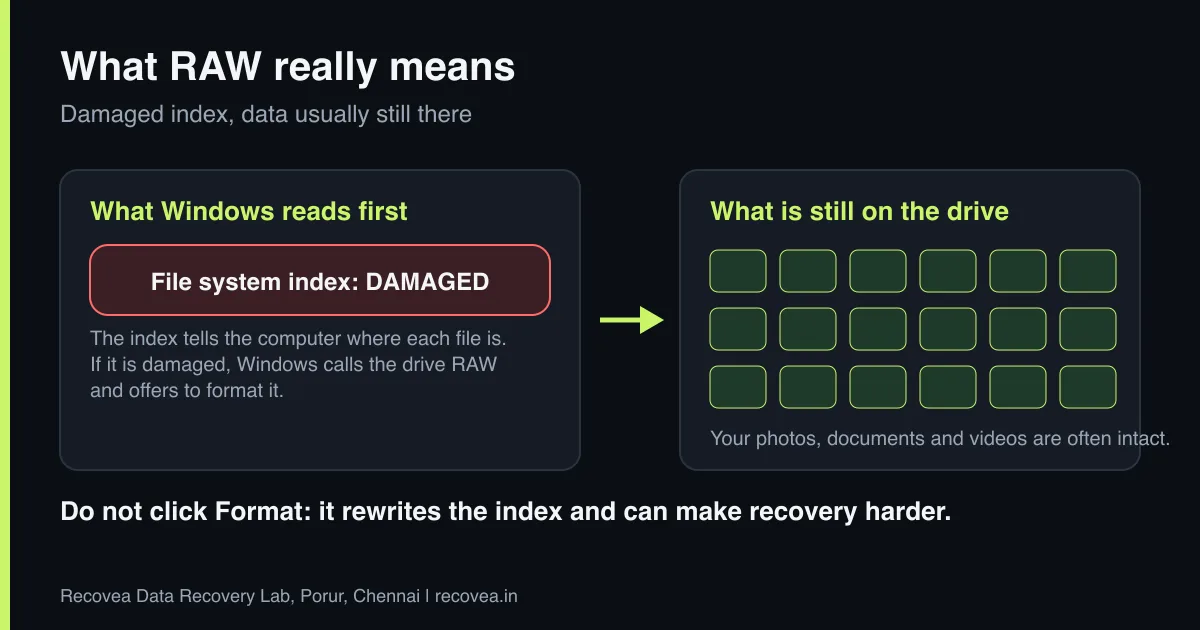
A file system (NTFS, exFAT, FAT32 on Windows; APFS or HFS+ on a Mac) is the index that tells the computer where each file starts and ends, and what it is called. When the index is damaged or unreadable, the operating system cannot interpret the drive and labels it RAW. The files themselves, the actual blocks of data, are usually still there. Think of a library whose catalogue has been lost: the books are on the shelves, but nobody can find them.
What causes a RAW drive
- Removing the drive without using Safely Remove Hardware, especially during writing.
- A power cut or crash while files were being written.
- Bad sectors on the drive, especially in the area that holds the index.
- Malware or a failed partition tool.
- A failing drive that is slowly getting worse. A RAW state can be the first warning.
- Encryption: a BitLocker-encrypted drive can look RAW before it is unlocked.
RAW drive: what Windows is telling you
Message, cause and what to do about it
stop careful safe
Common RAW messages and what they mean.
Do this now
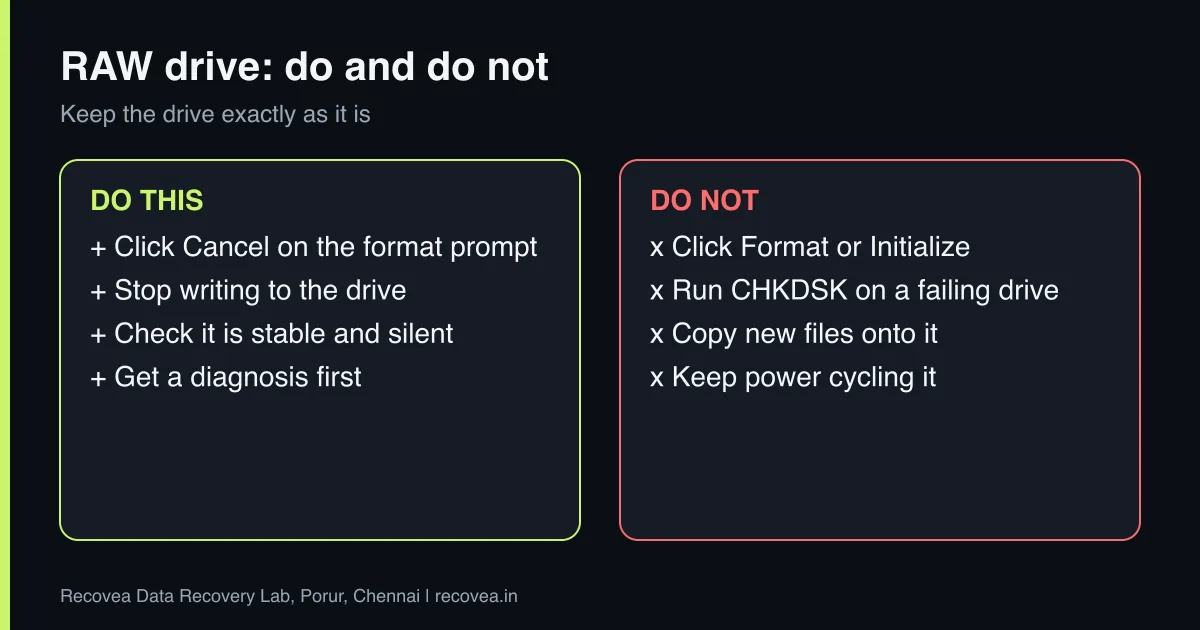
- Click Cancel on the format prompt.
- Stop using the drive and do not copy anything onto it. New files can overwrite the data you want back.
- Check that it is stable. Is it silent? Does it stay connected? Clicking, beeping or repeated disconnecting means a hardware fault, and the advice is to switch it off.
- If it is a BitLocker drive, look for your recovery key before anything else.
- Get a diagnosis first if the data matters.
Why formatting makes it worse
A quick format rewrites the index (the master file table on NTFS) and can make it harder to find your folder structure and file names. A full format can overwrite the data as well. Even tools that “repair” the drive, such as CHKDSK, work by changing the file system, which is risky on a drive that is already failing. If the problem is bad sectors, every extra read or write adds stress. The safest approach is always to copy the drive first and work on the copy.
Ask our experts: free diagnosis. Send us a message on WhatsApp and we reply within 30 minutes during working hours (Monday to Saturday, 10:30 to 20:00). Recovery starts from ₹990, physical and complex cases are quoted individually after diagnosis, and if we cannot recover your data, you do not pay.
Chat on WhatsApp | Call +91 79046 79817 | Ask D, free diagnosis
How recovery works
- Check the hardware. The engineer confirms that the drive is healthy enough to read. If it is not, the hardware fault is fixed first (heads, board or firmware).
- Make a safe copy (an image). The whole drive is copied to a healthy drive using specialised tools that handle bad sectors carefully.
- Rebuild the file system from the copy. Backup structures, such as the NTFS mirror of the master file table, are used where possible.
- Fall back to file signatures if needed. If the structure cannot be rebuilt, files can be found by their type (photos, documents, videos). Names and folders may be lost in that case, but the content is saved.
- Check and deliver. Files are opened and checked, then delivered on a clean drive.
Free tools: when they help and when they do not
Free tools can scan for lost partitions or deleted files on a healthy drive. If the drive is silent, stable and detected, a careful read-only scan is a reasonable first try, provided you install the tool on a different drive and save recovered files to a different drive. They are not suitable if the drive clicks, freezes, drops off, or if the data is important and you cannot afford another attempt. Read our guide to deciding between software and a lab.
SD cards, pen drives and Mac drives
The same logic applies to memory cards and pen drives: a RAW or “please format” message usually means a corrupted file system. Do not format, remove the card and stop using it. See SD card not recognised for camera-specific advice. On a Mac, a drive that will not mount or asks to be erased has the same cause, and the same rule applies.
RAW drive: what to do first
Follow the arrows and stop at the first YES
Did Windows ask you to format?
If no, go to the next question
Click Cancel. Do not format.
Is the drive silent and detected?
If no, go to the next question
Scan it with software saved on another drive.
Is the data important, or did the scan stall?
If no, go to the next question
Stop and ask a lab.
Noisy or not detected: switch off. Free diagnosis.
First steps for a RAW drive.
Cost and time
Diagnosis is free. Logical recovery commonly takes 24 to 72 hours, with some cases taking 7 to 15 working days. Recovery starts from ₹990; physical or complex cases are quoted individually. You pay only if your data is recovered.
Ask our experts: free diagnosis. Send us a message on WhatsApp and we reply within 30 minutes during working hours (Monday to Saturday, 10:30 to 20:00). Recovery starts from ₹990, physical and complex cases are quoted individually after diagnosis, and if we cannot recover your data, you do not pay.
Chat on WhatsApp | Call +91 79046 79817 | Ask D, free diagnosis
Frequently asked questions
Will I lose my data if I format a RAW drive?
You risk it. A quick format can make recovery harder and a full format can overwrite data. Do not format until you have your files.
Can RAW drive data be recovered without software?
Software can help when the drive is healthy. When there are bad sectors or the drive is unstable, a lab makes a safe copy first.
Why did my SD card or pen drive turn RAW?
Usually removal during writing, a corrupted file system or a failing card. The same advice applies: do not format.
Will file names and folders come back?
Often yes when the file system can be rebuilt. If not, files can still be found by type, but names may be lost.
Is CHKDSK safe to run on a RAW drive?
Not if the data matters. CHKDSK changes the file system. On a failing drive, copy first.
My drive says RAW and clicks. What now?
Switch it off. That is a hardware fault, not just a file system problem, and it needs a lab.
Related guides and services
- Hard drive not detected in Windows or BIOS: 7 checks
- Data recovery software or a professional lab
- Hard drive clicking noise: what to do first
- How much does data recovery cost in India?
- Hard disk data recovery in Chennai
- Pen drive and memory card recovery
Recovea is a data recovery lab at 2nd Floor, Plot No-4, Thiraviyam Nagar 1st Street, Sai Nagar, Porur, Chennai 600116. We accept drives by pickup or courier from anywhere in India.
