

A hard drive that clicks is usually a hard drive whose read/write heads cannot find their position. The single most important step is to switch the drive off and stop using it. Every extra minute of clicking can scratch the platters where your data lives, and a scratch cannot be undone.
Key takeaways
- Clicking (often called the “click of death”) usually points to failed heads, damaged platters or firmware trouble.
- In external drives it can also be a power or cable problem. Rule that out once, then stop.
- Never run recovery software, freeze the drive or open it.
- Recovery of a clicking drive needs a cleanroom, matched donor parts and specialised tools.
- Diagnosis is free at Recovea, and you pay only if your data is recovered.
In this guide
- How a hard drive works, in plain words
- Why a hard drive clicks
- Clicking, beeping, grinding: what each sound tells you
- What to do right now
- What not to do (the mistakes that destroy data)
- How a lab recovers data from a clicking drive
- How long it takes and what it costs
- Can you prevent it?
- Frequently asked questions
Written by the Recovea lab team, Porur, Chennai. Last reviewed 16 November 2026.
How a hard drive works, in plain words
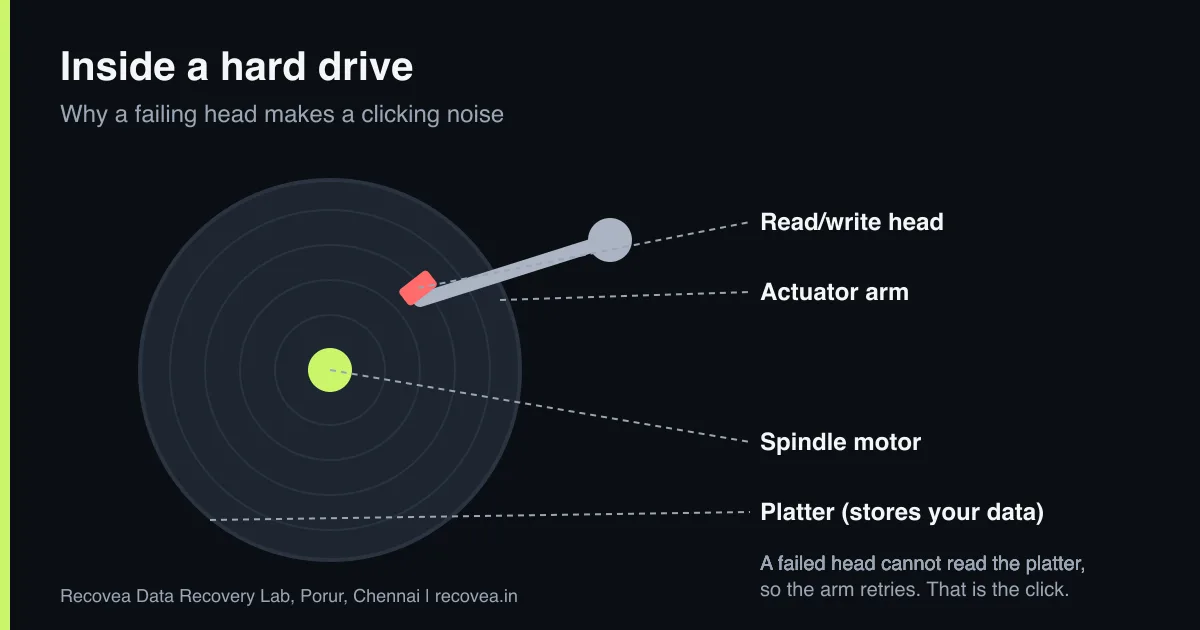
Inside a traditional hard drive are one or more round metal platters coated with a magnetic layer. They spin at 5,400 or 7,200 revolutions per minute. A small arm (the actuator) moves read/write heads across the platters. The heads do not touch the surface: they fly on a cushion of air only a few nanometres thick, thinner than a speck of smoke.
Before a drive can read your files, it must first read its own control data, called the service area or firmware, which is stored on the platters. The heads read that data, the drive confirms that everything is healthy, and only then does your computer see the drive. If the heads cannot read that data, the arm swings back to its parking position and tries again. That rhythmic “tick, tick, tick” is the sound of the drive retrying and failing.
Why a hard drive clicks
The sound is a symptom, and several different faults can cause it:
- Weak or failed read/write heads. This is the most common cause. Heads wear, or one of them stops working. The drive keeps trying to find the service area and cannot.
- Head crash or platter damage. A drop, a knock or a power cut while the drive is running can let the heads touch the platter. This can scrape off part of the magnetic layer and may leave debris inside the drive.
- Firmware or service-area corruption. The heads may be healthy, but the drive’s control data is damaged or unreadable, so the drive cannot start.
- Stuck or damaged parts. Stuck heads (called stiction) or a damaged arm can make a sharp tick as it tries to move.
- Insufficient power (external drives). A weak USB port, a faulty cable or the wrong power adapter can make a healthy drive click as it tries to spin up. This is the one cause you can safely test yourself.
Clicking drive: what it means
Sound, likely cause and the safe next step
stop careful safe
What a clicking drive is telling you.
Clicking, beeping, grinding: what each sound tells you
Different sounds point to different faults, and hearing the right one early helps:
- Regular ticking or clicking: heads cannot read the service area. Most often a head or firmware fault.
- Beeping or a whirring that never settles: the motor is trying to spin the platters and cannot, or the heads are stuck.
- Grinding or scraping: metal is touching metal. Switch off at once, because platters can be scratched within seconds.
- Silence plus not detected: may be a board, motor or firmware problem, a different case.
- Loud single knock then silence: heads have probably parked and the drive has given up.
Do not try to guess the fault from the sound alone. The point of listening is to decide quickly whether to keep the power on, and with clicking, beeping or grinding the answer is always no.
What to do right now
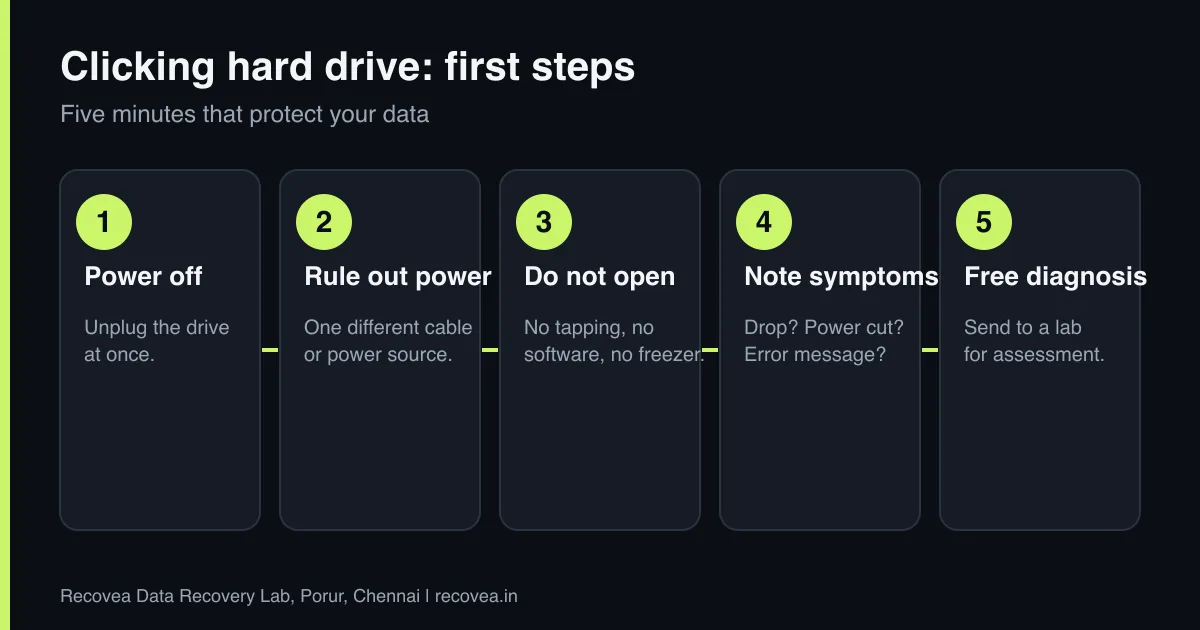
- Power the drive off and unplug it. If it is an internal drive, shut the computer down properly or hold the power button if it has frozen.
- Rule out power once (external drives only). Try a different USB cable and a different port, or the correct power adapter. If it still clicks, stop. Do not repeat the test many times.
- Do not shake, tap or move the drive while it is running. Moving a spinning drive can cause a head crash.
- Write down what happened before the noise began: a drop, a power cut, a Windows error, how old the drive is. This helps the engineer find the cause faster.
- Contact a lab for a diagnosis before you try anything else.
Ask our experts: free diagnosis. Send us a message on WhatsApp and we reply within 30 minutes during working hours (Monday to Saturday, 10:30 to 20:00). Recovery starts from ₹990, physical and complex cases are quoted individually after diagnosis, and if we cannot recover your data, you do not pay.
Chat on WhatsApp | Call +91 79046 79817 | Ask D, free diagnosis
What not to do (the mistakes that destroy data)
- Do not run recovery software. Software makes the drive read thousands of sectors in sequence. With damaged heads, each read risks more scratching.
- Do not put the drive in a freezer. It does not work on modern drives, and condensation can damage it. Here is why the freezer trick is a myth.
- Do not open the drive. Even a tiny dust particle can ruin a platter. Drives are opened only in a cleanroom or controlled environment.
- Do not swap the circuit board and hope. Modern boards hold drive-specific adaptive data, so a simple swap often does not work and can lose that data.
- Do not keep powering it on “one more time”. Each try is a chance of further damage.
How a lab recovers data from a clicking drive
At our Porur lab, a clicking drive is first checked with specialised tools such as PC-3000. The engineer reads how the drive behaves, identifies the exact fault and decides on the safest route.
If the heads have failed, they are replaced with matching donor parts. Matching matters: the donor must have the right model, firmware version and head type. This work is done inside a cleanroom so that dust does not land on the platters. After the heads are replaced, the engineer does not simply use the drive. A careful, controlled read is done, often with settings that skip bad areas first and return to them later. The data is copied to a healthy drive, and recovery is carried out from that copy, so the original is never put under more stress than needed.
If the cause is firmware or the service area, specialised tools can repair the drive’s control data so that it can be read. If platters are damaged, recovery may be partial, and the engineer tells you honestly what can and cannot be recovered before you decide.
What happens in the lab
A typical head-fault recovery, step by step
The lab process for a clicking drive.
How long it takes and what it costs
Diagnosis is free. Recovery starts from ₹990. Physical faults such as head replacement are complex, so they are quoted individually after diagnosis and typically take 3 to 15 working days, depending on parts and the condition of the platters. Firmware-only faults are often quicker. If we cannot recover your data, you do not pay. You can send the drive by courier from anywhere in India, and pickup is free if your data is recovered.
Can you prevent it?
You cannot stop every failure, but you can avoid most data loss. Keep a second copy of anything important, ideally in two places. Do not move a laptop or external drive while it is running. Use a proper power source for external drives. Replace drives that are more than four to five years old if they hold anything you cannot lose. And if you hear a new noise, copy your data off at once, then stop.
Ask our experts: free diagnosis. Send us a message on WhatsApp and we reply within 30 minutes during working hours (Monday to Saturday, 10:30 to 20:00). Recovery starts from ₹990, physical and complex cases are quoted individually after diagnosis, and if we cannot recover your data, you do not pay.
Chat on WhatsApp | Call +91 79046 79817 | Ask D, free diagnosis
Frequently asked questions
Can data be recovered from a clicking hard drive?
Often yes, but it depends on how far the damage has gone. Heads that have failed without scratching the platters give the best chance. That is why you should switch the drive off immediately.
Is a clicking sound always a head failure?
No. In external drives it can be a power problem. Try one different cable or power source. If it keeps clicking, stop and ask a lab. Firmware faults and stuck parts can also click.
Can I fix a clicking hard drive myself?
No. Replacing heads needs a cleanroom, matched donor parts and specialised tools. DIY attempts are one of the most common reasons data becomes unrecoverable.
Will the drive work normally after recovery?
Do not use it again for important data. We copy your data to a healthy drive. A drive that has failed once is not reliable.
How much does it cost in Chennai?
Diagnosis is free. Recovery starts from ₹990 and physical faults are quoted individually after diagnosis. If we cannot recover your data, you do not pay.
Can I send the drive by courier?
Yes. We accept drives from anywhere in India. Pack it in a rigid box with padding. Our packing tips are in the guide on choosing a lab.
Related guides and services
- Hard drive not detected in Windows or BIOS: 7 checks
- Does the freezer trick work? Why it is a myth
- Data recovery software or a professional lab
- How much does data recovery cost in India?
- Hard disk data recovery in Chennai
- External hard drive recovery
Recovea is a data recovery lab at 2nd Floor, Plot No-4, Thiraviyam Nagar 1st Street, Sai Nagar, Porur, Chennai 600116. We accept drives by pickup or courier from anywhere in India.
