

If you dropped an external hard drive, do not plug it in to see if it still works. A drop can damage the heads or platters, and powering the drive can turn a recoverable fault into permanent loss.
Key takeaways
- A drop can park-damage heads, misalign parts or scratch platters even if the case looks fine.
- Do not connect it to check. Each power-up can make damage worse.
- Some drops cause no damage at all, but you cannot tell from outside.
- A cleanroom lab can inspect, repair and copy the data to a healthy drive.
- Diagnosis is free at Recovea, and you pay only if your data is recovered.
In this guide
- What a drop does inside the drive
- Signs of damage
- What to do right now
- What not to do
- How a lab handles it
- Time and cost
- What to note before you contact a lab
- How to prevent it next time
- Frequently asked questions
Written by the Recovea lab team, Porur, Chennai. Last reviewed 16 November 2026.
What a drop does inside the drive
A hard drive’s heads sit on a fragile arm above spinning platters. A shock while it runs can slam the heads into the surface. A shock while it is off can still shift the arm, bend a head or move the motor. Plastic cases hide this: a drive can look perfect and be badly damaged inside.
Signs of damage
- Clicking, beeping or grinding when connected.
- The drive does not appear in Windows or Mac.
- It appears but is very slow or freezes.
- The drive appears with the wrong size.
- No sound at all and no light.
After a drop: what may be damaged
What you see, likely damage and what to do
stop careful safe
Common damage after a fall.
What to do right now
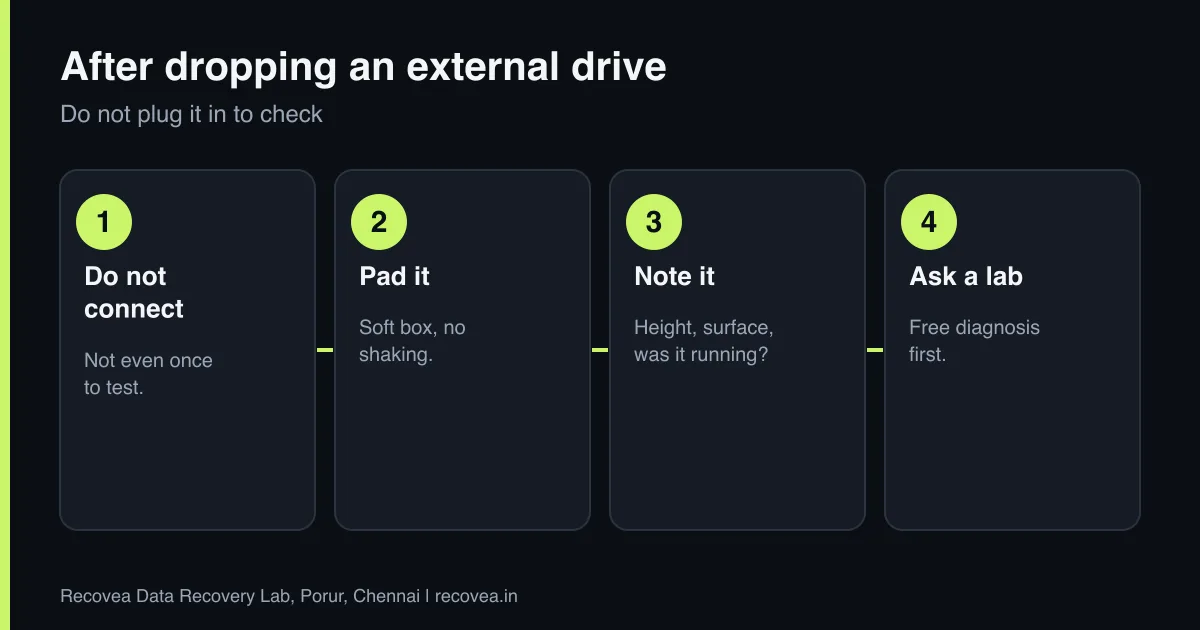
- Do not plug it in. If you already did and it clicks or grinds, unplug it at once.
- Put it in a padded box. Do not shake it.
- Do not open the enclosure. Some drives have the USB port built into the drive and opening can cause more damage.
- Tell the lab what height, what surface, and whether it was running.
What not to do
- No recovery software, no repeated plug-ins.
- No freezer or heating. See the freezer myth.
- No board swaps.
Ask our experts: free diagnosis. Send us a message on WhatsApp and we reply within 30 minutes during working hours (Monday to Saturday, 10:30 to 20:00). Recovery starts from ₹990, physical and complex cases are quoted individually after diagnosis, and if we cannot recover your data, you do not pay.
Chat on WhatsApp | Call +91 79046 79817 | Ask D, free diagnosis
How a lab handles it
The engineer tests the drive without risking it, then opens it in a cleanroom if needed. Damaged heads are replaced with matched donor parts and platters are inspected. The drive is read with careful settings and copied to a healthy drive. If the case or the USB board is the only damage, the drive can be read directly. Results depend on whether the platters were scratched.
What a drop does inside the drive
Why each retry can make it worse
What a drop does inside the drive.
Time and cost
Diagnosis is free. Recovery starts from ₹990; physical faults are quoted individually and typically take 3 to 15 working days. Pickup is available from anywhere in India, free if your data is recovered.
What to note before you contact a lab
A few details help the engineer diagnose faster and quote more accurately. Write down the drive brand, model and capacity (printed on the label), how old it is, what happened just before the problem began (a drop, a power cut, a Windows update, a noise), and which files matter most. If it is an external drive, note whether the enclosure has a separate power adapter. Do not worry if you do not know all of this: the free diagnosis fills in the rest. Keep the drive in an anti-static bag or a padded box until it reaches us.
How to prevent it next time
Hard drives are mechanical, and every one will fail eventually. The only real protection is a second copy of what matters. Follow the 3-2-1 idea: three copies, on two different kinds of storage, with one stored somewhere else (a cloud service or a drive at another location). Do not move a laptop or external drive while it is running, use the right power supply for external drives, and replace any drive that starts to make new noises, freezes on certain files or shows errors. Test your backup sometimes by restoring one file.
Ask our experts: free diagnosis. Send us a message on WhatsApp and we reply within 30 minutes during working hours (Monday to Saturday, 10:30 to 20:00). Recovery starts from ₹990, physical and complex cases are quoted individually after diagnosis, and if we cannot recover your data, you do not pay.
Chat on WhatsApp | Call +91 79046 79817 | Ask D, free diagnosis
Frequently asked questions
Can a dropped hard drive still work?
Sometimes it does, but you cannot tell from outside. Do not rely on it for important data.
Should I test it before sending?
No. Testing can cause further damage.
What if it works after the drop?
Copy your data off at once to another drive and stop using it. A drive that has been dropped is not reliable.
Is the case damage the problem?
Often the case is fine and the heads are damaged. Only an inspection tells.
How much does it cost?
Diagnosis is free; recovery starts from ₹990; physical faults are quoted after diagnosis.
Related guides and services
- Hard drive clicking noise: what to do first
- Hard drive grinding or scraping: switch it off now
- Hard drive not detected in Windows or BIOS: 7 checks
- How much does data recovery cost in India?
- External hard drive recovery
- Hard disk data recovery in Chennai
Recovea is a data recovery lab at 2nd Floor, Plot No-4, Thiraviyam Nagar 1st Street, Sai Nagar, Porur, Chennai 600116. We accept drives by pickup or courier from anywhere in India.
