

If your NAS shows a crashed, degraded or missing volume, do not rebuild, repair or reinitialise it. Those actions can overwrite the information that describes your data. Label the drives, switch the unit off and get advice.
Key takeaways
- A NAS stores data on several drives in a RAID. A crashed volume often means more than one drive has problems.
- Do not initialise, create a new volume or run repairs.
- Label drive slots before removing anything, and keep drives together.
- A lab images each drive and rebuilds the volume virtually, so originals are not stressed.
- We recover NAS in our Porur lab. We do not offer onsite RAID work.
In this guide
- What a crashed volume means
- First steps
- What not to do
- How a lab recovers a NAS
- Cost and time
- What to note before you contact a lab
- How to prevent it next time
- Frequently asked questions
Written by the Recovea lab team, Porur, Chennai. Last reviewed 16 November 2026.
What a crashed volume means
A NAS runs software RAID across its drives, with a file system on top (such as ext4 or Btrfs). A volume can crash when a second drive fails in a protected array, when metadata is corrupted after a power cut, or when a rebuild fails. The NAS then reports the volume as crashed, degraded, missing or read-only.
NAS volume status: what it means
Message, meaning and the safe next step
stop careful safe
NAS status messages and their meaning.
First steps
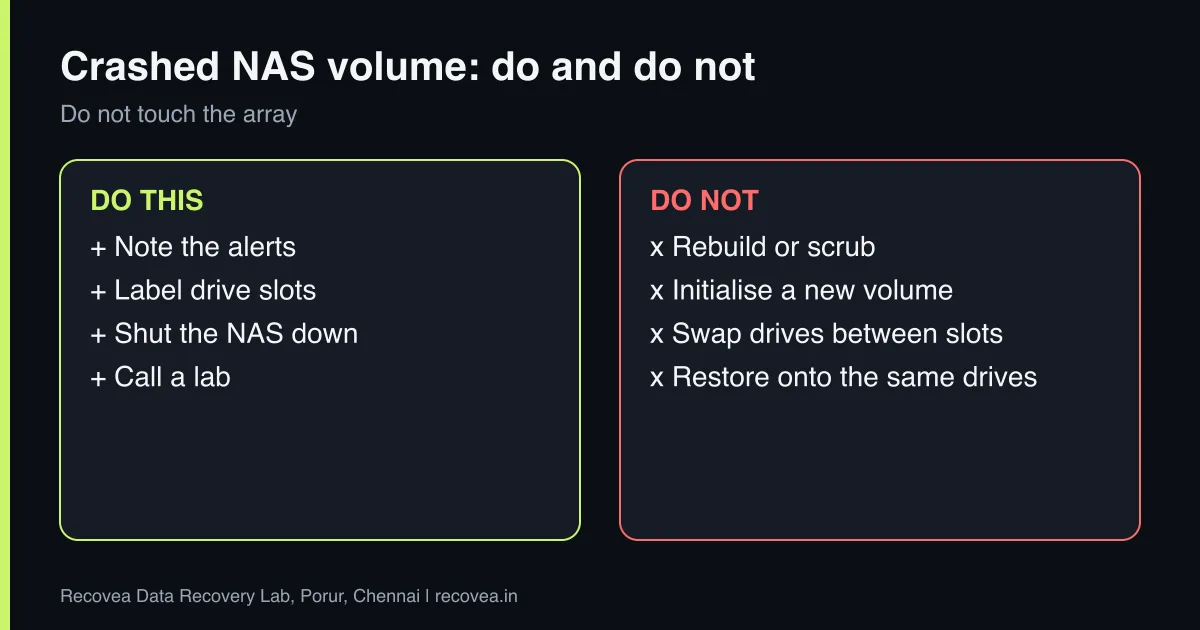
- Stop. Do not start a rebuild, repair or scrub.
- Note any alerts and which drives they mention.
- Back up what you can reach, if the volume is still readable.
- Shut the NAS down, label each drive with its slot number and keep them together.
- Contact a lab before you replace drives.
Crashed NAS volume: first steps
Follow the arrows and stop at the first YES
Does it say Crashed or pool missing?
If no, go to the next question
Stop. Do not recreate the volume.
Has only one drive failed?
If no, go to the next question
Copy data first, then replace the drive.
Is any drive clicking?
If no, go to the next question
Power off. Label every drive.
Unclear: photograph the screen and ask a lab.
First steps for a crashed NAS volume.
What not to do
- Do not initialise or create a new volume.
- Do not force a failed drive back online.
- Do not swap drives between slots.
- Do not run file system repair on the crashed volume.
- Do not restore a backup onto the same drives.
Ask our experts: free diagnosis. Send us a message on WhatsApp and we reply within 30 minutes during working hours (Monday to Saturday, 10:30 to 20:00). Recovery starts from ₹990, physical and complex cases are quoted individually after diagnosis, and if we cannot recover your data, you do not pay.
Chat on WhatsApp | Call +91 79046 79817 | Ask D, free diagnosis
How a lab recovers a NAS
Each drive is tested and imaged separately, with hardware that handles bad sectors. The engineer works out the RAID layout from the metadata, rebuilds the array virtually from the images, and reads the file system. Files are verified and delivered on a clean drive. We handle common NAS brands and layouts. See our NAS recovery page and RAID 5 guide.
Cost and time
Diagnosis is free. NAS cases are quoted individually after diagnosis because they depend on the number of drives and faults. If we cannot recover your data, you do not pay. Corporate and bulk pricing is available.
What to note before you contact a lab
Tell the engineer the NAS or server brand and model, the number and size of the drives, the RAID level, the file system, what happened first (a drive alert, a power cut, an update, a rebuild), and whether any rebuild was started. Label each drive with its slot number before you remove it, and keep them in anti-static bags. Do not re-create the array or run repair commands. We work in the lab, not onsite, so drives come to us by pickup or courier.
How to prevent it next time
RAID protects against one drive failing, not against deletion, ransomware, fire or a controller fault. Keep a separate backup on a different device, ideally with one copy off site. Replace drives that report errors rather than waiting, avoid mixing very old and new drives, keep the NAS on a UPS, keep its firmware updated, and restrict access from the internet. Test restoring a file from your backup at least a few times a year.
Ask our experts: free diagnosis. Send us a message on WhatsApp and we reply within 30 minutes during working hours (Monday to Saturday, 10:30 to 20:00). Recovery starts from ₹990, physical and complex cases are quoted individually after diagnosis, and if we cannot recover your data, you do not pay.
Chat on WhatsApp | Call +91 79046 79817 | Ask D, free diagnosis
Frequently asked questions
Can a crashed NAS volume be recovered?
Often yes. Do not rebuild before asking.
Do you work on site?
No. We do not offer onsite RAID work; drives come to our Porur lab by pickup or courier.
Can I move the drives to another NAS?
Only if you know exactly what you are doing. It can make things worse.
Is a NAS a backup?
No. It protects against a drive failure, not deletion or ransomware.
How much does it cost?
Diagnosis is free; NAS cases are quoted after diagnosis.
Related guides and services
- RAID 5 degraded or failed: do not rebuild yet
- Ransomware encrypted files: options and what not to do
- Hard drive clicking noise: what to do first
- How much does data recovery cost in India?
- NAS data recovery
- RAID and server data recovery
Recovea is a data recovery lab at 2nd Floor, Plot No-4, Thiraviyam Nagar 1st Street, Sai Nagar, Porur, Chennai 600116. We accept drives by pickup or courier from anywhere in India.
