

If your RAID 5 is degraded or has failed, do not start a rebuild and do not reinitialise it. Rebuilding reads every sector of every remaining drive, and if a second drive is weak, it can fail during the rebuild and take the data with it.
Key takeaways
- A degraded RAID 5 has lost one drive. Everything now depends on the remaining drives.
- A rebuild stresses all drives, so a weak second drive can fail mid-rebuild.
- Do not re-create, reinitialise or force a failed drive back online.
- Label drive order, back up what is readable, and contact a lab.
- Labs image each drive separately and rebuild the array virtually from the images. We do RAID in our Porur lab, not onsite.
In this guide
- How RAID 5 works
- What degraded and failed mean
- Why rebuilding can destroy the array
- Do this now
- What not to do
- How a lab recovers a RAID
- Time and cost
- Protecting yourself next time
- Frequently asked questions
Written by the Recovea lab team, Porur, Chennai. Last reviewed 16 November 2026.
How RAID 5 works
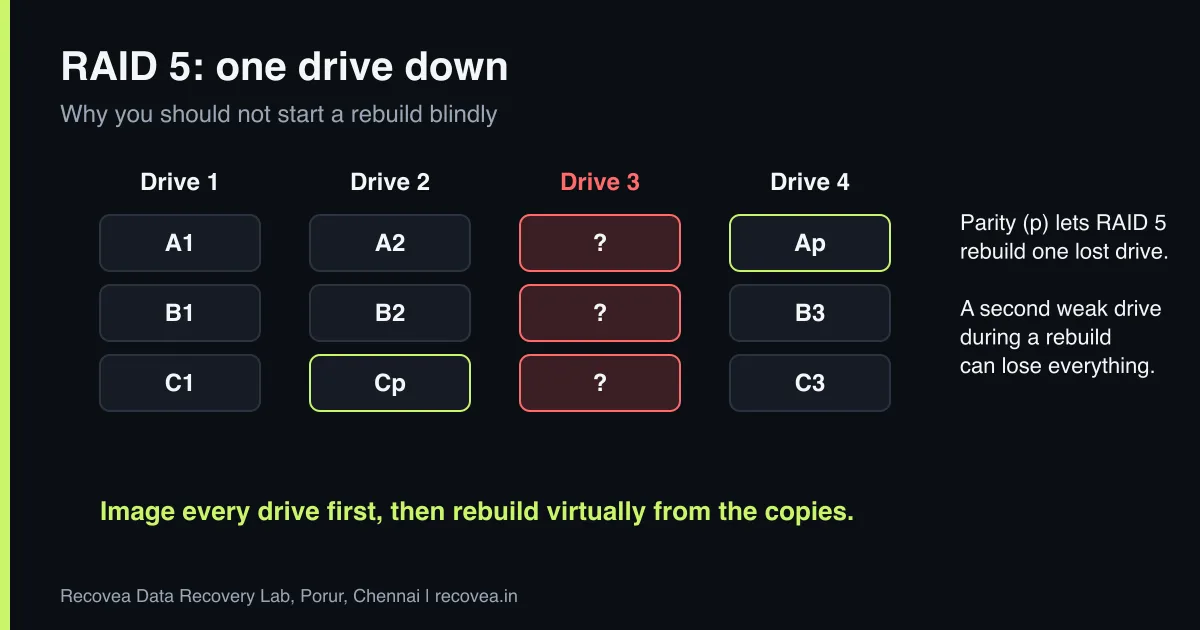
RAID 5 spreads data across three or more drives in stripes, and adds one block of parity data per stripe. The parity is calculated from the other blocks, and is rotated across the drives. If one drive fails, the controller can calculate its missing data from the remaining drives plus parity, so the array keeps working. The cost is that the array has no protection left while it is degraded: a second failure loses the array.
RAID 5 is common in small business servers and NAS devices, because it offers capacity and one-drive protection. The catch is that it is not a backup. It protects against a drive failure, not against deletion, ransomware, a controller failure or a second drive failure.
What degraded and failed mean
- Degraded: one drive has dropped out. The array still works but is slow and has no redundancy.
- Failed or offline: two or more drives have dropped out, or the controller has marked the array as unusable.
- Rebuilding: a replacement drive is being filled with calculated data. This is the riskiest period.
RAID 5 status: what it means
Array state, meaning and the safe next step
stop careful safe
What the RAID 5 status messages mean.
Why rebuilding can destroy the array
A rebuild reads every sector on every remaining drive to calculate the missing one. Drives in an array are often the same age and from the same batch, so when one fails, others may be close behind. Any unreadable sector or second failure in the middle of a rebuild can corrupt the array, and some controllers then mark more drives as failed, or begin writing wrong data. Large-capacity drives make this more likely because there is more to read. The safest approach for important data is to copy each drive first and work from the copies.
Do this now
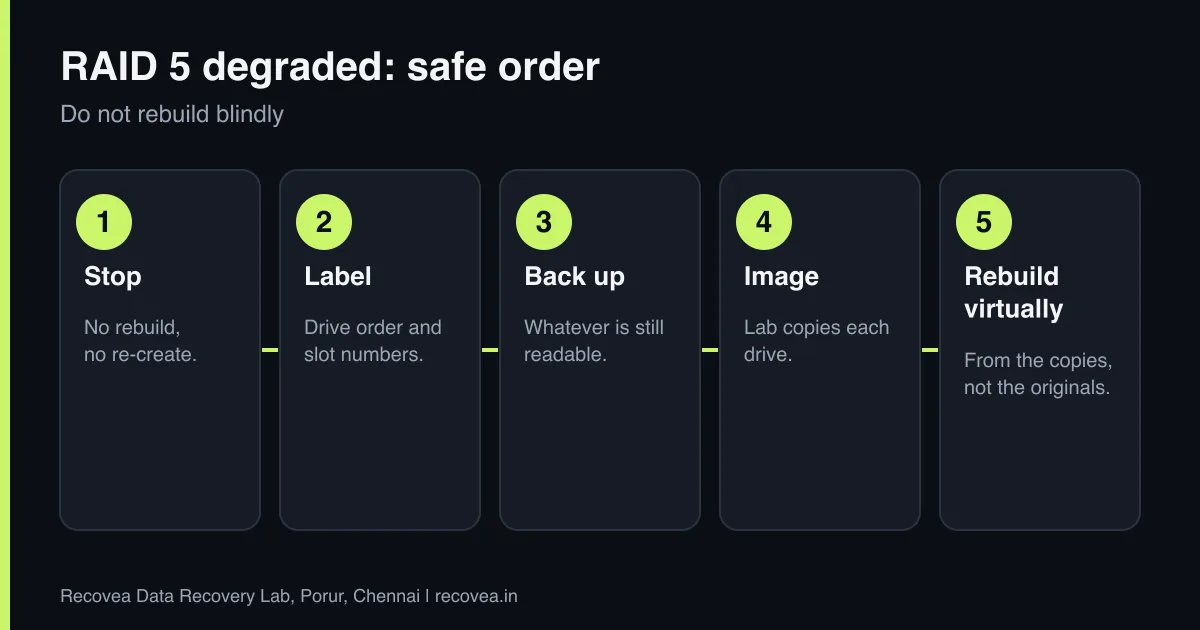
- Stop and do not rebuild. Do not insert a new drive and start a rebuild if the other drives show errors or you are unsure.
- Back up what you can reach if the array is still readable. Copy the most important data first.
- Label the drives. Note the order and slot number of each drive before you remove anything.
- Note the controller or NAS model and any messages on the screen. This helps the engineer.
- Contact a lab before you do anything else.
Ask our experts: free diagnosis. Send us a message on WhatsApp and we reply within 30 minutes during working hours (Monday to Saturday, 10:30 to 20:00). Recovery starts from ₹990, physical and complex cases are quoted individually after diagnosis, and if we cannot recover your data, you do not pay.
Chat on WhatsApp | Call +91 79046 79817 | Ask D, free diagnosis
RAID 5 degraded: before you rebuild
Follow the arrows and stop at the first YES
Are two or more drives marked failed?
If no, go to the next question
Power off. Label drives. Ask a lab.
Is the array degraded and the data important?
If no, go to the next question
Copy key data off first.
Is any drive clicking or showing errors?
If no, go to the next question
Do not rebuild. Image the drives first.
One failed drive and a backup in hand: replace and rebuild.
Questions to ask before you rebuild a RAID 5.
What not to do
- Do not force a failed drive back online or mark it as good.
- Do not re-create or reinitialise the array. That can overwrite the metadata that describes it.
- Do not run CHKDSK or file system repair on the array.
- Do not restore a backup onto the same drives.
- Do not swap drives around, which can change the order and confuse the controller.
How a lab recovers a RAID
- Check each drive. Every drive is tested separately. Faulty drives are repaired in a cleanroom if needed.
- Image each drive. Each drive is copied sector by sector to a healthy one, with hardware that handles bad sectors carefully. The originals are not written to.
- Work out the layout. The engineer determines the stripe size, the order of the drives, the parity rotation and any offsets, from the controller metadata and from the data itself.
- Rebuild the RAID virtually. The array is reassembled in software from the images, so the original drives are never stressed again.
- Recover the files and check them. Files are verified and delivered on a clean drive.
We handle RAID, NAS and SAS recoveries in our Porur lab. We do not offer onsite RAID work: drives come to the lab by pickup or courier. For NAS devices, see our NAS recovery page.
Time and cost
Diagnosis is free. RAID cases are quoted individually after diagnosis, since they depend on the number of drives, the faults and the layout. Recovery starts from ₹990 for simple cases, and corporate and bulk pricing is available. If we cannot recover your data, you do not pay.
Protecting yourself next time
Keep a separate backup, on a different device and ideally in a different place. Replace drives that report errors rather than waiting for them to fail. Do not mix very old and new drives in the same array. Test your backups sometimes by actually restoring a file.
Ask our experts: free diagnosis. Send us a message on WhatsApp and we reply within 30 minutes during working hours (Monday to Saturday, 10:30 to 20:00). Recovery starts from ₹990, physical and complex cases are quoted individually after diagnosis, and if we cannot recover your data, you do not pay.
Chat on WhatsApp | Call +91 79046 79817 | Ask D, free diagnosis
Frequently asked questions
Can a failed RAID 5 be recovered?
Often yes, even with two failed drives, depending on the damage. Do not rebuild before you ask.
Is rebuilding a RAID safe?
Only if all other drives are healthy. When in doubt, image the drives first.
Do you recover NAS and servers?
Yes, in our lab, including Synology and QNAP-type NAS devices.
Do you come on site for RAID?
No. We do not offer onsite RAID. We arrange pickup or courier.
My NAS shows degraded. Is the data lost?
No. It means one drive has dropped out. Back up what you can and ask before you rebuild.
Is RAID a backup?
No. RAID protects against one drive failure, not deletion, ransomware or controller faults.
Related guides and services
- Hard drive clicking noise: what to do first
- How much does data recovery cost in India?
- How to choose a data recovery service in Chennai
- Data recovery software or a professional lab
- RAID and server data recovery
- NAS data recovery
Recovea is a data recovery lab at 2nd Floor, Plot No-4, Thiraviyam Nagar 1st Street, Sai Nagar, Porur, Chennai 600116. We accept drives by pickup or courier from anywhere in India.
