

SAS drives are the faster, more robust drives used in servers and enterprise storage, and when they fail they need specialist equipment because normal PC ports and tools cannot talk to them. We handle SAS drives and server RAID in our Porur lab.
Key takeaways
- SAS (Serial Attached SCSI) drives are used in servers, SANs and enterprise arrays. They are not the same as the SATA drives in PCs.
- A normal desktop cannot read a SAS drive. It needs a SAS controller and the right tools.
- SAS drives are often part of a RAID, so you may need to recover the whole array.
- Do not rebuild or replace drives blindly in a failed server array.
- We accept servers and drives by pickup or courier from anywhere in India.
In this guide
- SAS and SATA: what is the difference
- Common SAS problems
- What to do first
- How a lab recovers SAS drives
- Virtual machines and databases
- Cost, time and business terms
- What to note before you contact a lab
- How to prevent it next time
- Frequently asked questions
Written by the Recovea lab team, Porur, Chennai. Last reviewed 18 November 2026.
SAS and SATA: what is the difference
SATA drives are what most PCs and small NAS devices use. SAS drives are built for servers: they spin faster (often 10,000 or 15,000 rpm), support two data paths for reliability, use different connectors and are designed for heavy, constant use. Some servers mix SAS and SATA drives. Because of the different interface, a standard PC cannot read a SAS drive, and the tools used for SATA need a SAS-capable setup.
SAS and SATA: key differences
Why server drives need different recovery tools
How SAS drives differ from SATA.
Common SAS problems
- Head or motor failure after years of heavy use.
- Firmware faults and service-area damage.
- Bad sectors on one or more drives in an array.
- A failed RAID controller or lost configuration.
- Power events that damage drives and boards in the same server.
What to do first
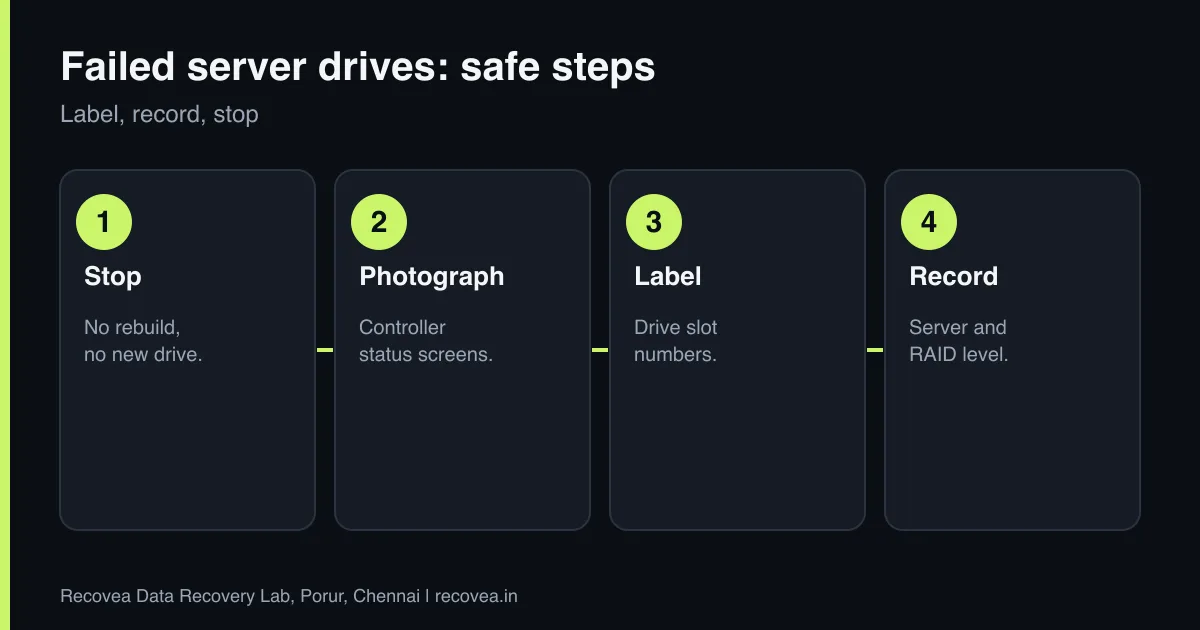
- Do not rebuild or replace drives until you know the cause.
- Take photos of the controller’s status screens and error messages.
- Label every drive with its slot number and keep them in order.
- Record the server model, the RAID controller and the RAID level.
- If your backup is recent, restore from it. If not, stop and ask for advice.
How a lab recovers SAS drives
The drives are connected through SAS-capable hardware that can talk to them properly. Drives with physical faults are repaired in a cleanroom, using compatible parts where needed, and firmware faults are handled with specialised tools. Each drive is imaged, then the RAID layout is worked out and the array is rebuilt virtually from the images. The files are verified and delivered on a clean drive. Read more on RAID recovery.
Ask our experts: free diagnosis. Send us a message on WhatsApp and we reply within 30 minutes during working hours (Monday to Saturday, 10:30 to 20:00). Recovery starts from ₹990, physical and complex cases are quoted individually after diagnosis, and if we cannot recover your data, you do not pay.
Chat on WhatsApp | Call +91 79046 79817 | Ask D, free diagnosis
Virtual machines and databases
Servers often hold virtual machines, databases and shared folders. After the array is rebuilt, we aim to give you the data in a usable form: virtual disk files, database files and the folder structure. Tell us what matters most, such as a particular VM or database, so we can check it first. We handle common file systems and can discuss special cases in the free diagnosis.
SAS drive failed: first steps
Follow the arrows and stop at the first YES
Is it part of a RAID or server array?
If no, go to the next question
Do not rebuild. Label every drive slot.
Did the controller show a predictive failure?
If no, go to the next question
Photograph the screen. Stop.
Does it hold virtual machines or a database?
If no, go to the next question
Tell the lab. It needs a careful rebuild.
Single SAS drive: free diagnosis.
First steps when a SAS drive fails.
Cost, time and business terms
Diagnosis is free. Server and enterprise cases are quoted individually after diagnosis, depending on the number and condition of drives. If we cannot recover your data, you do not pay. We offer corporate and bulk pricing and sign NDAs. We do not offer onsite RAID work. See our RAID and server recovery page.
What to note before you contact a lab
Tell the engineer the NAS or server brand and model, the number and size of the drives, the RAID level, the file system, what happened first (a drive alert, a power cut, an update, a rebuild), and whether any rebuild was started. Label each drive with its slot number before you remove it, and keep them in anti-static bags. Do not re-create the array or run repair commands. We work in the lab, not onsite, so drives come to us by pickup or courier.
How to prevent it next time
RAID protects against one drive failing, not against deletion, ransomware, fire or a controller fault. Keep a separate backup on a different device, ideally with one copy off site. Replace drives that report errors rather than waiting, avoid mixing very old and new drives, keep the NAS on a UPS, keep its firmware updated, and restrict access from the internet. Test restoring a file from your backup at least a few times a year.
Ask our experts: free diagnosis. Send us a message on WhatsApp and we reply within 30 minutes during working hours (Monday to Saturday, 10:30 to 20:00). Recovery starts from ₹990, physical and complex cases are quoted individually after diagnosis, and if we cannot recover your data, you do not pay.
Chat on WhatsApp | Call +91 79046 79817 | Ask D, free diagnosis
Frequently asked questions
Can you recover a SAS drive?
Yes. We recover SAS drives and server RAID in our Porur lab.
Can I plug a SAS drive into my PC?
Not normally. It needs a SAS controller. Do not try to force it.
Is SAS recovery more expensive?
Often, because the drives and arrays are more complex. We quote after the free diagnosis.
Do you work on site at our office?
No. We do not offer onsite RAID work. Drives come to our lab by pickup or courier.
Do you sign NDAs?
Yes. We handle client data under NDA and delete it within one week of delivery.
Related guides and services
- Two Drives Failed in a RAID: Is Recovery Possible?
- RAID 5 degraded or failed: do not rebuild yet
- Backup Plan for Small Businesses in Chennai: The 3-2-1 Rule in Plain Words
- Is Your Data Safe in a Data Recovery Lab? NDA, Privacy and Deletion
- RAID and server data recovery
- NAS data recovery
Recovea is a data recovery lab at 2nd Floor, Plot No-4, Thiraviyam Nagar 1st Street, Sai Nagar, Porur, Chennai 600116. We accept drives by pickup or courier from anywhere in India.
