

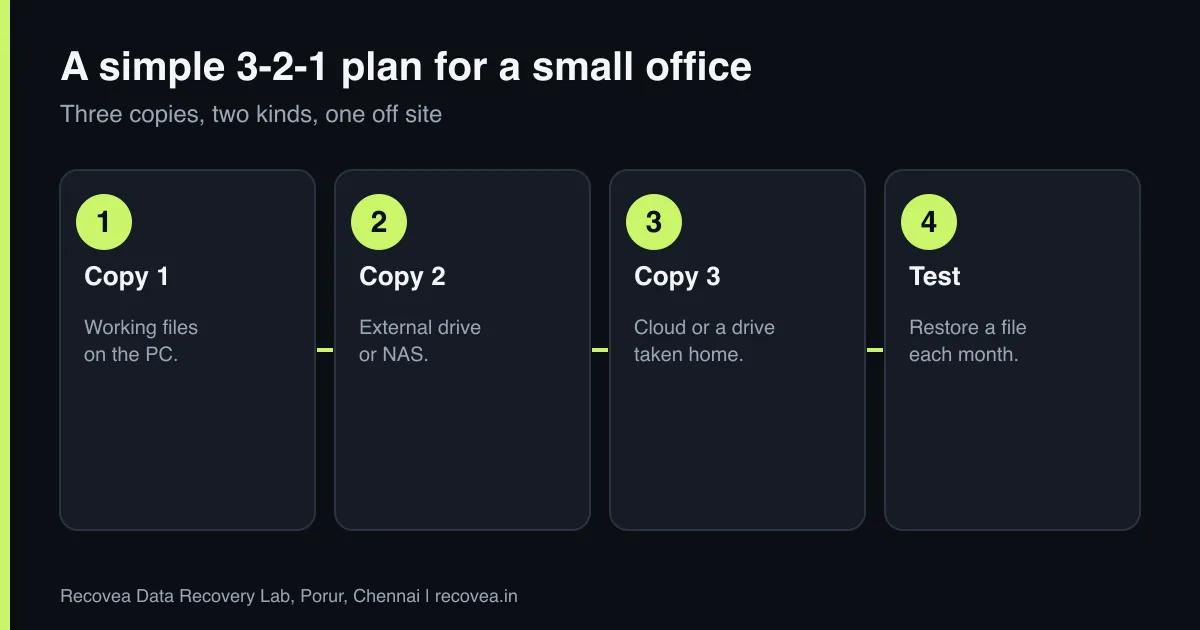
The 3-2-1 rule means keeping three copies of your data, on two different kinds of storage, with one copy kept somewhere else. It is the simplest plan that protects a small business from a failed drive, ransomware, theft, fire or a mistake.
Key takeaways
- 3 copies of your important data: the original and two backups.
- 2 different kinds of storage, such as the computer and an external drive or NAS.
- 1 copy off site, in the cloud or at another location.
- A RAID or NAS is not a backup. It protects against a drive failing, not against deletion or ransomware.
- Test restoring a file every few months, because an untested backup is only a hope.
In this guide
- Why small businesses lose data
- The 3-2-1 rule in plain words
- A simple setup for a small office
- What it costs
- Check that it works
- When a backup fails or is missing
- What to note before you contact a lab
- How to prevent it next time
- Frequently asked questions
Written by the Recovea lab team, Porur, Chennai. Last reviewed 18 November 2026.
Why small businesses lose data
Most businesses lose data in the same ways: a hard disk fails, someone deletes a folder, a laptop is lost, a power cut damages a server, or ransomware encrypts everything, including the backup drive that was left plugged in. The cost is not the drive. It is the days of work, the lost invoices and the customers you cannot serve.
The 3-2-1 rule in plain words
- 3 copies. Your working files, plus two backups.
- 2 kinds of storage. For example, the computer’s disk and an external drive, or a NAS and the cloud. Different kinds fail in different ways.
- 1 off site. A copy that a fire, flood, theft or ransomware at your office cannot reach.
A common modern addition is to keep one copy offline or unchangeable, so ransomware cannot encrypt it.
The 3-2-1 backup rule
Three copies, two kinds, one off site
The 3-2-1 backup rule in one table.
A simple setup for a small office
- Main copy: files on the office computer or server.
- Local backup: an external drive or a NAS that runs an automatic daily backup. Keep one extra external drive that you connect only to run the weekly backup.
- Off-site backup: a cloud backup service, or a drive taken home by the owner each week.
- Accounts and key files: export accounting data, such as your invoicing and tax data, regularly and keep copies in two places.
- A UPS for the computer and the backup device, to protect from Chennai power cuts.
What it costs
A backup does not need to be expensive. An external drive is a one-time cost. Many cloud services charge a small monthly fee per computer or by storage used. Compare that with the cost of a day or a week without your data. For larger businesses, a NAS with a second, separate backup device is a common choice. Choose a plan you can keep up, because an automatic backup that works is better than a perfect one that nobody runs.
Ask our experts: free diagnosis. Send us a message on WhatsApp and we reply within 30 minutes during working hours (Monday to Saturday, 10:30 to 20:00). Recovery starts from ₹990, physical and complex cases are quoted individually after diagnosis, and if we cannot recover your data, you do not pay.
Chat on WhatsApp | Call +91 79046 79817 | Ask D, free diagnosis
Check that it works
- Once a month, restore one file from each backup to check it opens.
- Look at the backup logs or emails for failures.
- Check that the backup drive is not always connected to the computer, so that ransomware cannot reach it.
- Replace drives every three to four years, before they fail.
- Keep a note of who is responsible and where the passwords are.
When a backup fails or is missing
If a disk, server or NAS fails and you have no backup, do not try repeated repairs. Switch it off and ask for a free diagnosis. We recover hard disks, SSDs, NAS and RAID in our Porur lab, offer corporate and bulk pricing and sign NDAs. Read about ransomware recovery and a degraded NAS.
A simple backup routine
How often to do what
A backup routine for a small office.
What to note before you contact a lab
Tell the engineer the NAS or server brand and model, the number and size of the drives, the RAID level, the file system, what happened first (a drive alert, a power cut, an update, a rebuild), and whether any rebuild was started. Label each drive with its slot number before you remove it, and keep them in anti-static bags. Do not re-create the array or run repair commands. We work in the lab, not onsite, so drives come to us by pickup or courier.
How to prevent it next time
RAID protects against one drive failing, not against deletion, ransomware, fire or a controller fault. Keep a separate backup on a different device, ideally with one copy off site. Replace drives that report errors rather than waiting, avoid mixing very old and new drives, keep the NAS on a UPS, keep its firmware updated, and restrict access from the internet. Test restoring a file from your backup at least a few times a year.
Ask our experts: free diagnosis. Send us a message on WhatsApp and we reply within 30 minutes during working hours (Monday to Saturday, 10:30 to 20:00). Recovery starts from ₹990, physical and complex cases are quoted individually after diagnosis, and if we cannot recover your data, you do not pay.
Chat on WhatsApp | Call +91 79046 79817 | Ask D, free diagnosis
Frequently asked questions
What is the 3-2-1 backup rule?
Three copies of your data, on two kinds of storage, with one copy off site.
Is a NAS or RAID a backup?
No. It protects against a drive failure, not deletion, ransomware or fire.
How often should we back up?
Daily for active business files, and weekly for a full copy. More often if you cannot afford to redo the work.
Is cloud backup safe?
Reputable services encrypt data and keep versions. Choose one with version history and protect the account with a strong password and two-step login.
What do we do if we have no backup and a drive fails?
Switch it off and ask a lab for a free diagnosis. Do not keep trying.
Related guides and services
- NAS Beeping or Showing Volume Degraded: What It Means and What to Do
- Ransomware Encrypted Files? Recovery Options
- How to Back Up Photos and Documents Properly: Free and Paid Options
- Two Drives Failed in a RAID: Is Recovery Possible?
- NAS data recovery
- All data recovery services
Recovea is a data recovery lab at 2nd Floor, Plot No-4, Thiraviyam Nagar 1st Street, Sai Nagar, Porur, Chennai 600116. We accept drives by pickup or courier from anywhere in India.
Free diagnosis. No data, no payment.Watch: what if your business lost its files?
