

When an NVMe SSD fails, the chance of getting data back depends on what failed: a software fault is usually recoverable, a controller fault sometimes, and a drive that was wiped by TRIM or encrypted without the key is not. The most useful thing you can do is stop powering the drive on and ask for a diagnosis.
Key takeaways
- NVMe SSDs fail without warning, unlike hard drives that usually click first.
- Software and file-system faults are often recoverable. Controller faults sometimes are, with chip-level work.
- TRIM-erased data and encrypted drives without the key are generally not recoverable.
- Do not keep power cycling a failing SSD, and do not run repair tools on it.
- Diagnosis is free; if we cannot recover your data, you do not pay.
In this guide
- How NVMe SSDs fail
- What is usually recoverable
- What is usually not recoverable
- What to do right now
- What a lab does
- Cost and time
- What to note before you contact a lab
- How to prevent it next time
- Frequently asked questions
Written by the Recovea lab team, Porur, Chennai. Last reviewed 18 November 2026.
How NVMe SSDs fail
An NVMe SSD has no moving parts. It has a controller chip, flash memory chips, a small DRAM cache on some models and firmware that maps your data to the flash. Failures usually fall into four groups: firmware or controller faults (the drive vanishes or reports a strange name or 0 GB), worn-out flash that becomes unreadable, power damage to the board, and software faults such as a damaged file system or partition table. Unlike a hard drive, an SSD often gives no warning before it stops being detected.
What is usually recoverable
- Logical faults: a damaged file system, lost partition, accidental format on a drive that has not been TRIMmed.
- Drives that are detected but unstable, where a lab can image the data carefully.
- Controller or firmware faults, in many cases, with specialised tools.
- Board damage, where the flash chips are intact and can be read directly. This is chip-level work.
What is usually not recoverable
- Files erased by TRIM after deletion. Read how TRIM decides.
- Drives with hardware encryption or BitLocker where the key or the controller that holds it is lost.
- Flash chips that are physically destroyed, burnt or cracked.
- Drives that were securely erased or reset.
Soldered drives in some laptops add difficulty, because the board cannot always be removed without damage. Tell us the exact laptop model.
NVMe SSD failure: what can come back
Symptoms, likely cause and the realistic outlook
stop careful safe
What can and cannot come back from an NVMe SSD.
What to do right now
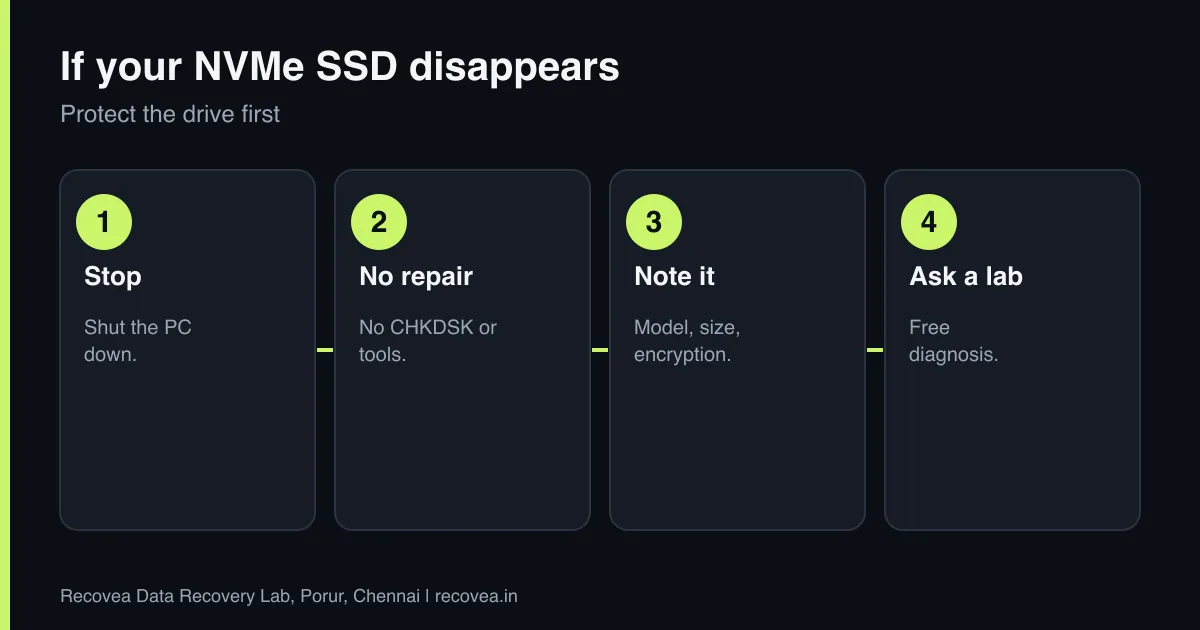
- Stop using the drive and, if it is the boot drive, shut the computer down.
- Do not run repair or check-disk tools. They write to the drive.
- Check backups, cloud copies and other devices first.
- Write down the model, capacity and whether BitLocker or other encryption was on. Find the recovery key if there is one.
- Contact a lab before you power the drive on repeatedly.
Ask our experts: free diagnosis. Send us a message on WhatsApp and we reply within 30 minutes during working hours (Monday to Saturday, 10:30 to 20:00). Recovery starts from ₹990, physical and complex cases are quoted individually after diagnosis, and if we cannot recover your data, you do not pay.
Chat on WhatsApp | Call +91 79046 79817 | Ask D, free diagnosis
What a lab does
The engineer first decides whether the fault is logical, firmware or hardware. Logical faults are handled with a full image of the drive. Firmware and controller faults may need vendor-specific tools. When the board is damaged, the flash chips can be read directly (chip-level reading) and the data reassembled, which needs experience because modern controllers scramble and interleave data. We offer chip-level reading for SSDs and cards at our Porur lab. See our SSD and NVMe recovery page and the guide to chip-off recovery.
NVMe SSD vanished: what to do
Follow the arrows and stop at the first YES
Does the PC freeze when it is connected?
If no, go to the next question
Disconnect it. Repeated power-ups can worsen the fault.
Is it BitLocker or FileVault protected?
If no, go to the next question
Find the recovery key first.
Does it show 0 GB?
If no, go to the next question
Controller fault. Needs a lab.
Hot to touch: let it cool and do not retry.
A decision path for a vanished NVMe SSD.
Cost and time
Diagnosis is free. Logical cases are often 24 to 72 hours after we receive the drive. Controller and chip-level work takes longer and is quoted individually after diagnosis. We accept drives by pickup or courier from anywhere in India, and if we cannot recover your data, you do not pay.
What to note before you contact a lab
Tell the engineer the brand, model and capacity, what device it was used in (camera, phone, laptop, drone), and what happened just before the problem: a removal during writing, a format prompt, a power cut. Note if the device is encrypted. Stop using the storage at once, because every write can overwrite what you want back. Keep memory cards and pen drives in a small anti-static bag or case. A free diagnosis tells you whether the problem is logical or a chip or controller fault.
How to prevent it next time
Flash storage fails without warning. Copy photos and files off cards and pen drives as soon as you can, keep at least two copies, and do not delete from the card in the camera until both copies are checked. Use the safe-eject option, never remove a card while the light is blinking, and format cards in the device that will use them rather than on a computer. For SSDs, keep system and personal files backed up to a second drive or the cloud, and keep your encryption recovery keys safe.
Ask our experts: free diagnosis. Send us a message on WhatsApp and we reply within 30 minutes during working hours (Monday to Saturday, 10:30 to 20:00). Recovery starts from ₹990, physical and complex cases are quoted individually after diagnosis, and if we cannot recover your data, you do not pay.
Chat on WhatsApp | Call +91 79046 79817 | Ask D, free diagnosis
Frequently asked questions
Why did my NVMe SSD suddenly disappear?
Usually the controller or its firmware has stopped responding, or the board has a power fault. It is rarely a sign that the data was wiped.
Is an SSD harder to recover than a hard drive?
Often yes. SSDs scramble data and may erase deleted files automatically, so some cases are not recoverable.
Can I recover data from a dead NVMe drive myself?
Not safely. Software cannot talk to a drive the PC cannot see, and repeated power cycling can make things worse.
Does BitLocker stop recovery?
If you have the recovery key, usually not. Without it, the data cannot be read.
How long does it take?
Logical cases take 24 to 72 hours after receipt. Hardware cases take longer.
Related guides and services
- SSD Not Detected or Showing 0 GB? Causes
- Deleted files from an SSD: TRIM explained
- BitLocker Locked Drive? Recovery Key and Data Help
- Formatted SSD or Pen Drive? Recovery Chances
- SSD and NVMe data recovery
- Laptop data recovery
Recovea is a data recovery lab at 2nd Floor, Plot No-4, Thiraviyam Nagar 1st Street, Sai Nagar, Porur, Chennai 600116. We accept drives by pickup or courier from anywhere in India.
