

If your CCTV DVR or NVR reports an HDD error or no longer records, switch it off and keep the hard disk safe, because the footage you need may still be on the disk. Surveillance drives run non-stop, and the evidence can be lost quickly if the recorder keeps overwriting it.
Key takeaways
- CCTV drives run day and night and wear out faster than ordinary drives.
- DVRs and NVRs record in a continuous loop, so old footage is overwritten. Stop the recorder at once if you need an incident.
- Do not format the disk when the DVR asks to initialise it.
- Remove the disk safely, label it with the camera system, and keep it away from heat and shocks.
- A lab can test and image the disk. Playable footage depends on the recorder’s format, so we assess it in the free diagnosis.
In this guide
- Why CCTV drives fail
- If you need footage of an incident
- What not to do
- How a lab can help
- Choosing disks and recorders
- Cost and time
- What to note before you contact a lab
- How to prevent it next time
- Frequently asked questions
Written by the Recovea lab team, Porur, Chennai. Last reviewed 18 November 2026.
Why CCTV drives fail
A surveillance disk writes video continuously, 24 hours a day, often in a hot cabinet with little air flow. Heads and motors wear, bad sectors appear and power cuts damage the file system. Typical signs are an HDD error on the recorder screen, missing recordings, a recorder that keeps rebooting, clicking from the box or a disk that the recorder no longer sees.
CCTV disk problems explained
What you see, likely cause and the safe next step
stop careful safe
Common CCTV recorder disk problems.
If you need footage of an incident
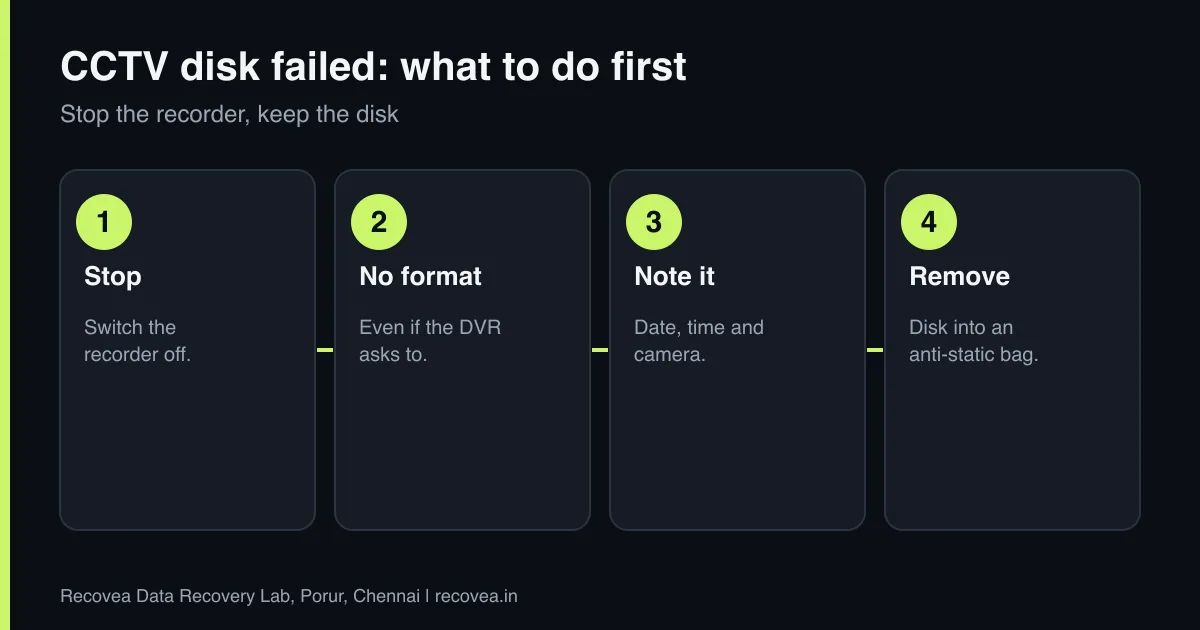
- Switch the recorder off as soon as you can, or stop recording from its menu, so new video does not overwrite the old.
- Do not format or initialise the disk, even if the recorder asks.
- Do not export or delete in a hurry. Note the date and time of the incident and the camera.
- Remove the disk and keep it in an anti-static bag or padded box.
- If you need footage for the police or insurance, tell us.
What not to do
- Do not format or initialise the disk to make the recorder work again.
- Do not run PC repair tools on the disk without understanding the format.
- Do not keep rebooting a recorder that clicks.
- Do not swap the disk into another recorder and let it overwrite.
How a lab can help
The engineer tests the disk. If it has bad sectors, heads or firmware problems, those are handled as in any hard disk case, then a full image of the disk is made. Recorders store video in their own formats, not as normal files, so after imaging we look at how the recorder organised the data and attempt to recover the recordings. Whether the footage is fully playable depends on the recorder’s format and on how much was overwritten. We tell you honestly after the free diagnosis, and you pay only if we recover your data.
Ask our experts: free diagnosis. Send us a message on WhatsApp and we reply within 30 minutes during working hours (Monday to Saturday, 10:30 to 20:00). Recovery starts from ₹990, physical and complex cases are quoted individually after diagnosis, and if we cannot recover your data, you do not pay.
Chat on WhatsApp | Call +91 79046 79817 | Ask D, free diagnosis
Choosing disks and recorders
Use disks made for surveillance, check their health regularly and replace them every few years, because they run all the time. Keep the recorder cool and on a UPS. For important sites, back up key recordings to another device and, for businesses, review our backup plan for small businesses.
CCTV footage is time-critical
Why you act the same day
Why CCTV footage recovery is time-critical.
Cost and time
Diagnosis is free. Recovery starts from ₹990, and physical or complex cases are quoted individually after diagnosis. Time depends on the disk’s condition and size, as surveillance disks are often large. We take disks by pickup or courier from anywhere in India. If we cannot recover your data, you do not pay. See our hard disk recovery page.
What to note before you contact a lab
A few details help the engineer diagnose faster and quote more accurately. Write down the drive brand, model and capacity (printed on the label), how old it is, what happened just before the problem began (a drop, a power cut, a Windows update, a noise), and which files matter most. If it is an external drive, note whether the enclosure has a separate power adapter. Do not worry if you do not know all of this: the free diagnosis fills in the rest. Keep the drive in an anti-static bag or a padded box until it reaches us.
How to prevent it next time
Hard drives are mechanical, and every one will fail eventually. The only real protection is a second copy of what matters. Follow the 3-2-1 idea: three copies, on two different kinds of storage, with one stored somewhere else (a cloud service or a drive at another location). Do not move a laptop or external drive while it is running, use the right power supply for external drives, and replace any drive that starts to make new noises, freezes on certain files or shows errors. Test your backup sometimes by restoring one file.
Ask our experts: free diagnosis. Send us a message on WhatsApp and we reply within 30 minutes during working hours (Monday to Saturday, 10:30 to 20:00). Recovery starts from ₹990, physical and complex cases are quoted individually after diagnosis, and if we cannot recover your data, you do not pay.
Chat on WhatsApp | Call +91 79046 79817 | Ask D, free diagnosis
Frequently asked questions
Can deleted CCTV footage be recovered?
Sometimes. If the recorder overwrote the space, it is gone. Stop the recorder as soon as you can.
My DVR says HDD error. Should I format?
No. Formatting can erase the footage. Remove the disk and ask for advice.
Will the recovered footage play on a normal computer?
It depends on the recorder’s format. We assess this in the diagnosis.
How big a disk can you handle?
Surveillance disks are often large. Tell us the capacity when you contact us.
How much does it cost?
Diagnosis is free. Recovery starts from ₹990, and complex cases are quoted after diagnosis.
Related guides and services
- Hard drive not detected in Windows or BIOS: 7 checks
- 10 Signs Your Hard Drive Is About to Fail
- Bad Sectors and CHKDSK: Help or Data Loss?
- How Long Does Data Recovery Take? By Fault
- Hard disk data recovery in Chennai
- All data recovery services
Recovea is a data recovery lab at 2nd Floor, Plot No-4, Thiraviyam Nagar 1st Street, Sai Nagar, Porur, Chennai 600116. We accept drives by pickup or courier from anywhere in India.
