

When two drives fail in a RAID 5 array, the volume goes offline, but recovery is often still possible, especially if one of the drives is only partly failed. The most important rule is to stop: do not rebuild, do not reinitialise and do not reorder the drives.
Key takeaways
- RAID 5 survives one failed drive. Two failures usually take the volume offline.
- One of the “failed” drives is often only partly failed or was dropped by the controller, and may still be readable.
- Do not rebuild, replace drives or reinitialise. Label the drives and keep their order.
- A lab images each drive, finds the RAID layout and rebuilds the array virtually from the images.
- We recover RAID and NAS in our Porur lab, not onsite.
In this guide
- Why two failures matter
- Why recovery is often still possible
- What to do right now
- How a lab recovers it
- What can make it harder
- Cost and time
- What to note before you contact a lab
- How to prevent it next time
- Frequently asked questions
Written by the Recovea lab team, Porur, Chennai. Last reviewed 18 November 2026.
Why two failures matter
RAID 5 spreads your data and some parity information across all the drives. The parity lets the array rebuild one lost drive. If a second drive fails before the first one has been rebuilt, the array has lost more than the parity can cover. RAID 6 survives two failures, but a third can finish it. This is why many NAS and server owners meet the problem during a rebuild: the stress of rebuilding triggers a second failure.
Why recovery is often still possible
- A drive may have been dropped from the array because of a timeout or a few bad sectors, not because it is dead.
- The data on a failed drive is often mostly readable with the right hardware.
- The array’s metadata, which describes the layout, usually still exists on the drives.
- A drive with a head or firmware fault can be repaired in a lab before imaging.
Two drives failed: your RAID type
What it means for each RAID level
stop careful safe
What two failed drives mean for each RAID level.
What to do right now
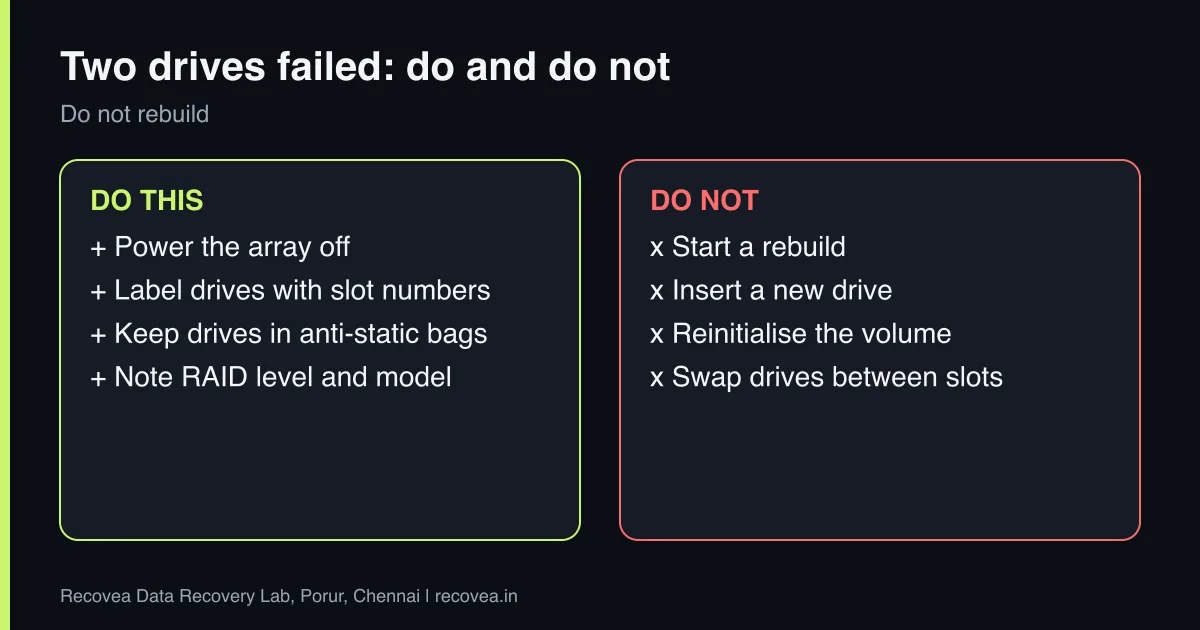
- Power the array off cleanly if you can.
- Do not insert a new drive or start a rebuild.
- Label every drive with its slot number before you remove it. Keep them together in anti-static bags.
- Note the RAID level, the controller or NAS model, and any messages.
- Do not reinitialise or create a new volume.
- Contact a lab before you try anything else.
How a lab recovers it
Each drive is tested and, if needed, repaired. A full image of every drive is made with hardware that copes with bad sectors. The engineer then works out the RAID level, stripe size, drive order and parity pattern from the images and rebuilds the array virtually, without writing to your original drives. Once the volume is rebuilt, the file system is read and files are verified before delivery. Read about the related case in NAS volume crashed.
Ask our experts: free diagnosis. Send us a message on WhatsApp and we reply within 30 minutes during working hours (Monday to Saturday, 10:30 to 20:00). Recovery starts from ₹990, physical and complex cases are quoted individually after diagnosis, and if we cannot recover your data, you do not pay.
Chat on WhatsApp | Call +91 79046 79817 | Ask D, free diagnosis
What can make it harder
- A rebuild or reinitialisation that overwrote metadata.
- Drives swapped between slots without notes.
- Several drives with serious physical damage.
- Hardware RAID controllers with proprietary layouts, which take more work.
Even then, partial recovery is often possible. We assess and give an honest answer in the free diagnosis.
How a lab recovers a failed RAID
Work from copies, never from the originals
How a lab rebuilds a failed RAID from copies.
Cost and time
Diagnosis is free. RAID cases are quoted individually after diagnosis because cost depends on the number of drives, their condition and the capacity. If we cannot recover your data, you do not pay. Corporate and bulk pricing is available for businesses. See our RAID and server recovery page.
What to note before you contact a lab
Tell the engineer the NAS or server brand and model, the number and size of the drives, the RAID level, the file system, what happened first (a drive alert, a power cut, an update, a rebuild), and whether any rebuild was started. Label each drive with its slot number before you remove it, and keep them in anti-static bags. Do not re-create the array or run repair commands. We work in the lab, not onsite, so drives come to us by pickup or courier.
How to prevent it next time
RAID protects against one drive failing, not against deletion, ransomware, fire or a controller fault. Keep a separate backup on a different device, ideally with one copy off site. Replace drives that report errors rather than waiting, avoid mixing very old and new drives, keep the NAS on a UPS, keep its firmware updated, and restrict access from the internet. Test restoring a file from your backup at least a few times a year.
Ask our experts: free diagnosis. Send us a message on WhatsApp and we reply within 30 minutes during working hours (Monday to Saturday, 10:30 to 20:00). Recovery starts from ₹990, physical and complex cases are quoted individually after diagnosis, and if we cannot recover your data, you do not pay.
Chat on WhatsApp | Call +91 79046 79817 | Ask D, free diagnosis
Frequently asked questions
Can I recover RAID 5 if two drives failed?
Often yes, especially if one drive is only partly failed. Stop and do not rebuild.
Should I replace one of the failed drives?
No. Replacing and rebuilding can overwrite what a lab needs.
Do I need the RAID controller?
Sometimes. Tell us the controller or NAS model. For many setups the layout can be found from the drives.
Can you work onsite?
No. We do not offer onsite RAID work. Drives come to our Porur lab.
How long does it take?
Many cases take a few days to two weeks, depending on drive condition. We estimate after diagnosis.
Related guides and services
- RAID 5 degraded or failed: do not rebuild yet
- NAS Beeping or Showing Volume Degraded: What It Means and What to Do
- SAS Drive and Enterprise Storage Recovery Explained
- Synology or QNAP NAS Volume Crashed? What to Do
- RAID and server data recovery
- NAS data recovery
Recovea is a data recovery lab at 2nd Floor, Plot No-4, Thiraviyam Nagar 1st Street, Sai Nagar, Porur, Chennai 600116. We accept drives by pickup or courier from anywhere in India.
