

A NAS that beeps or shows “Volume degraded” is warning you that a drive has failed or is failing, and your data is now running without full protection. Back up what you can, do not start any repair or rebuild until you know why, and replace drives only with a plan.
Key takeaways
- Beeping and a degraded volume usually mean at least one drive has failed, been removed or is reporting errors.
- A degraded RAID still works, but a second failure during a rebuild can lose the whole volume.
- Copy the most important files off the NAS first, if it is still readable.
- Do not rebuild, repair or swap drives randomly. Check the cause first.
- If two or more drives are affected, stop and ask a lab. We recover NAS in our Porur lab.
In this guide
- What the beep and the message mean
- Safe first steps
- Why a rebuild can be risky
- Common causes
- When to stop and ask a lab
- How to avoid a repeat
- What to note before you contact a lab
- How to prevent it next time
- Frequently asked questions
Written by the Recovea lab team, Porur, Chennai. Last reviewed 18 November 2026.
What the beep and the message mean
A NAS is a small computer that spreads your data over several drives in a RAID. When one drive in a protected array fails, the NAS keeps working in a degraded state, sounds an alarm and shows a warning. Your data is still there, but you have lost the safety margin: another failure, or a failed rebuild, can make the volume crash. The beep is the NAS asking for attention, not a sign that your data is already gone.
NAS beeping: what it means
What you hear or see, and the safe next step
stop careful safe
What a beeping NAS means.
Safe first steps
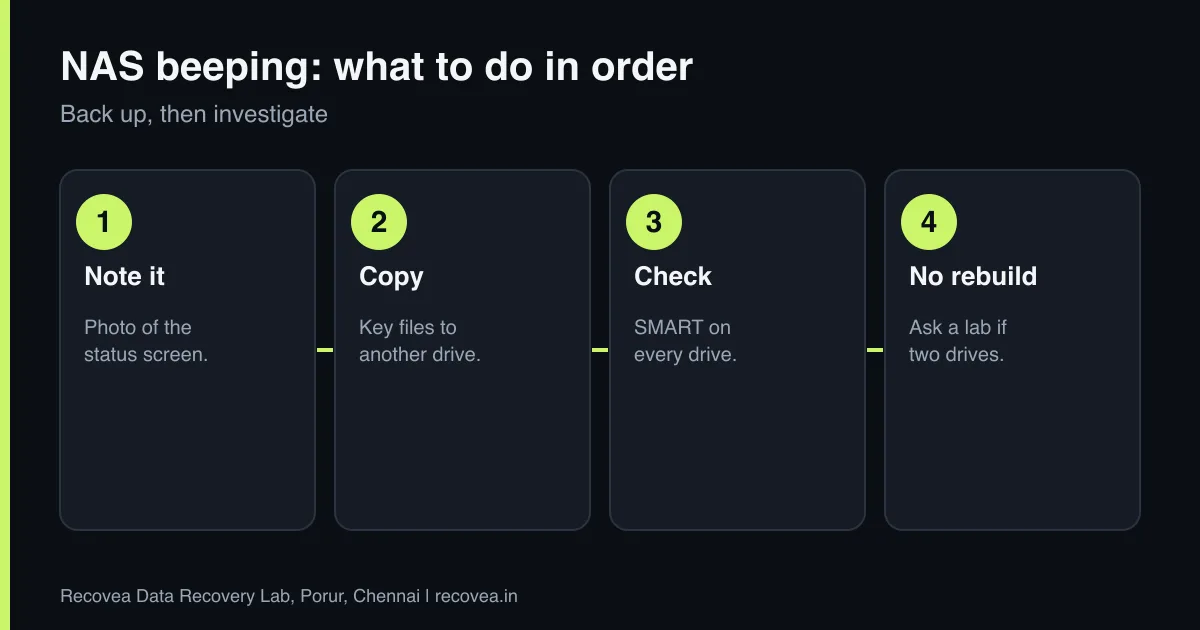
- Note the exact message and which drive or bay it names. Take a photo of the status screen.
- Silence the beep from the admin screen if you can. Do not power-cycle again and again.
- If the volume is readable, copy the most valuable files to another drive now.
- Check the drives’ health (SMART) in the NAS software. Look for other drives with warnings or reallocated sectors.
- Do not remove or swap any drive until you know which is failing and have a backup.
Why a rebuild can be risky
Replacing a failed drive makes the NAS rebuild the missing data by reading every other drive from start to end. That is hard work for drives that are often the same age as the one that failed. If a second drive has bad sectors, the rebuild can stop, or worse, write the wrong data. Read our guide on RAID 5 degraded or failed for the details. If the data matters and there is no backup, it is safer to image the drives first.
Common causes
- A drive wearing out or developing bad sectors.
- A power cut or an unclean shutdown.
- A loose or faulty drive bay or cable.
- A failed rebuild after replacing a drive.
- A drive being removed and reinserted in the wrong slot.
Ask our experts: free diagnosis. Send us a message on WhatsApp and we reply within 30 minutes during working hours (Monday to Saturday, 10:30 to 20:00). Recovery starts from ₹990, physical and complex cases are quoted individually after diagnosis, and if we cannot recover your data, you do not pay.
Chat on WhatsApp | Call +91 79046 79817 | Ask D, free diagnosis
When to stop and ask a lab
- More than one drive shows errors or has dropped out.
- A rebuild has started and failed.
- The NAS shows the volume as crashed or missing. Read NAS volume crashed.
- A drive is clicking or not detected.
- The data is important and you have no backup.
We image each drive, rebuild the array virtually and recover files, so your originals are not stressed. We do not offer onsite RAID work: drives come to our Porur lab by pickup or courier.
How to avoid a repeat
A NAS is not a backup. Keep a separate copy of important data on another device or in the cloud, replace drives that report errors rather than waiting, use a UPS to protect from power cuts and test your backups by restoring a file. For businesses, see our backup plan for small businesses.
NAS beeping: act in this order
Follow the arrows and stop at the first YES
Is the beep with a clicking drive?
If no, go to the next question
Power off. Label the drive.
Is the volume degraded but still accessible?
If no, go to the next question
Copy key files to another drive.
Has a second drive shown errors?
If no, go to the next question
Do not rebuild. Ask a lab.
One failed drive and a backup: replace, then rebuild.
The safe order of actions when a NAS beeps.
What to note before you contact a lab
Tell the engineer the NAS or server brand and model, the number and size of the drives, the RAID level, the file system, what happened first (a drive alert, a power cut, an update, a rebuild), and whether any rebuild was started. Label each drive with its slot number before you remove it, and keep them in anti-static bags. Do not re-create the array or run repair commands. We work in the lab, not onsite, so drives come to us by pickup or courier.
How to prevent it next time
RAID protects against one drive failing, not against deletion, ransomware, fire or a controller fault. Keep a separate backup on a different device, ideally with one copy off site. Replace drives that report errors rather than waiting, avoid mixing very old and new drives, keep the NAS on a UPS, keep its firmware updated, and restrict access from the internet. Test restoring a file from your backup at least a few times a year.
Ask our experts: free diagnosis. Send us a message on WhatsApp and we reply within 30 minutes during working hours (Monday to Saturday, 10:30 to 20:00). Recovery starts from ₹990, physical and complex cases are quoted individually after diagnosis, and if we cannot recover your data, you do not pay.
Chat on WhatsApp | Call +91 79046 79817 | Ask D, free diagnosis
Frequently asked questions
Is my data lost if the NAS shows volume degraded?
No. The data is usually intact, but the protection is reduced. Back up now.
Can I just replace the drive?
Only if you have a backup and the other drives are healthy. A rebuild stresses every drive.
Why does the NAS keep beeping?
It is alerting you to a failed or missing drive. You can silence it in the admin screen.
Can I use the NAS while it is degraded?
Yes for reading, but avoid heavy use and copy your important files off.
How much does NAS recovery cost?
Diagnosis is free. NAS cases are quoted individually after diagnosis, and if we cannot recover your data, you do not pay.
Related guides and services
- Synology or QNAP NAS Volume Crashed? What to Do
- RAID 5 degraded or failed: do not rebuild yet
- Two Drives Failed in a RAID: Is Recovery Possible?
- Backup Plan for Small Businesses in Chennai: The 3-2-1 Rule in Plain Words
- NAS data recovery
- RAID and server data recovery
Recovea is a data recovery lab at 2nd Floor, Plot No-4, Thiraviyam Nagar 1st Street, Sai Nagar, Porur, Chennai 600116. We accept drives by pickup or courier from anywhere in India.
