

Every hard drive brand can fail, and most failures come from the same few causes: worn heads, damaged firmware, bad sectors, a faulty board or a motor that will not spin. Brand matters less than the symptoms. What matters most is that you stop using a drive that is misbehaving.
Key takeaways
- Seagate, Western Digital (WD) and Toshiba drives all fail in broadly the same ways.
- Some models and generations have known weak points, such as firmware faults or head wear, but a model name alone does not predict your fault.
- The sound, the detected size and the SMART status tell a lab far more than the logo.
- Do not swap circuit boards between drives yourself: modern boards hold drive-specific adaptive data.
- Free diagnosis, and if we cannot recover your data you do not pay.
In this guide
- Why brand is only part of the story
- Common faults on Seagate drives
- Common faults on WD drives
- Common faults on Toshiba drives
- What the symptoms tell a lab
- Why you should not swap the circuit board
- What happens in the lab
- What to note before you contact a lab
- How to prevent it next time
- Frequently asked questions
Written by the Recovea lab team, Porur, Chennai. Last reviewed 18 November 2026.
Why brand is only part of the story
Hard drives from the three big makers use the same basic design: spinning platters, a moving arm with read/write heads, a motor and a circuit board with firmware. When a drive fails, the cause is almost always one of those parts. A Seagate, a WD and a Toshiba drive that all click are probably failing for the same reason: the heads cannot read the service area on the platters.
That said, labs do see patterns. Certain families of drives, certain capacities and certain production years show up more often with particular problems. We will not name and shame a model in a general guide, because failure rates vary by batch and by how a drive was used. What we can do is describe the faults you are most likely to meet.
Common faults on Seagate drives
Seagate drives are widely used in desktops, external drives and CCTV recorders. Faults we commonly diagnose include firmware or service-area problems that make a drive show the wrong name or a tiny size, drives that are detected but never become ready, head wear that causes slow reads and clicking, and bad-sector build-up on older drives. A drive that appears as 0 GB or with an odd name is often a firmware fault, not an empty disk. Do not initialise or format it. See our guide on drives that show 0 GB.
Common faults on WD drives
Western Digital drives are very common in laptops and in portable “My Passport” style external drives. Typical cases are the portable drive that stops being detected after a knock, a drive with a damaged USB-to-SATA bridge board (the drive inside is fine but the enclosure board is not), clicking from worn heads, and drives that become slow and then freeze. With some portable drives the USB interface is built into the drive board and the data is encrypted by that board, which makes a hardware fault more delicate. Always keep the original enclosure and do not open it.
Common faults on Toshiba drives
Toshiba makes many laptop and portable drives. We most often see knock damage in portable drives, heads that fail after a drop, motors that do not spin up, and bad sectors in older drives. Small 2.5-inch drives are more sensitive to shocks because the heads park closer to the platter. If a portable drive has been dropped, the best step is not to plug it in again. See what to do after a drop.
Ask our experts: free diagnosis. Send us a message on WhatsApp and we reply within 30 minutes during working hours (Monday to Saturday, 10:30 to 20:00). Recovery starts from ₹990, physical and complex cases are quoted individually after diagnosis, and if we cannot recover your data, you do not pay.
Chat on WhatsApp | Call +91 79046 79817 | Ask D, free diagnosis
Seagate, WD, Toshiba: common faults
Often-reported faults by brand. The symptom matters more
stop careful safe
Faults often reported by brand.
What the symptoms tell a lab
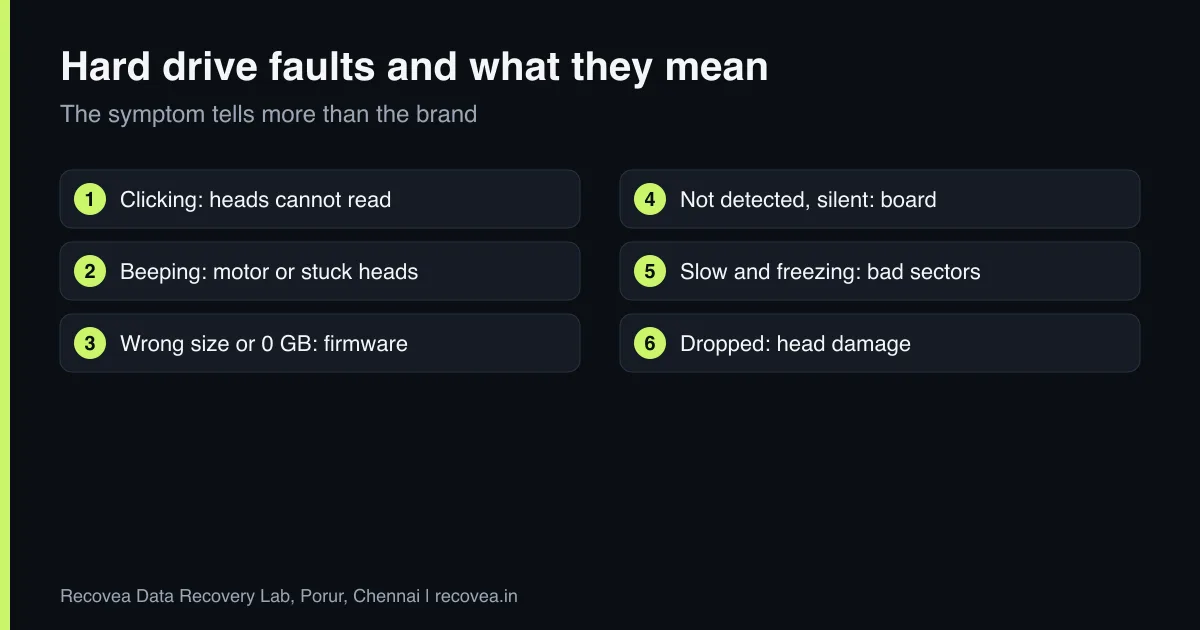
- Clicking or tapping: heads cannot find the service area. Read the clicking guide.
- Beeping or no spin: motor or stuck heads. Read the beeping guide.
- Detected with wrong size: firmware or service-area fault.
- Not detected, silent: board, motor or firmware.
- Detected but slow, freezing: weak heads or bad sectors. Copy what you can once and stop.
Why you should not swap the circuit board
Older advice said you could swap the board from an identical drive. On modern drives the board holds adaptive data that is unique to the heads and platters inside. A swapped board can make the drive fail to read or, worse, write wrong data. A lab transfers that data properly, or reads it from the platters, and uses compatible donor parts only after testing.
What happens in the lab
We test the drive, record its faults and give you a free diagnosis. Firmware and service-area faults are handled with specialised tools (PC-3000). Head faults need a head replacement in a cleanroom with a compatible donor. Once the drive reads, we make a full image of it and recover your files from the image, so the original is stressed as little as possible. Read what a cleanroom is.
Which fault does your drive have?
Follow the arrows and stop at the first YES
Is the drive clicking or beeping?
If no, go to the next question
Switch off. Heads or motor are likely.
Does it show a wrong size or name?
If no, go to the next question
Firmware fault. Needs PC-3000.
Is it silent and not detected?
If no, go to the next question
Board or motor fault. Do not swap the board.
Detected but slow: image it, do not keep using it.
A symptom check that works for any brand.
What to note before you contact a lab
A few details help the engineer diagnose faster and quote more accurately. Write down the drive brand, model and capacity (printed on the label), how old it is, what happened just before the problem began (a drop, a power cut, a Windows update, a noise), and which files matter most. If it is an external drive, note whether the enclosure has a separate power adapter. Do not worry if you do not know all of this: the free diagnosis fills in the rest. Keep the drive in an anti-static bag or a padded box until it reaches us.
How to prevent it next time
Hard drives are mechanical, and every one will fail eventually. The only real protection is a second copy of what matters. Follow the 3-2-1 idea: three copies, on two different kinds of storage, with one stored somewhere else (a cloud service or a drive at another location). Do not move a laptop or external drive while it is running, use the right power supply for external drives, and replace any drive that starts to make new noises, freezes on certain files or shows errors. Test your backup sometimes by restoring one file.
Ask our experts: free diagnosis. Send us a message on WhatsApp and we reply within 30 minutes during working hours (Monday to Saturday, 10:30 to 20:00). Recovery starts from ₹990, physical and complex cases are quoted individually after diagnosis, and if we cannot recover your data, you do not pay.
Chat on WhatsApp | Call +91 79046 79817 | Ask D, free diagnosis
Frequently asked questions
Which brand of hard drive fails the least?
No brand is free of failures. Failure rates vary by model and batch, and how a drive is used matters as much as the brand.
My Seagate drive shows 0 GB. Is the data gone?
Usually not. It is often a firmware fault, and the data is still on the platters. Do not format or initialise it.
Can I swap the board from another identical drive?
We do not advise it. Modern boards hold drive-specific data, and a swap can cause more damage.
My WD portable drive is not detected. What now?
Try one other cable and port, once. If it still does not appear, stop and ask a lab. It may be the enclosure board or the drive itself.
How much does recovery cost?
Diagnosis is free. Recovery starts from ₹990, and physical or complex cases are quoted individually after diagnosis. If we cannot recover your data, you do not pay.
Related guides and services
- Hard drive clicking noise: what to do first
- Hard Drive Shows 0 GB or Wrong Size? Firmware
- Dropped External Hard Drive? Can Data Be Saved
- What Is a Cleanroom in Data Recovery?
- Hard disk data recovery in Chennai
- External hard drive recovery
Recovea is a data recovery lab at 2nd Floor, Plot No-4, Thiraviyam Nagar 1st Street, Sai Nagar, Porur, Chennai 600116. We accept drives by pickup or courier from anywhere in India.
