

A hard drive that beeps, buzzes or does not spin is telling you its motor or heads cannot start. Switch it off. Repeated power-ups can turn a motor fault into a head crash, and that is much harder to fix.
Key takeaways
- Beeping or buzzing usually means the motor is trying to spin and cannot, or the heads are stuck.
- Silence with no spin can be a dead circuit board, a power problem or a seized motor.
- Try one different cable or power source (external drives), then stop.
- Do not tap, shake or keep power cycling the drive.
- Motor, board and head faults are repaired in a lab and recovered from a safe copy.
In this guide
- What happens when a drive starts
- Common causes
- Safe checks, once
- What not to do
- How a lab recovers it
- Time and cost
- What to note before you contact a lab
- How to prevent it next time
- Frequently asked questions
Written by the Recovea lab team, Porur, Chennai. Last reviewed 16 November 2026.
What happens when a drive starts
When power is applied, the circuit board spins up the motor, the platters reach speed, the heads move off their parking ramp and read the drive’s own firmware. Only then does your computer see the drive. A beep or buzz means the first steps are failing: the motor draws current and cannot turn the platters, or the heads are stuck against them.
Common causes
- Stuck heads (stiction). After a long time off, or after a knock, heads can stick to the platter surface and stop the motor from turning.
- Seized or failing spindle motor. Worn bearings or a damaged motor stop the platters spinning.
- Faulty circuit board. A power surge can burn the board so the motor never gets power. The drive stays silent.
- Weak power supply. External drives on a weak USB port or the wrong adapter may buzz without spinning.
- Damage from a drop. Heads or the motor can be damaged internally.
Beeping drive: what it means
Sound, likely cause and the safe next step
stop careful safe
What the beeping is telling you.
Safe checks, once
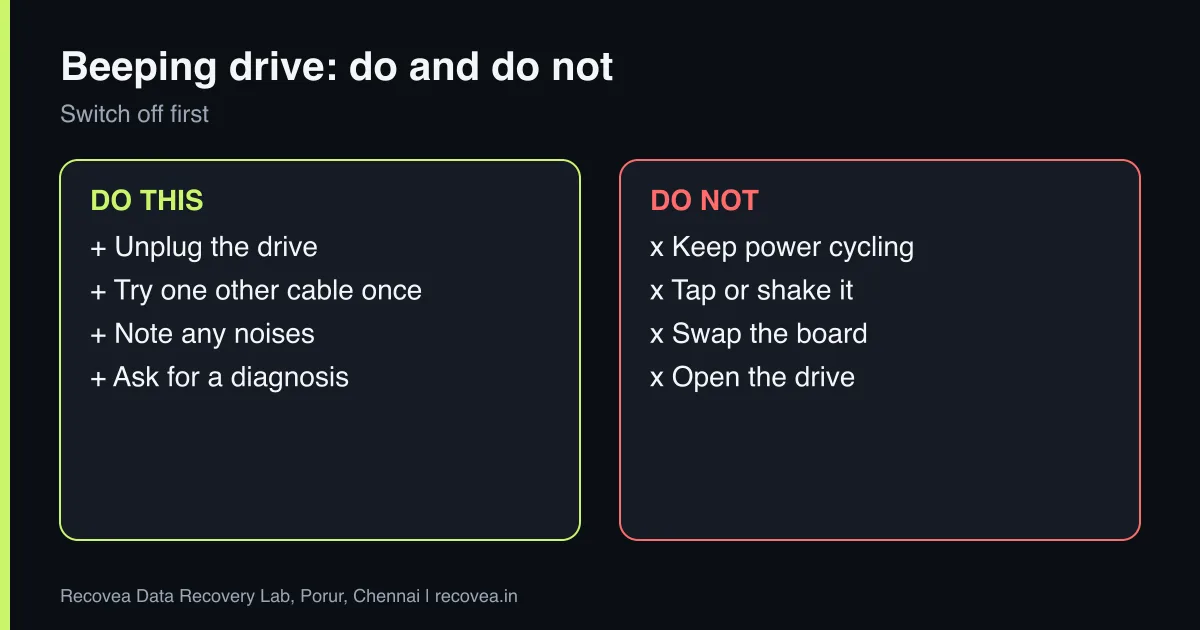
- Unplug the drive and let it rest for a minute.
- For an external drive, try a different cable and the correct power adapter or a rear USB port.
- Listen again once. If it still beeps, buzzes or is silent, stop.
- Do not try more than once or twice, and never leave it running.
Each power-up sends current through a motor that may be seized, and a stuck head that is forced to move can tear the platter surface.
What not to do
- Do not tap, shake or twist the drive to “free” it.
- Do not freeze or heat it. See the freezer myth.
- Do not open it. Heads and platters need a cleanroom.
- Do not swap the circuit board and hope. Modern drives keep unique adaptive data on the board, so a swap often fails.
- Do not run recovery software. The drive is not even detected.
Ask our experts: free diagnosis. Send us a message on WhatsApp and we reply within 30 minutes during working hours (Monday to Saturday, 10:30 to 20:00). Recovery starts from ₹990, physical and complex cases are quoted individually after diagnosis, and if we cannot recover your data, you do not pay.
Chat on WhatsApp | Call +91 79046 79817 | Ask D, free diagnosis
How a lab recovers it
The engineer checks the board first, looking for burnt parts, and tests power. If the board is damaged, the drive’s adaptive data is moved to a matching donor board, or the board is repaired. If the motor or heads are stuck, the drive is opened in a cleanroom: heads are freed or replaced with matched donor parts, and the platters are inspected. The drive is then read carefully and copied to a healthy drive, and your files are recovered from the copy. We use tools such as PC-3000 for this work.
How a lab recovers a beeping drive
From diagnosis to delivered files
How a beeping drive is recovered.
Time and cost
Diagnosis is free. Recovery starts from ₹990; physical faults are quoted individually after diagnosis and typically take 3 to 15 working days. If we cannot recover your data, you do not pay. We accept drives by pickup or courier from anywhere in India.
What to note before you contact a lab
A few details help the engineer diagnose faster and quote more accurately. Write down the drive brand, model and capacity (printed on the label), how old it is, what happened just before the problem began (a drop, a power cut, a Windows update, a noise), and which files matter most. If it is an external drive, note whether the enclosure has a separate power adapter. Do not worry if you do not know all of this: the free diagnosis fills in the rest. Keep the drive in an anti-static bag or a padded box until it reaches us.
How to prevent it next time
Hard drives are mechanical, and every one will fail eventually. The only real protection is a second copy of what matters. Follow the 3-2-1 idea: three copies, on two different kinds of storage, with one stored somewhere else (a cloud service or a drive at another location). Do not move a laptop or external drive while it is running, use the right power supply for external drives, and replace any drive that starts to make new noises, freezes on certain files or shows errors. Test your backup sometimes by restoring one file.
Ask our experts: free diagnosis. Send us a message on WhatsApp and we reply within 30 minutes during working hours (Monday to Saturday, 10:30 to 20:00). Recovery starts from ₹990, physical and complex cases are quoted individually after diagnosis, and if we cannot recover your data, you do not pay.
Chat on WhatsApp | Call +91 79046 79817 | Ask D, free diagnosis
Frequently asked questions
Why is my hard drive beeping?
Usually the motor cannot spin the platters or the heads are stuck. It can also be a power problem on external drives.
Can a beeping drive be recovered?
Often yes, if the platters are not badly damaged. Switch it off at once and get a diagnosis.
Should I try the drive in another computer?
Once, with a good power source. If it still beeps, stop.
Can I replace the circuit board myself?
Usually not. Modern boards hold drive-specific data and a simple swap often does not work.
How much does it cost?
Diagnosis is free; recovery starts from ₹990 and physical faults are quoted after diagnosis. You pay only if data is recovered.
Related guides and services
- Hard drive clicking noise: what to do first
- Hard drive grinding or scraping: switch it off now
- Hard drive not detected in Windows or BIOS: 7 checks
- How much does data recovery cost in India?
- Hard disk data recovery in Chennai
- External hard drive recovery
Recovea is a data recovery lab at 2nd Floor, Plot No-4, Thiraviyam Nagar 1st Street, Sai Nagar, Porur, Chennai 600116. We accept drives by pickup or courier from anywhere in India.
