

If a pen drive asks you to format it or shows 0 bytes, do not format it. The message usually means the file system is damaged, and your files may still be inside. A drive that shows 0 bytes may have a failing controller.
Key takeaways
- “Please format” usually means a damaged file system, not lost files.
- 0 bytes or an unknown capacity usually points to a controller or memory fault.
- Formatting can overwrite the index and make recovery harder.
- Stop using the drive, and do not keep plugging it in.
- Labs can repair file systems, rebuild structures or read the memory chips directly.
In this guide
- Why a pen drive asks to format
- Why a pen drive shows 0 bytes
- Do this now
- What not to do
- How a lab recovers data
- Cost and time
- What to note before you contact a lab
- How to prevent it next time
- Frequently asked questions
Written by the Recovea lab team, Porur, Chennai. Last reviewed 16 November 2026.
Why a pen drive asks to format
Pen drives use a simple file system. Removing the drive during writing, a power cut, a virus or worn memory can corrupt it. Windows then cannot read the index and offers to format the drive. The files are usually still there, but the computer cannot find them.
Why a pen drive shows 0 bytes
A pen drive has a small controller and one or two memory chips. If the controller cannot read its map, it may report 0 bytes or a tiny size. This can be firmware corruption, a damaged controller, a cracked solder joint or worn memory. These are hardware faults, and software cannot fix them.
Pen drive problems explained
What you see, likely cause and the safe next step
stop careful safe
Common pen drive errors and what they mean.
Do this now
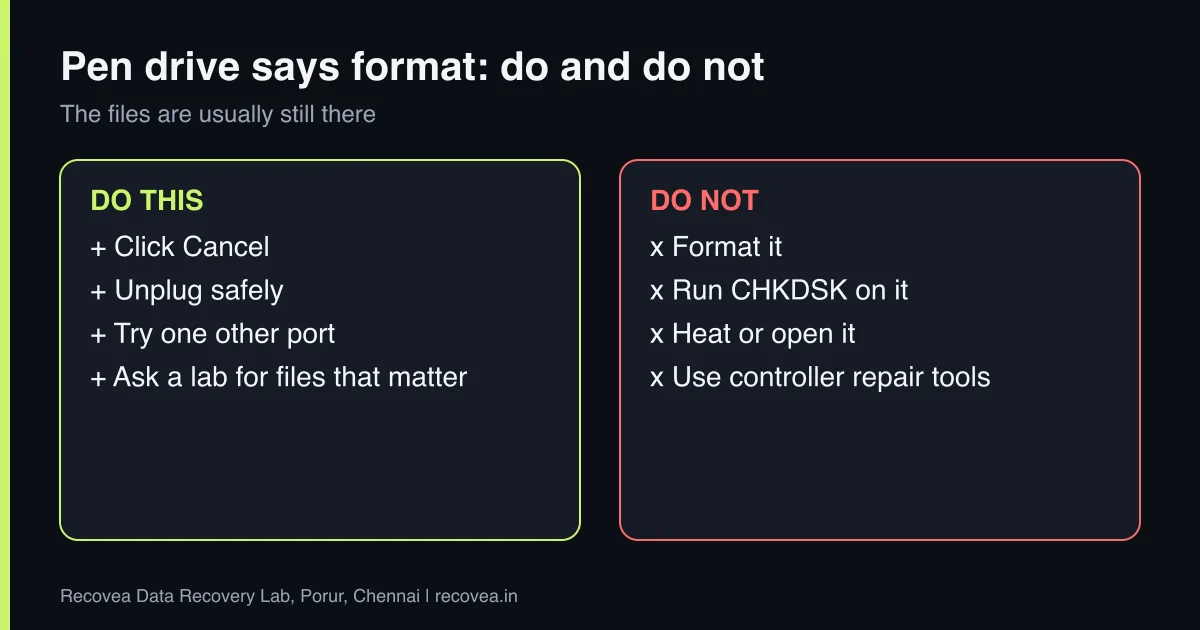
- Click Cancel on the format prompt.
- Unplug the drive safely and stop plugging it in.
- Try a different port once, with no other devices attached.
- If it is warm, hot or disconnects, stop.
- Ask a lab if the files matter.
Pen drive: what to try first
Follow the arrows and stop at the first YES
Does it ask to format but show the right size?
If no, go to the next question
Cancel. Scan it with software on a computer.
Does it show 0 bytes?
If no, go to the next question
Controller fault. Stop using it.
Is it bent, cracked or wet?
If no, go to the next question
Do not plug it in again.
Not detected anywhere: free diagnosis.
First steps for a failing pen drive.
What not to do
- Do not format, even “just to see”.
- Do not run CHKDSK on a pen drive that is failing.
- Do not open or heat the drive.
- Do not use tools that promise to “repair the controller”, which may rewrite the firmware.
Ask our experts: free diagnosis. Send us a message on WhatsApp and we reply within 30 minutes during working hours (Monday to Saturday, 10:30 to 20:00). Recovery starts from ₹990, physical and complex cases are quoted individually after diagnosis, and if we cannot recover your data, you do not pay.
Chat on WhatsApp | Call +91 79046 79817 | Ask D, free diagnosis
How a lab recovers data
If the file system is damaged, the engineer images the drive and rebuilds the structure from the copy. If the controller is faulty, the memory chip is removed or read in place with specialised equipment and the data order is rebuilt in software (chip-level recovery). This needs NDA-level care, and we sign one where required. Success depends on the controller type and on encryption.
Cost and time
Diagnosis is free. File system repairs are quick (24 to 72 hours); chip-level work takes longer and is quoted individually. Recovery starts from ₹990. You pay only if data is recovered.
What to note before you contact a lab
Tell the engineer the brand, model and capacity, what device it was used in (camera, phone, laptop, drone), and what happened just before the problem: a removal during writing, a format prompt, a power cut. Note if the device is encrypted. Stop using the storage at once, because every write can overwrite what you want back. Keep memory cards and pen drives in a small anti-static bag or case. A free diagnosis tells you whether the problem is logical or a chip or controller fault.
How to prevent it next time
Flash storage fails without warning. Copy photos and files off cards and pen drives as soon as you can, keep at least two copies, and do not delete from the card in the camera until both copies are checked. Use the safe-eject option, never remove a card while the light is blinking, and format cards in the device that will use them rather than on a computer. For SSDs, keep system and personal files backed up to a second drive or the cloud, and keep your encryption recovery keys safe.
Ask our experts: free diagnosis. Send us a message on WhatsApp and we reply within 30 minutes during working hours (Monday to Saturday, 10:30 to 20:00). Recovery starts from ₹990, physical and complex cases are quoted individually after diagnosis, and if we cannot recover your data, you do not pay.
Chat on WhatsApp | Call +91 79046 79817 | Ask D, free diagnosis
Frequently asked questions
Is my data lost if the pen drive asks to format?
Usually not. The file system is damaged, but the data is often intact.
Why does my pen drive show 0 bytes?
The controller cannot read its map or the memory has failed. It is a hardware fault.
Can I fix it with a free tool?
Only a healthy drive with a file system fault. Controller faults need a lab.
Can data be recovered from a broken pen drive?
Often, through chip-level reading, depending on the model.
How much does it cost?
Diagnosis is free; recovery starts from ₹990.
Related guides and services
- Formatted SSD or pen drive: recovery chances
- Memory card corrupted or camera error
- Hard drive shows RAW or asks to format
- How much does data recovery cost in India?
- Pen drive and memory card recovery
- SSD and NVMe data recovery
Recovea is a data recovery lab at 2nd Floor, Plot No-4, Thiraviyam Nagar 1st Street, Sai Nagar, Porur, Chennai 600116. We accept drives by pickup or courier from anywhere in India.
