

A failing drive is fragile, so how you pack it for the courier can decide whether it arrives in the same state it left. Use an anti-static bag, plenty of padding and a rigid box, and never send it loose or in an envelope.
Key takeaways
- Switch the device off and do not test it again before packing.
- Use an anti-static bag, then wrap it well in bubble wrap or foam and put it in a rigid box.
- Leave space around the drive and fill gaps so it cannot move. Shocks are the main risk.
- Include a note with your name, phone number, the fault and the files that matter. Do not include passwords on the box.
- Recovea arranges pickup from anywhere in India, so you may not need to pack it yourself.
In this guide
- Why packing matters
- Step-by-step packing
- What to include
- What not to do
- Let us arrange the pickup
- What happens when it arrives
- What to note before you contact a lab
- How to prevent it next time
- Frequently asked questions
Written by the Recovea lab team, Porur, Chennai. Last reviewed 18 November 2026.
Why packing matters
A hard drive with a damaged head or a weak motor is more fragile than a healthy one. A fall of even a short distance, or a heavy knock in transit, can scratch the platters. An SSD or pen drive is tougher against shock, but static, moisture and bending can still damage them. Good packing protects against knocks, static and water, and costs very little compared with the cost of a damaged drive.
Step-by-step packing
- Switch the device off and disconnect it. If it is an external drive, keep the cable and power adapter separate.
- Put the drive in an anti-static bag. If you do not have one, a clean, dry plastic bag is better than nothing.
- Wrap it in several layers of bubble wrap or soft foam.
- Place it in a sturdy box, with at least 4 to 5 cm of padding on every side. It should not move if you shake the box.
- Put the box in a second, larger box or a thick courier bag for a heavy-duty layer.
- Seal it with tape and mark it as fragile, with arrows pointing up.
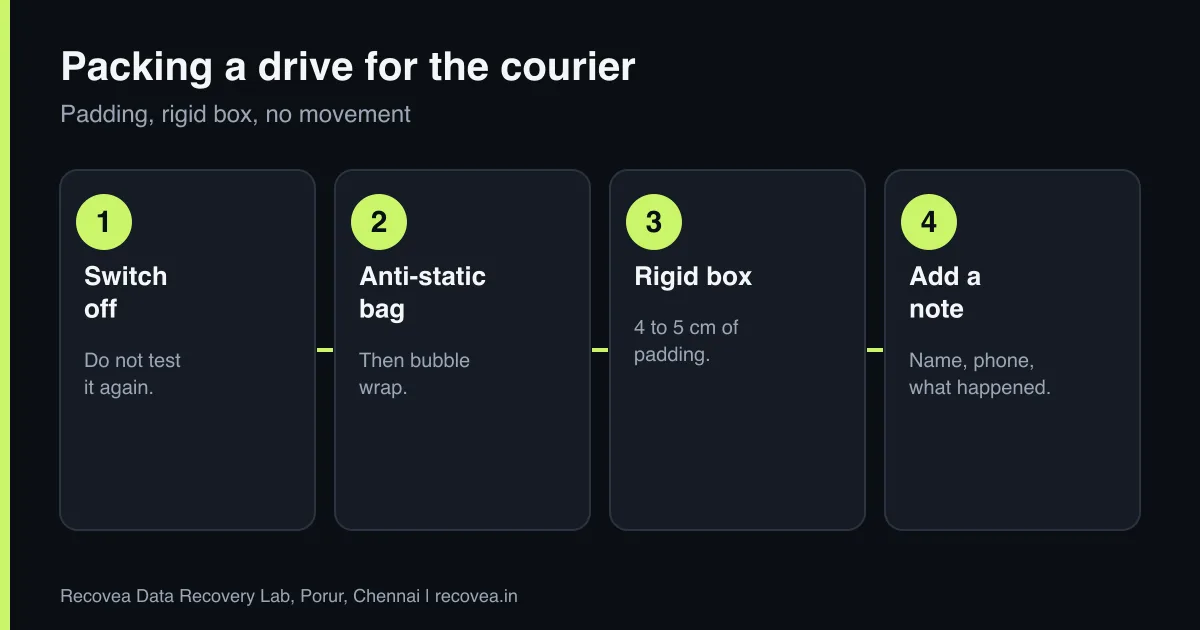
Packing a device for the courier
What to use and what to avoid
How to pack each type of device.
What to include
- A note with your name, mobile number and email.
- A short description of what happened and when.
- The files or folders that matter most.
- The device brand, model and capacity, if known.
- For NAS or RAID: the drive order, labelled with slot numbers.
- For phones: the invoice and a photocopy of your ID, if the phone is locked.
Keep passwords and recovery keys off the box. Tell us in a message instead.
What not to do
- Do not send a drive loose, in an envelope or only in a bag.
- Do not pack a wet device in a sealed bag. Dry it gently and tell us it was wet.
- Do not include chargers inside the same bag as the drive.
- Do not keep powering it on to “check” before you pack it.
Ask our experts: free diagnosis. Send us a message on WhatsApp and we reply within 30 minutes during working hours (Monday to Saturday, 10:30 to 20:00). Recovery starts from ₹990, physical and complex cases are quoted individually after diagnosis, and if we cannot recover your data, you do not pay.
Chat on WhatsApp | Call +91 79046 79817 | Ask D, free diagnosis
Let us arrange the pickup
You do not have to find a courier yourself. We arrange pickup from anywhere in India. The pickup is free if we recover your data. If you decline after the diagnosis, only the one-way courier is charged, and the return courier is free. Message us on WhatsApp first and we explain how to pack for your device. If you are in Chennai, you can also bring the device to our Porur lab; message us first so we can plan your visit.
What happens when it arrives
We log the device, check it and start the free diagnosis. We message you with the fault, the chance of recovery and the price, and nothing is done without your approval. If we cannot recover your data, you do not pay for the recovery. Read how long recovery takes.
The journey of your drive
From first message to return
The journey of a courier recovery.
What to note before you contact a lab
Gather the basics: the device type, brand and model, what happened first, any noises or error messages, and which files matter most. Keep the device switched off if it is making noise or has been damaged. Write down any passwords or recovery keys needed for encrypted storage, and keep the original packaging or an anti-static bag. A short note to the lab saves time, and the diagnosis is free.
How to prevent it next time
The best protection is a second copy of everything that matters, kept on a different device and, ideally, in a different place. Check your backups sometimes by actually restoring a file, replace old storage before it fails, and keep devices away from heat, water and shocks. If a device behaves strangely, copy your data off first and investigate afterwards.
Ask our experts: free diagnosis. Send us a message on WhatsApp and we reply within 30 minutes during working hours (Monday to Saturday, 10:30 to 20:00). Recovery starts from ₹990, physical and complex cases are quoted individually after diagnosis, and if we cannot recover your data, you do not pay.
Chat on WhatsApp | Call +91 79046 79817 | Ask D, free diagnosis
Frequently asked questions
Can I just send a drive in an envelope?
No. It can be crushed or knocked. Use an anti-static bag, padding and a rigid box.
Do I need to send the charger?
For external drives, send the cable and power adapter in a separate bag. For phones, the charger is optional.
Who pays for the courier?
Pickup is free if we recover your data. If you decline after the diagnosis, only the one-way courier is charged. The return courier is free.
Should I send the drive’s enclosure too?
Yes, for external drives. The enclosure board can matter.
Can I visit the lab instead?
In Chennai, yes. Message us first so we can plan your visit.
Related guides and services
- Dropped External Hard Drive? Can Data Be Saved
- Data Recovery in Chennai: Porur, Vadapalani, Guindy, Anna Nagar and Tambaram
- Is Your Data Safe in a Data Recovery Lab? NDA, Privacy and Deletion
- How Long Does Data Recovery Take? By Fault
- All data recovery services
- Hard disk data recovery in Chennai
Recovea is a data recovery lab at 2nd Floor, Plot No-4, Thiraviyam Nagar 1st Street, Sai Nagar, Porur, Chennai 600116. We accept drives by pickup or courier from anywhere in India.
