

If your Mac will not start, do not erase it or reinstall macOS before you know whether your data is backed up. On modern Macs the storage is encrypted and tied to the machine, so recovery depends on the cause, and honest advice matters more than promises.
Key takeaways
- Macs with the T2 chip and Apple silicon (M1 and later) encrypt the internal storage automatically.
- On these Macs the storage is usually soldered to the board, so you cannot simply take the drive out and read it elsewhere.
- If the Mac still powers on, the best routes are Target Disk Mode, Share Disk from macOS Recovery, Time Machine and iCloud.
- Never erase the disk or reinstall macOS before checking backups.
- If the logic board is dead, recovery can be very limited. We say so after a free diagnosis.
In this guide
- Why Macs are different
- First checks if the Mac does not start
- Ways to reach your files if the Mac powers on
- When the Mac will not power on
- What a lab can and cannot do
- Protecting your Mac data in future
- What to note before you contact a lab
- How to prevent it next time
- Frequently asked questions
Written by the Recovea lab team, Porur, Chennai. Last reviewed 18 November 2026.
Why Macs are different
Older Macs had a removable hard drive or SSD. You could take it out and read it in an enclosure. Macs with the Apple T2 security chip, and every Mac with Apple silicon, encrypt the internal storage with keys held in the machine. On many models the storage chips are soldered to the logic board. The data is protected from being read on another computer, which is good for security and makes failures harder to deal with.
Mac will not start: by Mac type
Your Mac, what it means for your data and what to do
stop careful safe
Mac boot problems by Mac type.
First checks if the Mac does not start
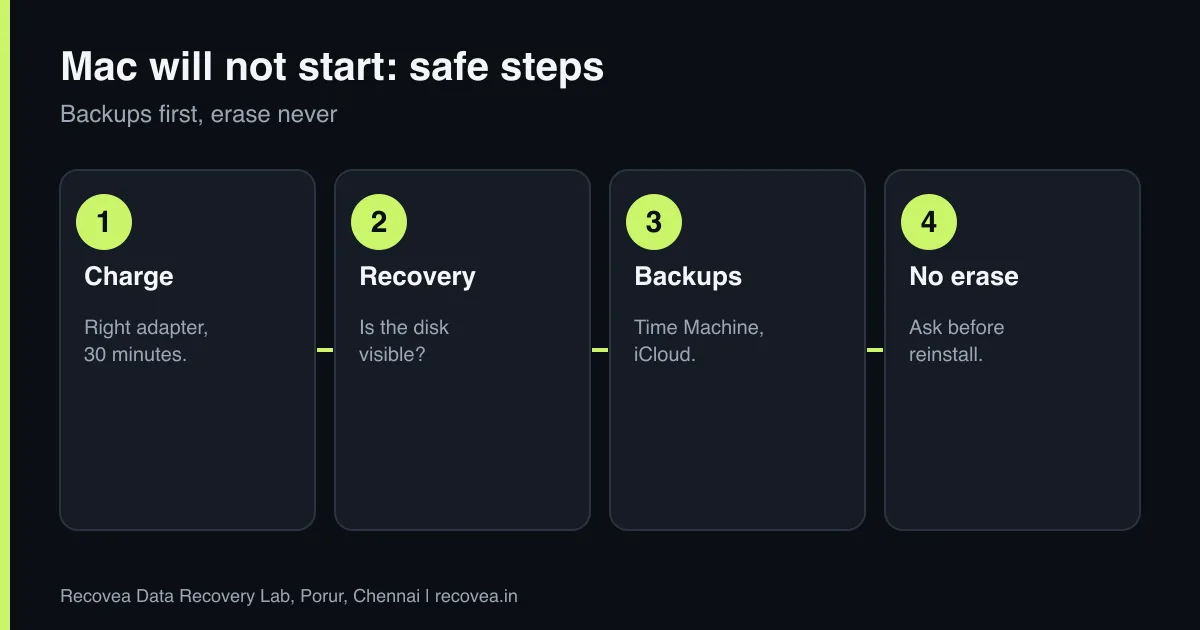
- Charge it properly with the right adapter for at least 30 minutes, and try a different outlet.
- Disconnect all accessories.
- Note what happens: a black screen, a folder with a question mark, a spinning globe, a loop or a kernel panic message.
- Try macOS Recovery (hold the power button on Apple silicon, or Command and R on Intel) to see whether the disk is visible in Disk Utility.
- Do not choose Erase or Reinstall until you know where your files are.
Ways to reach your files if the Mac powers on
- Time Machine or iCloud: check these first. Your files may already be safe.
- Target Disk Mode on Intel Macs with a T2 chip: connect to another Mac and read the disk if you can unlock it.
- Share Disk from macOS Recovery on Apple silicon Macs, used with a second Mac.
- A new macOS install on an external drive, so you can reach the internal disk without changing it.
These methods need your login password or recovery key if FileVault is on.
When the Mac will not power on
If the Mac shows no sign of life, the fault may be on the logic board: a power-circuit fault, liquid damage or a failed component. Repair of the board may bring it back to life so the data can be read, but this depends on the fault and on whether the storage chips are undamaged. Data on a soldered, encrypted drive generally cannot be read without a working board that holds the keys. Liquid damage is time-critical: switch the Mac off and do not charge it.
Ask our experts: free diagnosis. Send us a message on WhatsApp and we reply within 30 minutes during working hours (Monday to Saturday, 10:30 to 20:00). Recovery starts from ₹990, physical and complex cases are quoted individually after diagnosis, and if we cannot recover your data, you do not pay.
Chat on WhatsApp | Call +91 79046 79817 | Ask D, free diagnosis
What a lab can and cannot do
We assess your Mac in the free diagnosis and tell you honestly whether recovery is realistic. For Macs with removable SSDs or hard drives we can often recover data as for any other drive. For T2 and Apple silicon Macs, the chance depends on repairing the board or reaching the disk through the machine itself. We do not promise what the hardware does not allow. Tell us the exact model and year, and whether FileVault was on.
Protecting your Mac data in future
Turn on Time Machine with an external drive, and keep iCloud Drive and Photos on for the files you cannot replace. Keep your FileVault recovery key and Apple ID details somewhere safe. A Mac that boots today may not tomorrow, and with soldered storage a backup is the only dependable protection. Read our backup guide.
Mac not booting: decide the route
Follow the arrows and stop at the first YES
Does it reach macOS Recovery?
If no, go to the next question
Check the disk is visible and copy your data.
Do you have a Time Machine or iCloud backup?
If no, go to the next question
Restore from it.
Is the Mac completely dead?
If no, go to the next question
Board-level check. Results vary.
Do not erase or reinstall macOS.
Choosing the right route when a Mac will not boot.
What to note before you contact a lab
Tell the engineer the laptop or PC model, the operating system, how the problem started (an update, a crash, a fall, liquid), whether the drive is encrypted with BitLocker or FileVault, and which folders matter most. Keep the encryption recovery key if you have one. Do not reinstall Windows or reset the computer, because that can overwrite your files. If the drive is a hard disk that clicks or is not detected, switch it off and do not try again.
How to prevent it next time
Use File History or Windows Backup, Time Machine on a Mac, or a cloud service for your documents and photos, and keep a second copy on an external drive that is not always connected. Check that backups really finish. Save your BitLocker or FileVault recovery key somewhere safe and separate from the computer. Replace an old hard disk with an SSD before it fails, and keep the laptop away from heat, dust and liquids.
Ask our experts: free diagnosis. Send us a message on WhatsApp and we reply within 30 minutes during working hours (Monday to Saturday, 10:30 to 20:00). Recovery starts from ₹990, physical and complex cases are quoted individually after diagnosis, and if we cannot recover your data, you do not pay.
Chat on WhatsApp | Call +91 79046 79817 | Ask D, free diagnosis
Frequently asked questions
Can I take the SSD out of my MacBook and read it?
On many modern Macs the storage is soldered, and on T2 and Apple silicon Macs it is encrypted and tied to the machine, so no.
Will erasing the Mac help?
No. Erasing removes your data. Check backups first.
My MacBook got wet. What now?
Switch it off, do not charge it and contact us quickly. Liquid damage gets worse with time.
Does FileVault stop recovery?
Without the password or recovery key, the data cannot be read.
How much does it cost?
Diagnosis is free. Recovery starts from ₹990 and complex cases are quoted after diagnosis. If we cannot recover your data, you do not pay.
Related guides and services
- Laptop Will Not Boot? How to Get Your Files Out
- FileVault Locked Mac: What Is Possible Without the Password
- Windows Will Not Start? Save Your Data First
- How to Back Up Photos and Documents Properly: Free and Paid Options
- Laptop data recovery
- All data recovery services
Recovea is a data recovery lab at 2nd Floor, Plot No-4, Thiraviyam Nagar 1st Street, Sai Nagar, Porur, Chennai 600116. We accept drives by pickup or courier from anywhere in India.
