

If Windows will not start, protect your files before you try repairs. Many fixes, including reset and reinstall, can erase data. A few safe checks tell you whether the problem is software or the drive.
Key takeaways
- A blue screen or boot loop is often a software fault, but it can be the first sign of a failing drive.
- Do not choose “reset this PC”, “remove everything” or reinstall if the files matter.
- Boot a repair option only if the drive is healthy. Clicking or slowness means stop.
- Files can be copied from the drive without Windows.
- A lab reads the drive directly and saves your files first.
In this guide
- Common reasons Windows fails to start
- Signs that the drive is the problem
- Safe steps
- What not to do
- How we save your data
- Cost and time
- What to note before you contact a lab
- How to prevent it next time
- Frequently asked questions
Written by the Recovea lab team, Porur, Chennai. Last reviewed 16 November 2026.
Common reasons Windows fails to start
- Failed or interrupted updates.
- Corrupted system files or boot records.
- Malware.
- Failing storage: bad sectors on a hard disk or SSD errors.
- New hardware or driver problems.
- Power cuts during writing.
Signs that the drive is the problem
- Clicking, ticking or beeping.
- Very slow startup before the failure.
- Errors such as “inaccessible boot device” or “no boot device found”.
- Files that would not open before the failure.
If you see these, switch off. Repeated restarts stress the drive.
Windows will not start: causes
What you see, likely cause and the safe next step
stop careful safe
Why Windows fails to start.
Safe steps
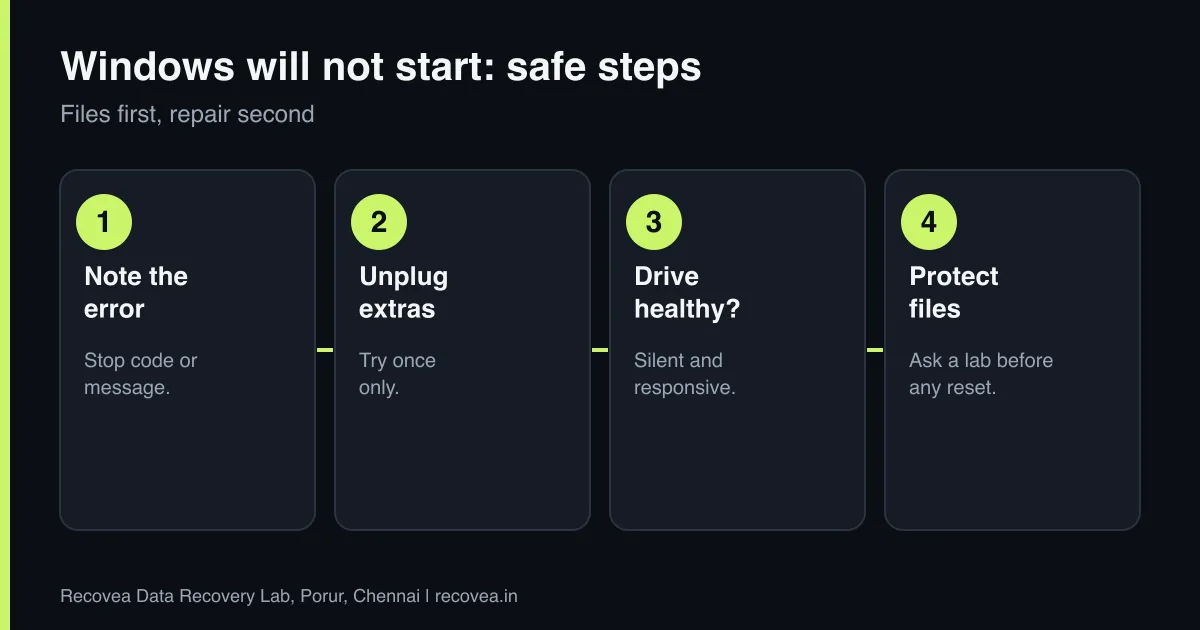
- Note the error message or stop code.
- Remove external devices and try once.
- If it offers Startup Repair, run it only if the drive is silent and healthy.
- If the files matter and the drive struggles, stop and ask a lab.
- Do not reset, remove everything or reinstall.
What not to do
- Do not select “Reset this PC” with “Remove everything”.
- Do not reinstall Windows onto the same drive.
- Do not run CHKDSK repeatedly on a failing drive.
- Do not format the drive.
Ask our experts: free diagnosis. Send us a message on WhatsApp and we reply within 30 minutes during working hours (Monday to Saturday, 10:30 to 20:00). Recovery starts from ₹990, physical and complex cases are quoted individually after diagnosis, and if we cannot recover your data, you do not pay.
Chat on WhatsApp | Call +91 79046 79817 | Ask D, free diagnosis
How we save your data
The drive is connected to a recovery system that does not depend on Windows. For a healthy drive, files are copied straight to another drive. If the drive is failing, the engineer makes a safe copy first. Encrypted drives need the recovery key. After your files are safe, Windows can be reinstalled without risk.
Save your data in this order
Before any repair or reinstall
The safe order to save files before repairing Windows.
Cost and time
Diagnosis is free. Simple copies are quick; physical faults take 3 to 15 working days. Recovery starts from ₹990, and you pay only if data is recovered.
What to note before you contact a lab
Tell the engineer the laptop or PC model, the operating system, how the problem started (an update, a crash, a fall, liquid), whether the drive is encrypted with BitLocker or FileVault, and which folders matter most. Keep the encryption recovery key if you have one. Do not reinstall Windows or reset the computer, because that can overwrite your files. If the drive is a hard disk that clicks or is not detected, switch it off and do not try again.
How to prevent it next time
Use File History or Windows Backup, Time Machine on a Mac, or a cloud service for your documents and photos, and keep a second copy on an external drive that is not always connected. Check that backups really finish. Save your BitLocker or FileVault recovery key somewhere safe and separate from the computer. Replace an old hard disk with an SSD before it fails, and keep the laptop away from heat, dust and liquids.
Ask our experts: free diagnosis. Send us a message on WhatsApp and we reply within 30 minutes during working hours (Monday to Saturday, 10:30 to 20:00). Recovery starts from ₹990, physical and complex cases are quoted individually after diagnosis, and if we cannot recover your data, you do not pay.
Chat on WhatsApp | Call +91 79046 79817 | Ask D, free diagnosis
Frequently asked questions
Will reinstalling Windows delete my files?
It can. Copy your files first or ask a lab.
Is a blue screen always a drive problem?
No, but it can be. Clicking or slowness suggests it is.
Can you recover files from a Windows PC that will not boot?
Yes, by reading the drive directly.
Do I need my BitLocker key?
If the drive is encrypted, yes.
How much does it cost?
Diagnosis is free; recovery starts from ₹990.
Related guides and services
- Laptop will not boot: how to get your files out
- BitLocker locked drive: recovery key and data safety
- Bad sectors and CHKDSK: when it helps and when it destroys data
- How much does data recovery cost in India?
- Laptop data recovery
- Hard disk data recovery in Chennai
Recovea is a data recovery lab at 2nd Floor, Plot No-4, Thiraviyam Nagar 1st Street, Sai Nagar, Porur, Chennai 600116. We accept drives by pickup or courier from anywhere in India.
