

If BitLocker asks for a recovery key, the first job is to find the key, not to reset the drive. Without the key or the password, encrypted data cannot be read by anyone, including a lab. With it, recovery is usually straightforward.
Key takeaways
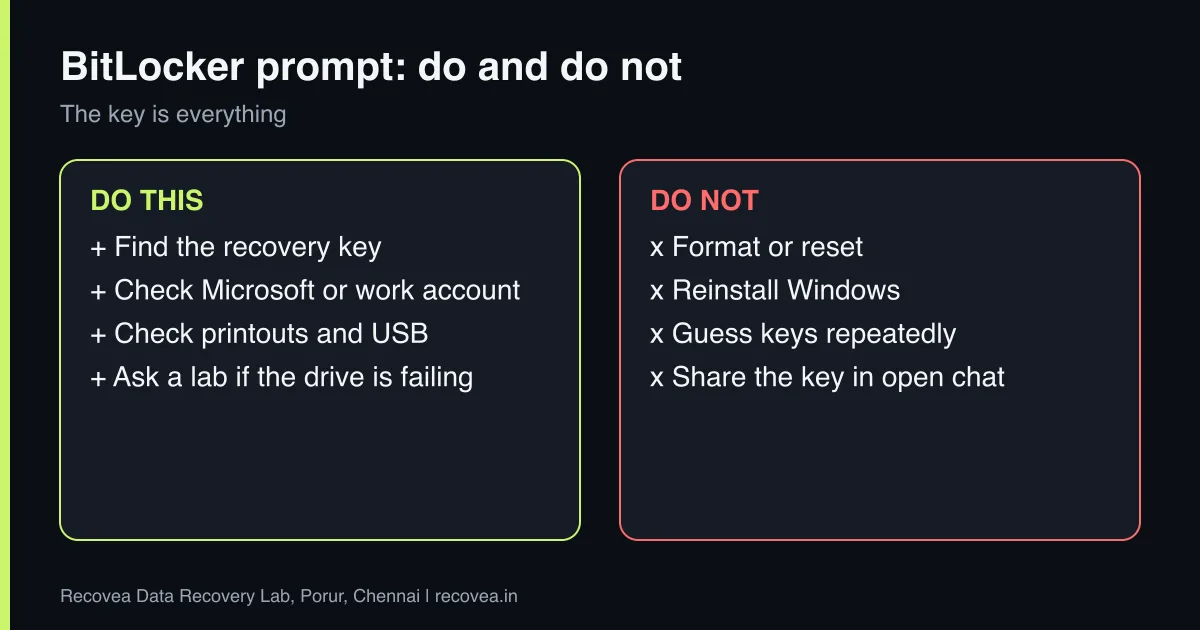
- BitLocker encrypts the whole drive. The recovery key is the only fallback if the password or hardware changes.
- Look for the key in your Microsoft account, a work or school account, a printout, a USB drive or a saved file.
- Do not format, reset or reinstall. That destroys the encrypted data permanently.
- With the key, a lab can recover from failing or damaged encrypted drives.
- Without the key or password, no lab can decrypt BitLocker data.
In this guide
- Why BitLocker asks for a key
- Where to find the recovery key
- What not to do
- What recovery looks like with the key
- Without the key
- What to note before you contact a lab
- How to prevent it next time
- Frequently asked questions
Written by the Recovea lab team, Porur, Chennai. Last reviewed 16 November 2026.
Why BitLocker asks for a key
BitLocker ties the drive’s encryption to the computer’s hardware and to your sign-in. Changes such as a BIOS update, a new motherboard, a battery that drained completely or a drive moved to another computer can make BitLocker ask for the recovery key before it will unlock.
BitLocker asks for a key: why
What you see, why it happens and what to do
stop careful safe
Why BitLocker asks for a recovery key.
Where to find the recovery key
- Your Microsoft account, under the devices or recovery keys page.
- A work or school account, or your IT department’s directory.
- A printout or a text file saved when BitLocker was turned on.
- A USB drive you saved it to.
The key is a long number in eight groups, and an ID shown on the screen helps match it to the right key.
Where to look for the BitLocker key
Follow the arrows and stop at the first YES
Is a Microsoft account signed in somewhere?
If no, go to the next question
The key may be in your account online.
Is it a work or school PC?
If no, go to the next question
Ask the IT admin for the key.
Did you print or save the key?
If no, go to the next question
Check USB drives, printouts and files.
No key anywhere: a lab cannot bypass it. We will say so.
Where to look for a lost BitLocker key.
What not to do
- Do not format, reset or reinstall Windows. That erases the encryption headers and the data.
- Do not try random keys repeatedly on a failing drive.
- Do not decrypt or change settings if the drive is unstable.
- Do not send us your recovery key in an open message. We tell you how to share it safely.
Ask our experts: free diagnosis. Send us a message on WhatsApp and we reply within 30 minutes during working hours (Monday to Saturday, 10:30 to 20:00). Recovery starts from ₹990, physical and complex cases are quoted individually after diagnosis, and if we cannot recover your data, you do not pay.
Chat on WhatsApp | Call +91 79046 79817 | Ask D, free diagnosis
What recovery looks like with the key
If the drive is healthy, the key unlocks it and files can be copied. If the drive is damaged or failing, the engineer first makes a copy of the encrypted drive, then uses the key to read the data from the copy. This works for hard disks and for many SSDs. If the drive was a RAW state that is really an unlock prompt, the data is intact.
Without the key
If the key and password are lost, BitLocker data cannot be recovered. That is how the encryption is designed. A lab can still check whether you have an older copy, a backup, or whether the drive is not actually encrypted. Diagnosis is free and tells you where you stand.
What to note before you contact a lab
Tell the engineer the laptop or PC model, the operating system, how the problem started (an update, a crash, a fall, liquid), whether the drive is encrypted with BitLocker or FileVault, and which folders matter most. Keep the encryption recovery key if you have one. Do not reinstall Windows or reset the computer, because that can overwrite your files. If the drive is a hard disk that clicks or is not detected, switch it off and do not try again.
How to prevent it next time
Use File History or Windows Backup, Time Machine on a Mac, or a cloud service for your documents and photos, and keep a second copy on an external drive that is not always connected. Check that backups really finish. Save your BitLocker or FileVault recovery key somewhere safe and separate from the computer. Replace an old hard disk with an SSD before it fails, and keep the laptop away from heat, dust and liquids.
Ask our experts: free diagnosis. Send us a message on WhatsApp and we reply within 30 minutes during working hours (Monday to Saturday, 10:30 to 20:00). Recovery starts from ₹990, physical and complex cases are quoted individually after diagnosis, and if we cannot recover your data, you do not pay.
Chat on WhatsApp | Call +91 79046 79817 | Ask D, free diagnosis
Frequently asked questions
Can data be recovered from a BitLocker drive?
Yes, if you have the key or password.
What if I lost the key?
Check your Microsoft or work account. Without it, the data cannot be decrypted.
Can BitLocker drives be damaged?
Yes. A lab can image a failing encrypted drive and then use the key.
Is a BitLocker drive RAW?
It can look RAW before unlocking. Do not format it.
How much does it cost?
Diagnosis is free; recovery starts from ₹990.
Related guides and services
- Laptop will not boot: how to get your files out
- Windows will not start: save your data first
- Hard drive shows RAW or asks to format
- How much does data recovery cost in India?
- Laptop data recovery
- Hard disk data recovery in Chennai
Recovea is a data recovery lab at 2nd Floor, Plot No-4, Thiraviyam Nagar 1st Street, Sai Nagar, Porur, Chennai 600116. We accept drives by pickup or courier from anywhere in India.
