

If your camera says “card error”, “card not formatted” or “cannot read card”, stop shooting and do not format it. Photos and videos are very often still on the card, and the right first step is to protect them.
Key takeaways
- Camera errors usually mean a damaged file system or an unreliable card, not erased photos.
- Stop shooting. New photos can overwrite old ones.
- Do not format in the camera or the computer.
- Use a card reader, not the camera cable, and do not run repairs on a failing card.
- Labs make a copy of the card and recover photos and videos by their structure or signatures.
In this guide
- Why cards fail
- What the error means
- Do this now
- What not to do
- How a lab recovers photos and videos
- Cost and time
- What to note before you contact a lab
- How to prevent it next time
- Frequently asked questions
Written by the Recovea lab team, Porur, Chennai. Last reviewed 16 November 2026.
Why cards fail
Memory cards are used in demanding conditions: constant writes, heat, removal at the wrong time, battery drops and long use. A card can fail through corrupted file system data, worn memory cells, damaged contacts or controller faults. The result is the camera saying the card is not formatted, cannot be read, or has an error.
What the error means
- “Card needs formatting”: file system damaged.
- “Card error” or “cannot read”: file system or card fault.
- Some photos show grey or corrupted: damaged data blocks.
- Card not detected at all: controller or contacts fault.
Memory card errors explained
What the camera says and what it means
stop careful safe
Common camera card errors.
Do this now
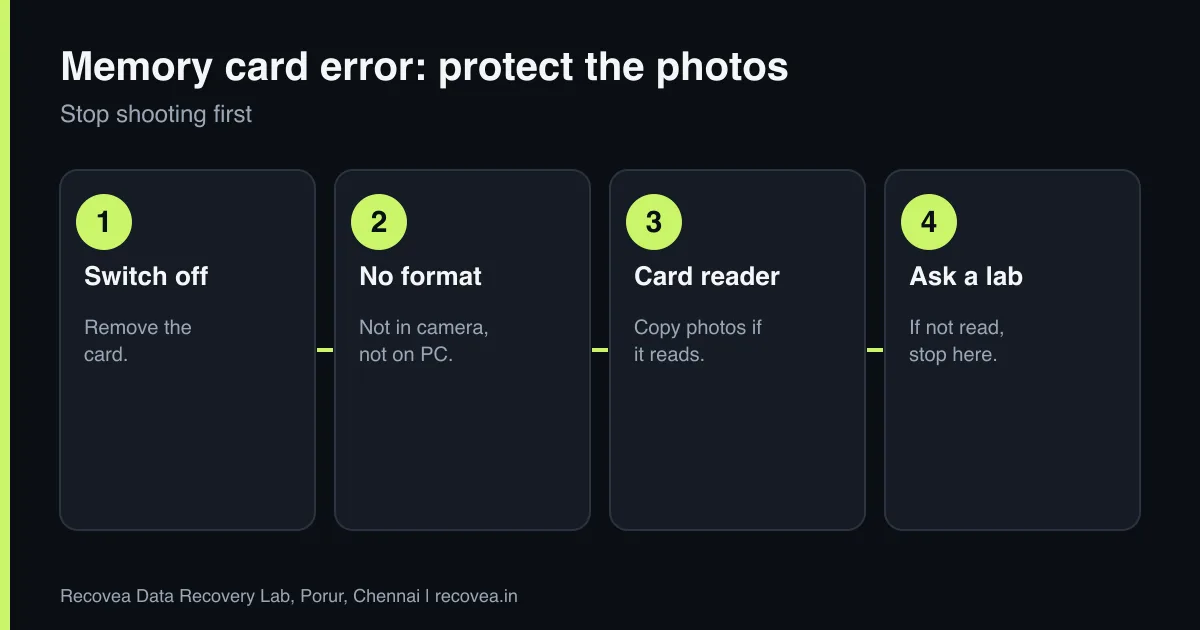
- Switch the camera off and remove the card. Do not shoot more.
- Do not format, in the camera or the computer.
- Try the card in a good card reader once. If photos appear, copy them at once to a computer.
- If it is not read, stop and keep the card in its case.
- Tell the lab the camera model, card brand and what happened.
What not to do
- Do not format “to fix it”.
- Do not keep shooting to see whether the error goes away.
- Do not use repair tools on a card that is failing.
- Do not delete photos to make space.
Ask our experts: free diagnosis. Send us a message on WhatsApp and we reply within 30 minutes during working hours (Monday to Saturday, 10:30 to 20:00). Recovery starts from ₹990, physical and complex cases are quoted individually after diagnosis, and if we cannot recover your data, you do not pay.
Chat on WhatsApp | Call +91 79046 79817 | Ask D, free diagnosis
How a lab recovers photos and videos
The engineer makes a full copy of the card. If the file system is damaged, it is rebuilt from the copy. If not, photos and videos are found by their file signatures, including RAW formats from many cameras. Fragmented videos may need extra work. If the card is physically damaged, chip-level reading can still get the data out. Recovered files are checked and delivered on a clean drive.
Rescue photos in this order
Protect the card first
The safe order for rescuing photos.
Cost and time
Diagnosis is free. Recovery commonly takes 24 to 72 hours and starts from ₹990; complex cases are quoted after diagnosis. You pay only if data is recovered.
What to note before you contact a lab
Tell the engineer the brand, model and capacity, what device it was used in (camera, phone, laptop, drone), and what happened just before the problem: a removal during writing, a format prompt, a power cut. Note if the device is encrypted. Stop using the storage at once, because every write can overwrite what you want back. Keep memory cards and pen drives in a small anti-static bag or case. A free diagnosis tells you whether the problem is logical or a chip or controller fault.
How to prevent it next time
Flash storage fails without warning. Copy photos and files off cards and pen drives as soon as you can, keep at least two copies, and do not delete from the card in the camera until both copies are checked. Use the safe-eject option, never remove a card while the light is blinking, and format cards in the device that will use them rather than on a computer. For SSDs, keep system and personal files backed up to a second drive or the cloud, and keep your encryption recovery keys safe.
Ask our experts: free diagnosis. Send us a message on WhatsApp and we reply within 30 minutes during working hours (Monday to Saturday, 10:30 to 20:00). Recovery starts from ₹990, physical and complex cases are quoted individually after diagnosis, and if we cannot recover your data, you do not pay.
Chat on WhatsApp | Call +91 79046 79817 | Ask D, free diagnosis
Frequently asked questions
Can photos be recovered from a corrupted memory card?
Often yes, especially if you stop shooting at once.
Should I format the card?
No. Format only after your photos are safely copied.
Can I recover videos?
Often yes, but long videos may be fragmented and need extra work.
Does the card brand matter?
It affects how a lab approaches chip-level work, but the first steps are the same.
How much does it cost?
Diagnosis is free; recovery starts from ₹990.
Related guides and services
- SD card not recognised: what to do before you format it
- Pen drive asks to format or shows 0 bytes
- Formatted SSD or pen drive: recovery chances
- How much does data recovery cost in India?
- Pen drive and memory card recovery
- SSD and NVMe data recovery
Recovea is a data recovery lab at 2nd Floor, Plot No-4, Thiraviyam Nagar 1st Street, Sai Nagar, Porur, Chennai 600116. We accept drives by pickup or courier from anywhere in India.
