

Use software only when the drive is physically healthy. Use a lab when the drive makes noise, disappears, overheats or has been dropped. Choosing wrongly can turn a recoverable drive into a lost one, so it is worth spending two minutes on the decision.
Key takeaways
- Recovery software works on logical problems (deleted files, formatted cards) on a drive that is physically healthy.
- Clicking, beeping, not detected, wrong size, dropped, wet or burnt drives need a lab.
- Never install software on, or save recovered files to, the drive you are recovering from.
- Stop at the first sign of struggle: freezing, noise, or the drive dropping off.
- If the data is important and the drive is unstable, a free diagnosis costs nothing.
In this guide
- Logical and physical failures: the key difference
- When software is a reasonable first try
- How to use software safely
- When to go straight to a lab
- Why not try software first on a failing drive?
- What a lab can do that software cannot
- Cost: software versus lab
- What if you already tried software?
- Frequently asked questions
Written by the Recovea lab team, Porur, Chennai. Last reviewed 16 November 2026.
Logical and physical failures: the key difference
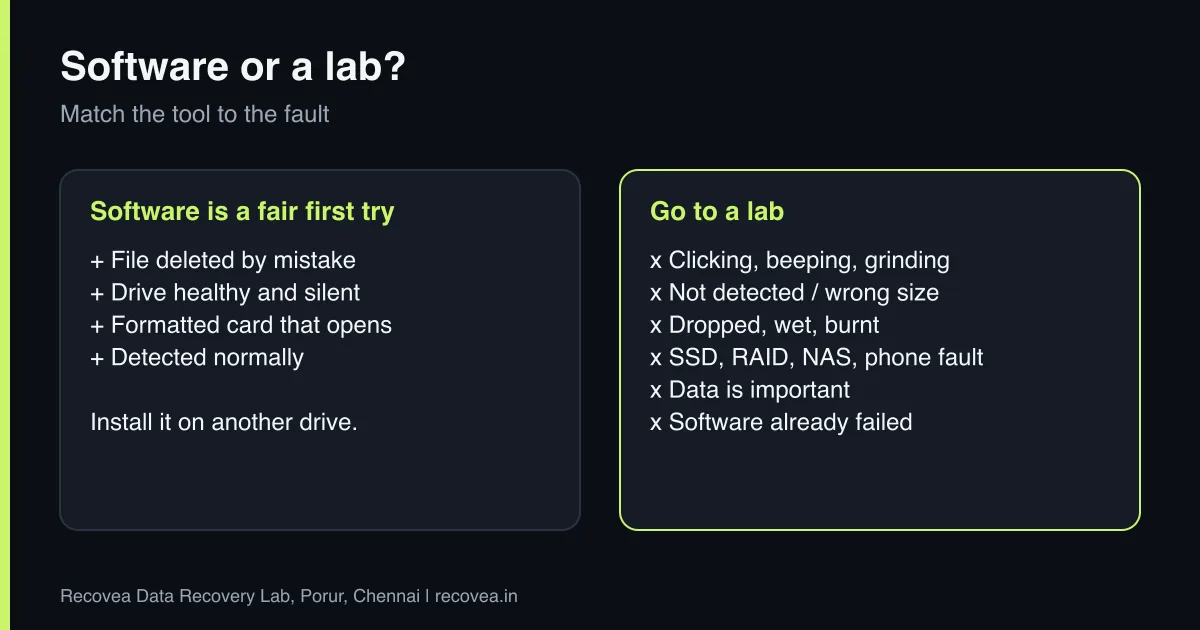
Almost every data loss is one of two kinds. A logical failure means the drive hardware is fine but the data or its index is damaged: a file deleted by mistake, a formatted card, a lost partition, a corrupted file system. A physical failure means something in the hardware is broken: heads, motor, circuit board, memory chips, or a controller. Software can only help with the first kind, because it relies on the drive working normally. A lab handles both, and is the only option for the second.
Software or a lab? Match the tool
Your situation decides the right first step
stop careful safe
When software is enough and when it is not.
When software is a reasonable first try
- You deleted a file or folder by mistake and the drive works normally.
- A memory card or pen drive was formatted but still opens and reads quickly.
- The drive is detected, silent, and not slow or disconnecting.
- The data is not irreplaceable, or you accept the risk.
Well-known tools such as Recuva, Disk Drill, R-Studio, TestDisk and PhotoRec all work this way: they scan the drive and look for traces of files. They are inexpensive or free, and on a healthy drive they can be effective.
How to use software safely
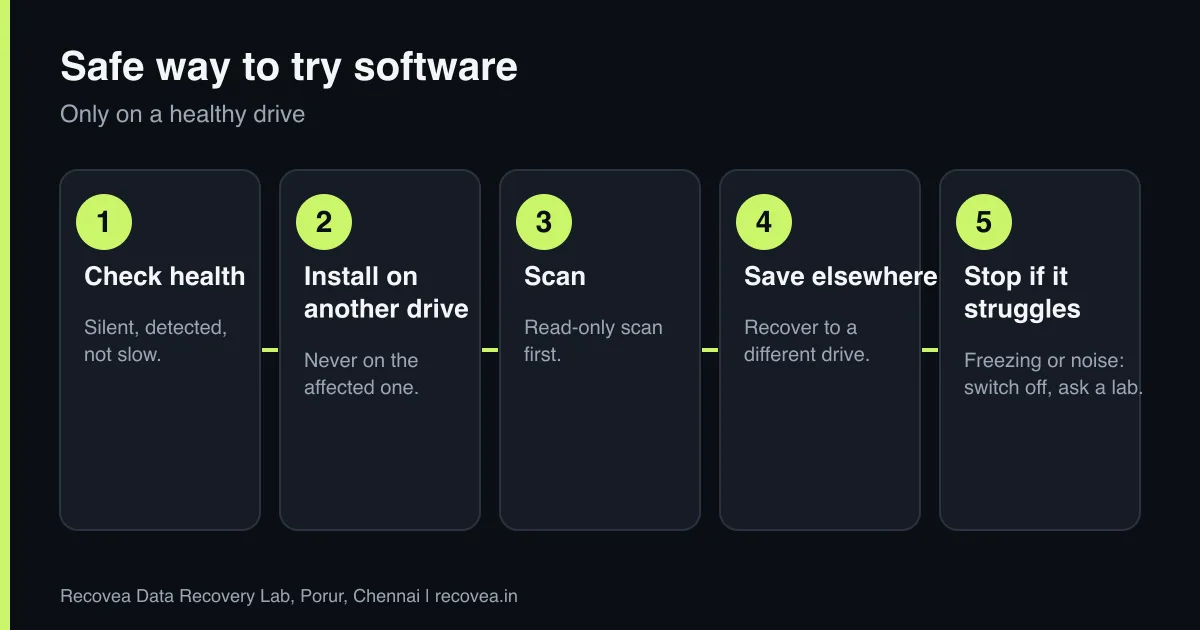
- Check that the drive is healthy. If it is silent, detected and responds normally, continue. Any noise or lag means stop.
- Install the software on a different drive. Installing on the affected drive writes data and can overwrite what you want back.
- Run a read-only scan first. Look at what it finds before you recover anything.
- Save recovered files to another physical drive. Never back to the same one.
- Stop if the scan freezes, slows down or the drive makes noise. Switch off and ask a lab.
When to go straight to a lab
- The drive clicks, beeps, grinds or does not spin.
- It is not detected, or shows the wrong size.
- It was dropped, wet, burnt or hit by a power surge.
- It is an SSD, a NAS, a RAID or a phone with a hardware fault.
- The data is important: business records, legal documents, family photos.
- You tried software and it froze, crashed or found nothing.
Ask our experts: free diagnosis. Send us a message on WhatsApp and we reply within 30 minutes during working hours (Monday to Saturday, 10:30 to 20:00). Recovery starts from ₹990, physical and complex cases are quoted individually after diagnosis, and if we cannot recover your data, you do not pay.
Chat on WhatsApp | Call +91 79046 79817 | Ask D, free diagnosis
Why not try software first on a failing drive?
Recovery software reads the drive hard: thousands of sectors, often several times. A healthy drive handles that. A drive with weak heads or growing bad sectors can get worse with every scan, and each failed attempt can reduce what a lab can later recover. A professional starts with a careful copy, using hardware that controls how the drive is read and can skip damaged areas, and then recovers from the copy. That difference is the main reason labs cost more than software and the reason they succeed where software fails.
What a lab can do that software cannot
- Repair or replace heads, boards and motors in a cleanroom.
- Fix firmware and service-area faults with tools such as PC-3000.
- Read memory chips directly (chip-level) when an SSD, pen drive or memory card has failed.
- Rebuild RAID and NAS volumes from separate images of each drive.
- Recover data from phones with board-level repair.
Should you try software first?
Follow the arrows and stop at the first YES
Does it click, beep, grind or vanish?
If no, go to the next question
Go straight to a lab.
Is it silent and detected normally?
If no, go to the next question
Software on another drive is a fair try.
Did the scan stall or show errors?
If no, go to the next question
Stop. Ask a lab before another scan.
Important data: free diagnosis before you try anything.
A path for choosing software or a lab.
Cost: software versus lab
Software costs little upfront, but a failed attempt on a bad drive can cost you the data. A lab costs more, but with Recovea the diagnosis is free, recovery starts from ₹990 (physical and complex cases are quoted individually), and you pay only if your data is recovered. For anything important, the lab is the safer choice.
What if you already tried software?
Tell the lab exactly what you ran and when. Labs can often still recover after a software attempt, though results are better when the drive has not been stressed further. If the software made the drive click or disappear, tell us that too.
Ask our experts: free diagnosis. Send us a message on WhatsApp and we reply within 30 minutes during working hours (Monday to Saturday, 10:30 to 20:00). Recovery starts from ₹990, physical and complex cases are quoted individually after diagnosis, and if we cannot recover your data, you do not pay.
Chat on WhatsApp | Call +91 79046 79817 | Ask D, free diagnosis
Frequently asked questions
Is free data recovery software safe?
It is safe on a healthy drive if you install it on another drive. It is not suitable for drives with physical problems.
Can a lab recover after software has failed?
Often yes, though results are better if the drive was not stressed further. Stop at the first sign of trouble.
Is software cheaper than a lab?
Software is cheaper upfront. A lab costs more but pays off when the data matters and the drive is failing. We start from ₹990 and you pay only if we recover.
How do I choose?
Use the lists above. When in doubt, ask for a free diagnosis.
Can software recover from an SSD?
Only if the data still exists. After TRIM has cleared the blocks, nothing can recover it. See our SSD guide.
Can I recover from a phone with software?
Only simple cases. Phones with hardware or water damage need board-level repair in a lab.
Related guides and services
- Hard drive shows RAW or asks to format
- Deleted files from an SSD: TRIM explained
- Hard drive not detected in Windows or BIOS: 7 checks
- How much does data recovery cost in India?
- All data recovery services
- Data recovery FAQs
Recovea is a data recovery lab at 2nd Floor, Plot No-4, Thiraviyam Nagar 1st Street, Sai Nagar, Porur, Chennai 600116. We accept drives by pickup or courier from anywhere in India.
