

If you have forgotten your phone’s PIN, start with the official recovery routes for your device and account, because a locked phone is protected on purpose. We only work on certain locked models, and only with proof of ownership.
Key takeaways
- Modern phones encrypt your data with a key tied to your PIN or passcode.
- Use the official routes first: Apple ID or Google account recovery, and the manufacturer’s service centre.
- Be careful: too many wrong attempts can lock or erase the phone.
- We only help with certain models and need proof of ownership, such as the invoice and your ID.
- Nobody can lawfully unlock a phone that does not belong to them.
In this guide
- Why a locked phone is hard to open
- Official routes to try first
- What a lab can do
- What to bring
- What not to do
- Preventing it
- What to note before you contact a lab
- How to prevent it next time
- Frequently asked questions
Written by the Recovea lab team, Porur, Chennai. Last reviewed 18 November 2026.
Why a locked phone is hard to open
Phones are built to protect your data if they are lost or stolen. The data is encrypted, and the key is released only when the correct passcode, fingerprint or face is given. That is why guessing is risky: many phones add delays after wrong attempts, and some are set to erase after ten. It is also why no one can simply read a locked phone’s storage on a computer.
Official routes to try first
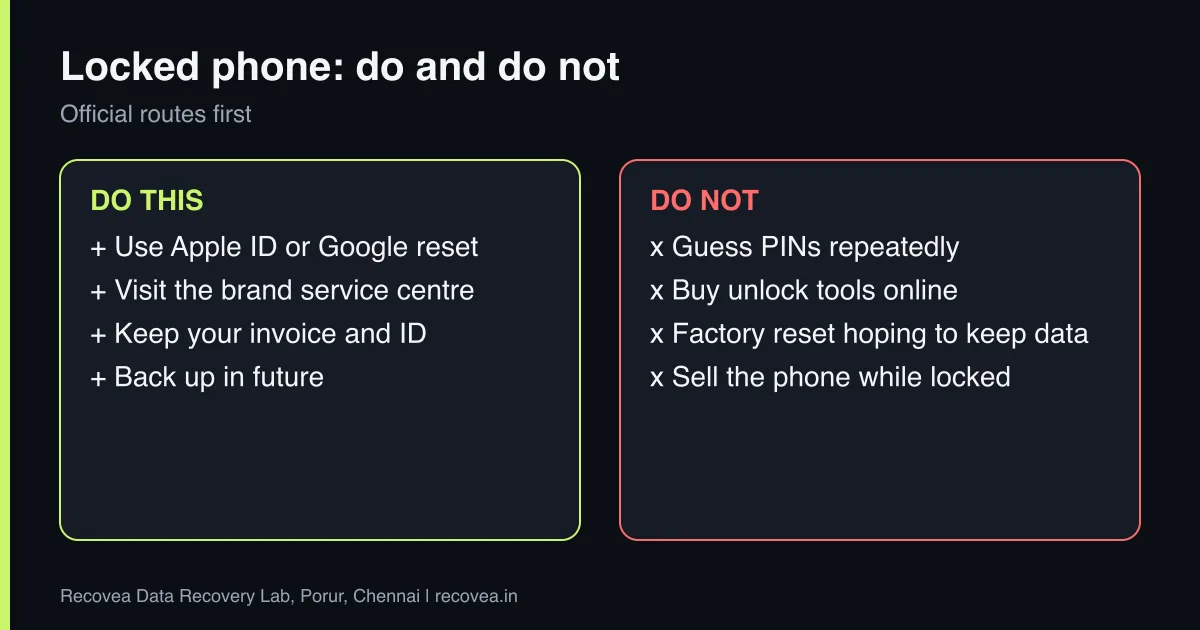
- iPhone: if you see an option such as Erase iPhone or Forgot Passcode, it is meant to reset the phone, which erases data unless you have a backup. Use iCloud or a computer backup to restore afterwards.
- Android: use your Google account to reset the lock, where the phone offers it, and check Find My Device. Some phones need a factory reset, which erases data.
- Samsung and other makes may offer their own account route if you set one up.
- Visit the brand’s service centre with your invoice and ID.
These routes protect your data from thieves, so they may require waiting or erasing.
Locked phone: lawful ways back in
Your situation and the official route
stop careful safe
Lawful ways to open a locked phone.
What a lab can do
Our help with locked phones is limited and honest. We can only work on certain models, and only when you can prove the phone is yours. For those models, we assess in the free diagnosis whether the data can be reached. If the phone is also damaged (dead, wet, cracked screen), the other guides in this series explain what is possible. We do not bypass locks on phones whose ownership is unclear, and we will refuse a request that looks like theft or tampering.
What to bring
- The phone, its charger and its SIM.
- The original invoice or order confirmation, showing the model and serial number or IMEI.
- Your ID.
- The Apple ID or Google account, if you remember it.
Ask our experts: free diagnosis. Send us a message on WhatsApp and we reply within 30 minutes during working hours (Monday to Saturday, 10:30 to 20:00). Recovery starts from ₹990, physical and complex cases are quoted individually after diagnosis, and if we cannot recover your data, you do not pay.
Chat on WhatsApp | Call +91 79046 79817 | Ask D, free diagnosis
Phone locked: where to start
Follow the arrows and stop at the first YES
Do you remember the Apple ID or Google account?
If no, go to the next question
Use the official reset route.
Do you have the invoice and ID?
If no, go to the next question
Visit the brand service centre.
Is the data in a backup?
If no, go to the next question
Restore it on a new phone.
None: a lab cannot bypass it without ownership proof.
Where to start when a phone is locked.
What not to do
- Do not buy unlock tools or services from unknown websites.
- Do not try repeated guesses if the phone warns about erasing.
- Do not factory reset in the hope the data remains. It will not.
- Do not sell or give the phone away while the lock is unresolved.
Preventing it
Use a passcode you can remember, and write it down in a safe place or a password manager. Keep your Apple ID or Google account recovery details current. Make sure your phone backs up automatically, because a restore from a backup is the easiest way past a reset.
What to note before you contact a lab
Tell the engineer the phone make and model, how the problem began (water, a drop, a broken screen, a failed update), whether it still switches on, and whether it was locked or encrypted. Switch it off if it was damaged, and keep the SIM and memory card. Bring the original invoice if the phone is locked, because we only help with certain models and only with proof of ownership. Do not factory reset the phone: that erases the data.
How to prevent it next time
Turn on automatic backups: iCloud for iPhone, Google Photos and Google Drive backup for Android. Check once a month that the last backup is recent. Copy important photos to a computer or external drive as well. Use a sturdy case, keep the phone away from water and heat, and keep your passcode and account details somewhere safe, because backups are useless if you cannot sign in.
Ask our experts: free diagnosis. Send us a message on WhatsApp and we reply within 30 minutes during working hours (Monday to Saturday, 10:30 to 20:00). Recovery starts from ₹990, physical and complex cases are quoted individually after diagnosis, and if we cannot recover your data, you do not pay.
Chat on WhatsApp | Call +91 79046 79817 | Ask D, free diagnosis
Frequently asked questions
Can you unlock any phone?
No. We only work on certain models, and only with proof of ownership.
Will I lose my data if I reset a locked phone?
Usually yes, unless you have a backup to restore.
Can you unlock a phone I bought second-hand?
Only with proof of ownership. If a phone is still tied to someone else’s account, we cannot help.
Is it legal to bypass a phone lock?
Only on your own device. We always ask for proof of ownership.
How much does the diagnosis cost?
Diagnosis is free. We tell you whether your model can be handled.
Related guides and services
- Dead Phone with Photos Inside: Board-Level Recovery Explained
- iPhone Data Recovery Without a Backup: Options
- Android Broken Screen? Get Your Data Out
- Is Your Data Safe in a Data Recovery Lab? NDA, Privacy and Deletion
- iPhone and Android data recovery
- All data recovery services
Recovea is a data recovery lab at 2nd Floor, Plot No-4, Thiraviyam Nagar 1st Street, Sai Nagar, Porur, Chennai 600116. We accept drives by pickup or courier from anywhere in India.
