

If your Mac is protected by FileVault and you have lost the password, the data cannot be read without a valid password or recovery key. That is how the encryption is designed, and no honest lab can break it. The good news is there are several legitimate ways back in.
Key takeaways
- FileVault encrypts the whole disk. Without a valid password or recovery key, the data cannot be decrypted.
- Check for a recovery key (printed or in iCloud), another administrator account and your Apple ID before anything else.
- Resetting a Mac with Erase removes your data permanently. Do not do it if you need the files.
- A lab can help if the disk or board is damaged and you still have the password or key.
- Proof of ownership is needed for any work on a locked device.
In this guide
- How FileVault works
- Legitimate ways to get back in
- What does not work
- When a lab can help
- Ownership and privacy
- Preventing a lockout
- What to note before you contact a lab
- How to prevent it next time
- Frequently asked questions
Written by the Recovea lab team, Porur, Chennai. Last reviewed 18 November 2026.
How FileVault works
FileVault turns the contents of the disk into unreadable scrambled data. The key that unlocks it is protected by your login password, and optionally by a recovery key or your iCloud account. On Macs with Apple silicon or a T2 chip, the encryption is built into the hardware and tied to that machine. This protects you if the Mac is stolen, and it also means nobody, including Apple or a data recovery lab, can bypass it.
FileVault lockout: your ways back in
The honest options, in order
stop careful safe
The legitimate ways back into a FileVault Mac.
Legitimate ways to get back in
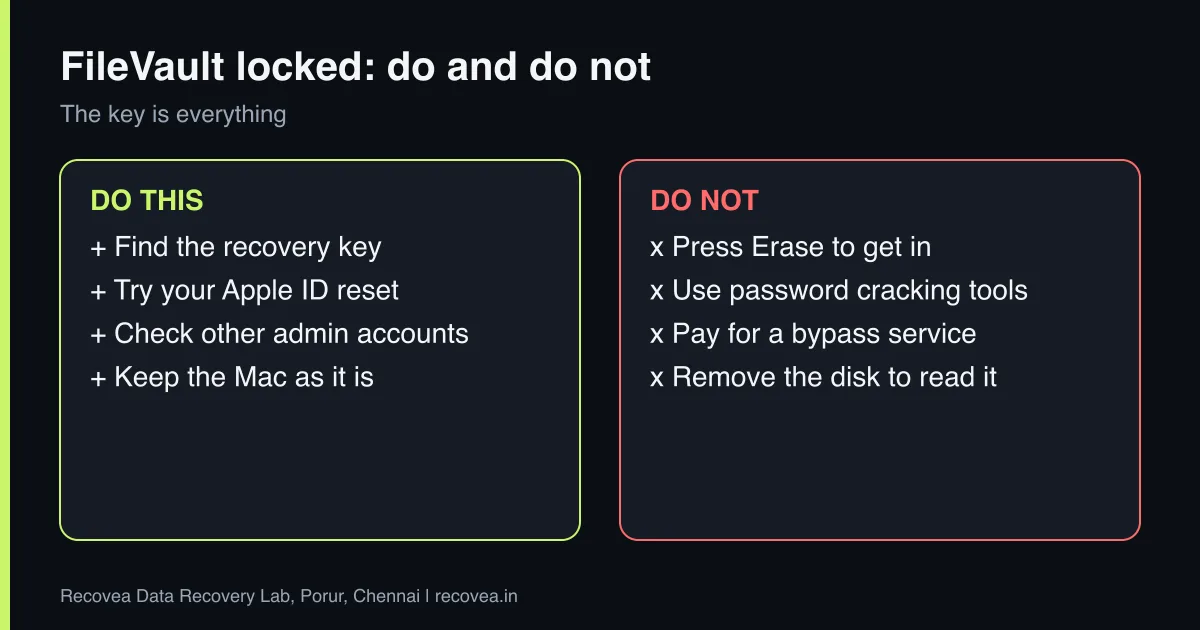
- Try the password you most likely used, including variations. Check caps lock and keyboard layout.
- Use your Apple ID. If you chose to allow it, macOS Recovery can offer to reset the password with your Apple ID.
- Use the recovery key. It looks like a string of letters and numbers. Search your email, password manager, notes or the printout you saved.
- Use another administrator account on the same Mac, which can reset other users’ passwords where allowed.
- Check iCloud or a managed account. A work Mac may have its key stored by your IT department.
FileVault: where is your way in?
Follow the arrows and stop at the first YES
Do you have the FileVault recovery key?
If no, go to the next question
Use it in macOS Recovery.
Is your Apple ID linked to the Mac?
If no, go to the next question
Try the Apple ID reset.
Is there another admin user?
If no, go to the next question
Log in and reset the password.
None: keep the Mac as it is. Do not erase it.
Where to look for your FileVault way in.
What does not work
- Removing the disk and reading it on another computer.
- Password-cracking tools from the internet, which waste time and may carry malware.
- Pressing Erase in macOS Recovery. This deletes the data and cannot be undone.
- Paying anyone who promises to bypass FileVault without the key.
When a lab can help
FileVault is not the only thing that can go wrong. If the disk or logic board is damaged and you still know the password or have the recovery key, a lab may be able to repair the hardware, reach the disk and help you recover the files. That is a different problem from lost credentials. We assess it in the free diagnosis, and tell you honestly if the hardware design prevents recovery.
Ask our experts: free diagnosis. Send us a message on WhatsApp and we reply within 30 minutes during working hours (Monday to Saturday, 10:30 to 20:00). Recovery starts from ₹990, physical and complex cases are quoted individually after diagnosis, and if we cannot recover your data, you do not pay.
Chat on WhatsApp | Call +91 79046 79817 | Ask D, free diagnosis
Ownership and privacy
We never help to bypass a lock on a device that does not belong to you. We ask for proof of ownership, such as the invoice, and we handle your data under NDA. Files are deleted from our systems within one week of delivery. Read more in is your data safe in a lab.
Preventing a lockout
Save the recovery key in a password manager or print it and store it with important papers, away from the Mac. Add a second administrator account for emergencies. Keep your Apple ID details current. Back up with Time Machine, because a backup is the one thing that protects you even if every lock is lost.
What to note before you contact a lab
Tell the engineer the laptop or PC model, the operating system, how the problem started (an update, a crash, a fall, liquid), whether the drive is encrypted with BitLocker or FileVault, and which folders matter most. Keep the encryption recovery key if you have one. Do not reinstall Windows or reset the computer, because that can overwrite your files. If the drive is a hard disk that clicks or is not detected, switch it off and do not try again.
How to prevent it next time
Use File History or Windows Backup, Time Machine on a Mac, or a cloud service for your documents and photos, and keep a second copy on an external drive that is not always connected. Check that backups really finish. Save your BitLocker or FileVault recovery key somewhere safe and separate from the computer. Replace an old hard disk with an SSD before it fails, and keep the laptop away from heat, dust and liquids.
Ask our experts: free diagnosis. Send us a message on WhatsApp and we reply within 30 minutes during working hours (Monday to Saturday, 10:30 to 20:00). Recovery starts from ₹990, physical and complex cases are quoted individually after diagnosis, and if we cannot recover your data, you do not pay.
Chat on WhatsApp | Call +91 79046 79817 | Ask D, free diagnosis
Frequently asked questions
Can a lab remove a FileVault password?
No. FileVault encryption cannot be removed without the password or recovery key.
I forgot my Mac password. Is my data gone?
Not necessarily. Try your Apple ID reset, a recovery key or another administrator account first.
Should I erase my Mac to get in?
Only if you do not need the data. Erasing deletes it permanently.
Can I read the disk on another Mac?
On T2 and Apple silicon Macs, no, because the encryption is tied to the machine.
How much does help cost?
Diagnosis is free. We tell you honestly whether recovery is possible before you pay anything.
Related guides and services
- Mac Not Booting: T2 and Apple Silicon Data Recovery, What Works
- BitLocker Locked Drive? Recovery Key and Data Help
- Phone Locked or PIN Forgotten: Lawful Options and Limits
- Is Your Data Safe in a Data Recovery Lab? NDA, Privacy and Deletion
- Laptop data recovery
- All data recovery services
Recovea is a data recovery lab at 2nd Floor, Plot No-4, Thiraviyam Nagar 1st Street, Sai Nagar, Porur, Chennai 600116. We accept drives by pickup or courier from anywhere in India.
