

Files deleted from an SSD are often much harder to recover than from a hard drive, because of a feature called TRIM. Once the SSD has acted on TRIM, the data is gone and cannot be brought back. The sooner you stop using the drive, the better your chances.
Key takeaways
- TRIM tells the SSD which blocks are no longer used, so it can erase them in the background.
- After the blocks are cleared, the data is gone for good. Neither software nor a lab can bring it back.
- TRIM may not have run on external SSDs, some enclosures and some systems, so recovery is sometimes still possible.
- A deleted file and a failed SSD are different problems. SSDs that are not detected or show 0 GB are often recoverable.
- Stop using the SSD immediately after a deletion and do not install tools on it.
In this guide
- How an SSD stores and deletes data
- What TRIM does to your chances
- When recovery is still possible
- Do this now
- When the SSD itself has failed
- Encryption makes a difference
- Cost and time
- Frequently asked questions
Written by the Recovea lab team, Porur, Chennai. Last reviewed 16 November 2026.
How an SSD stores and deletes data
A hard drive writes data on a magnetic surface and can overwrite it at any time. An SSD stores data in flash memory chips organised in pages and blocks. Flash cannot overwrite a page directly: it must first erase the whole block that contains it. To keep writes fast, the SSD’s controller works in the background, moving data around, erasing blocks and spreading wear evenly across the chips. This is called garbage collection and wear levelling.
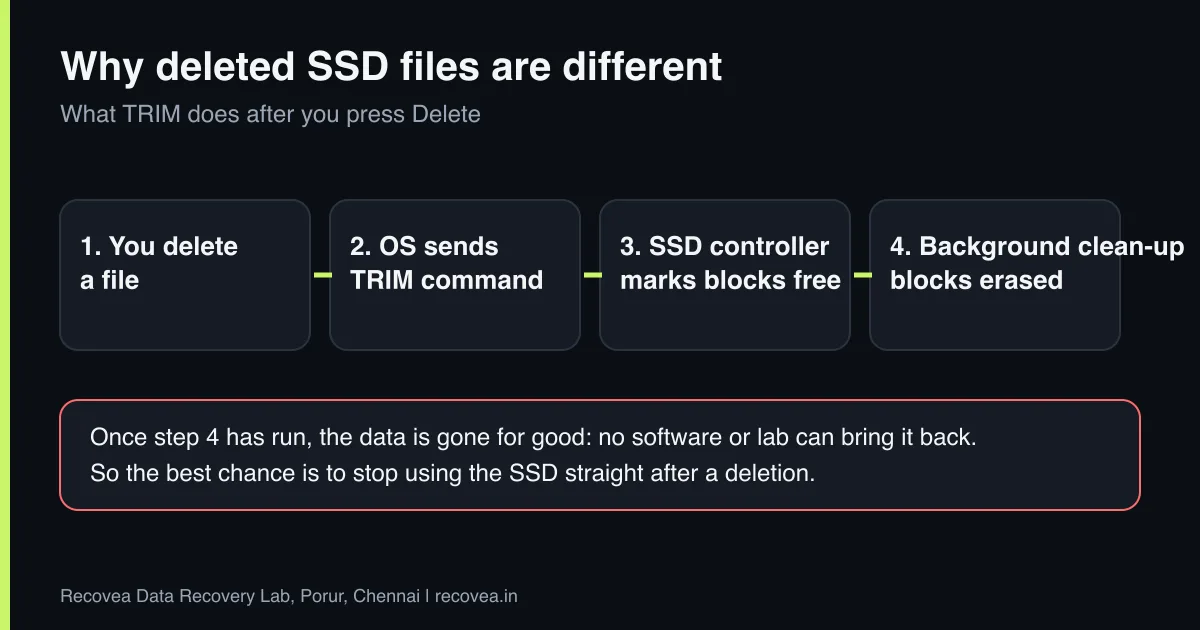
When you delete a file on a hard drive, the operating system only removes the entry from the file system index, and the data stays until something overwrites it. On an SSD, the operating system also sends a TRIM command, telling the drive that those blocks are no longer in use. The controller is then free to erase them whenever it likes.
What TRIM does to your chances
After TRIM and background clean-up, the erased blocks may return zeros when they are read, or the controller may no longer map them at all. In both cases there is nothing left to recover. Because the SSD erases in the background, even a drive that is simply sitting plugged in can lose deleted data over minutes or hours. That is why the advice is to stop using it straight away.
This is the main reason software that works well on hard drives often finds nothing on SSDs.
Deleted SSD files: your chances
It depends on what happened next
stop careful safe
Your chances after deleting files from an SSD.
When recovery is still possible
- TRIM did not run. Some external SSDs and USB enclosures do not pass TRIM through, some older systems and operating-system settings have it off, and some formats or configurations skip it.
- Very recent deletion and the drive was switched off at once. The less time the controller has, the better the chance.
- The problem is not deletion. A corrupted file system, a lost partition, an SSD that is not detected, one that shows 0 GB or the wrong size, or a controller fault are all different. These are often recoverable, because the data is still in the chips.
- Chip-level recovery. On some failed SSDs and memory cards, the engineer can read the memory chips directly and rebuild the data. This depends on the controller and on encryption.
Ask our experts: free diagnosis. Send us a message on WhatsApp and we reply within 30 minutes during working hours (Monday to Saturday, 10:30 to 20:00). Recovery starts from ₹990, physical and complex cases are quoted individually after diagnosis, and if we cannot recover your data, you do not pay.
Chat on WhatsApp | Call +91 79046 79817 | Ask D, free diagnosis
Do this now
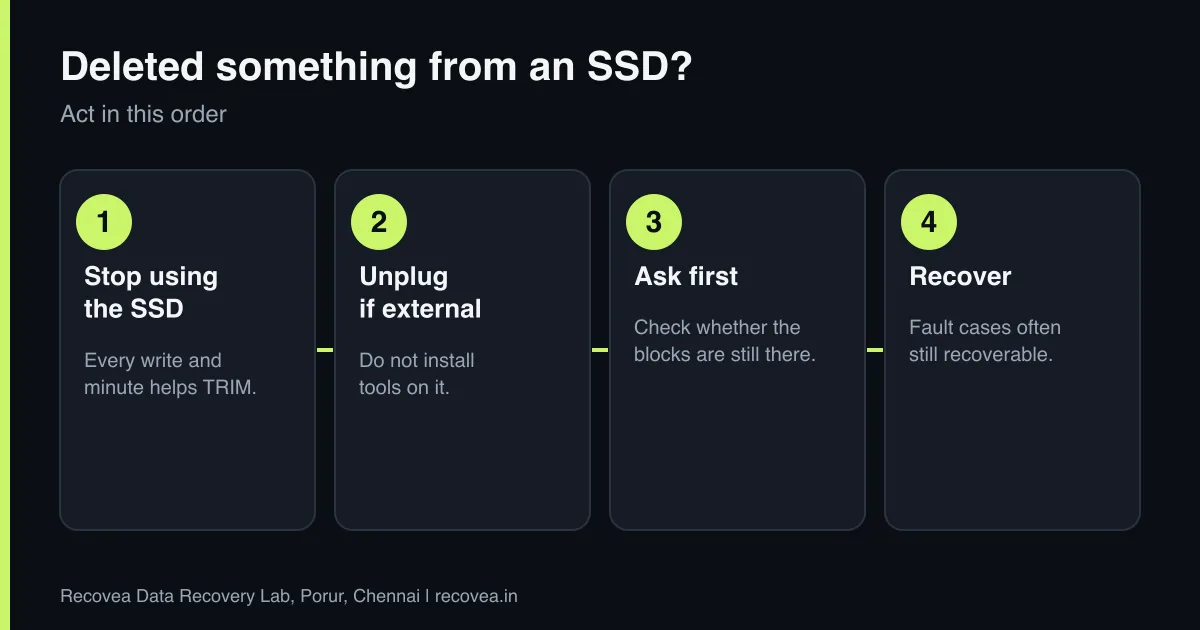
- Stop using the SSD. Every write and every minute of power helps the controller clear space.
- If it is external, unplug it. If it is your system drive, shut the computer down and do not start it from that drive.
- Do not install recovery software on the affected drive. It writes data and can overwrite what you want back.
- Check your backups. Cloud backups, File History, Time Machine and the Recycle Bin are the easiest ways to get files back.
- Ask before you run any tool. A free diagnosis tells you whether the data can still exist.
When the SSD itself has failed
SSD failures are different from deletions, and they are often more recoverable. Typical signs are an SSD that is not detected in the BIOS, shows 0 GB or a strange name, disappears after a few minutes, or becomes read-only. Causes include controller failure, firmware corruption, worn-out memory and damaged circuit boards. Our lab handles SSD and memory card faults including controller failures, firmware problems and chip-level reading. Where an NDA is needed for chip-level work, we sign one. For NVMe drives, the process depends on the model and encryption, and we explain the options after diagnosis.
Encryption makes a difference
Many modern laptops encrypt their SSDs (for example BitLocker or device encryption on Windows, or FileVault and the T2/Apple silicon on Macs). If the SSD is encrypted and the keys are tied to the computer, recovering from the chips alone may not be possible. Keep your recovery key safe, and tell us what encryption was in use when you contact us.
Deleted from an SSD? Decide fast
Follow the arrows and stop at the first YES
Did you just delete and the SSD is still on?
If no, go to the next question
Switch it off now. Stop writing.
Is the SSD encrypted?
If no, go to the next question
Keep the recovery key. It is needed.
Does the SSD fail to detect?
If no, go to the next question
Controller or chip fault. Needs lab tools.
Deleted long ago with TRIM on: we will say honestly if it is unlikely.
A quick decision path after an SSD deletion.
Cost and time
Diagnosis is free. Recovery starts from ₹990; chip-level and complex SSD cases are quoted individually after diagnosis. If we cannot recover your data, you do not pay. Pickup and courier are available from anywhere in India.
Ask our experts: free diagnosis. Send us a message on WhatsApp and we reply within 30 minutes during working hours (Monday to Saturday, 10:30 to 20:00). Recovery starts from ₹990, physical and complex cases are quoted individually after diagnosis, and if we cannot recover your data, you do not pay.
Chat on WhatsApp | Call +91 79046 79817 | Ask D, free diagnosis
Frequently asked questions
Can I recover files deleted from an SSD?
Sometimes. If TRIM already cleared the blocks, no. If TRIM did not run, or the problem is a fault and not deletion, recovery may be possible.
How do I know if TRIM is on?
On Windows, TRIM is usually on by default for internal SSDs. Do not experiment on the affected drive. Ask us.
Is an SSD that is not detected recoverable?
Often yes, depending on the controller and the memory chips. That is a different case from deleted files.
Is software enough for an SSD?
It works only on a healthy drive where the data still exists. A lab can help when the drive is faulty.
Does turning off the computer stop TRIM?
Powering off stops the background clean-up, which is why we advise switching off right after a deletion.
Can data be recovered from a formatted SSD?
It depends on whether the format triggered TRIM and how much time has passed. Stop using it and get a diagnosis.
Related guides and services
- External SSD not detected: causes and recovery options
- Data recovery software or a professional lab
- Hard drive shows RAW or asks to format
- How much does data recovery cost in India?
- SSD and NVMe data recovery
- Pen drive and memory card recovery
Recovea is a data recovery lab at 2nd Floor, Plot No-4, Thiraviyam Nagar 1st Street, Sai Nagar, Porur, Chennai 600116. We accept drives by pickup or courier from anywhere in India.
