

A broken screen does not mean your data is lost. The storage inside the phone is usually fine. The challenge is getting at it when you cannot see or touch the screen.
Key takeaways
- Check Google Photos and Google Drive backups from another device first.
- If the phone still works, copy data to a computer or use a mouse through an adapter.
- Do not factory reset or keep pressing a dead screen.
- Encryption means the phone’s own board usually needs to work for recovery.
- A lab can replace the screen or repair the board to bring the data out.
In this guide
- Check your backups
- If the phone still switches on
- What not to do
- How a lab recovers the data
- Cost and time
- What to note before you contact a lab
- How to prevent it next time
- Frequently asked questions
Written by the Recovea lab team, Porur, Chennai. Last reviewed 16 November 2026.
Check your backups
- Open photos.google.com or the Google Photos app on another device.
- Check Google Drive and your contacts at contacts.google.com.
- Check WhatsApp backup on Google Drive.
- Check brand clouds such as Samsung Cloud.
If the phone still switches on
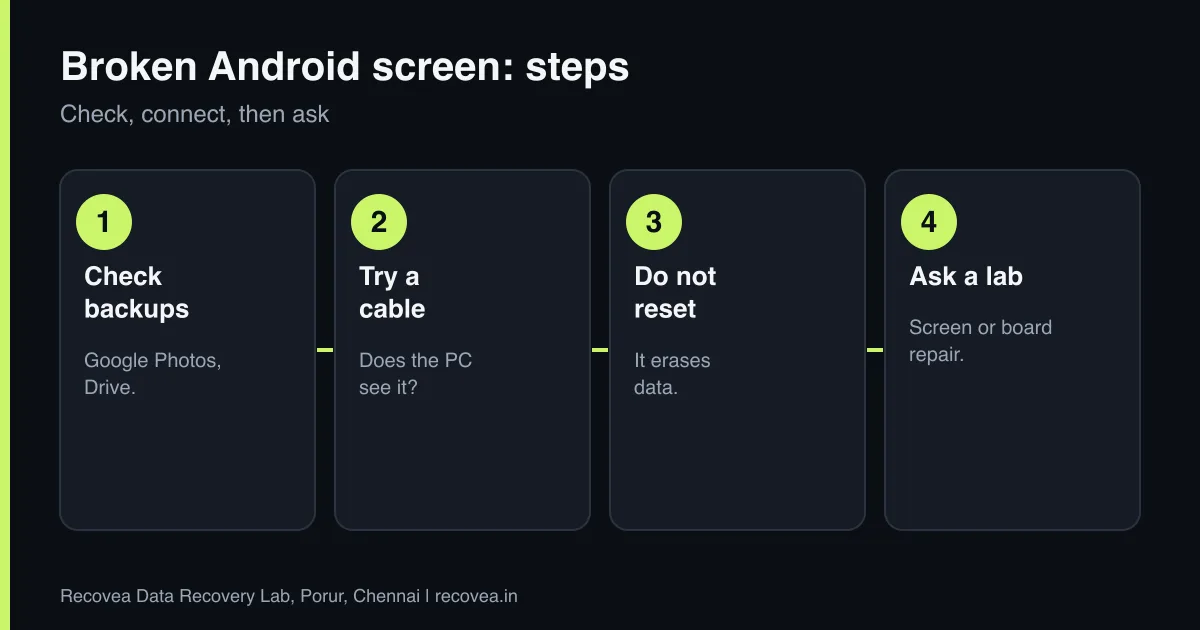
- Connect it to a computer by cable and see if it shows as a device.
- If the screen is black but the phone vibrates, it may still be working.
- A USB mouse through an adapter can sometimes control the phone.
- Try screen mirroring if it was enabled before.
Broken Android screen: your options
Problem, likely cause and the safe next step
stop careful safe
Options for a broken Android screen.
What not to do
- Do not factory reset the phone.
- Do not keep pressing a cracked screen. Glass can cut and the display can be damaged more.
- Do not use heat to loosen the screen.
- Do not install unknown tools that promise to unlock the phone.
Ask our experts: free diagnosis. Send us a message on WhatsApp and we reply within 30 minutes during working hours (Monday to Saturday, 10:30 to 20:00). Recovery starts from ₹990, physical and complex cases are quoted individually after diagnosis, and if we cannot recover your data, you do not pay.
Chat on WhatsApp | Call +91 79046 79817 | Ask D, free diagnosis
How a lab recovers the data
The engineer can replace the screen to bring the phone back to a working state, or repair the board if the phone is dead, then copy the data. Modern Android phones encrypt their storage, so data usually can be recovered only through the working original board, not by moving the chip. We tell you honestly after diagnosis. For locked phones, we help only with certain models and with proof of ownership.
Android broken screen: try in order
From easiest to most advanced
The order to try recovery options on a broken Android.
Cost and time
Diagnosis is free. Screen and board work is quoted individually after diagnosis. You pay only if data is recovered.
What to note before you contact a lab
Tell the engineer the phone make and model, how the problem began (water, a drop, a broken screen, a failed update), whether it still switches on, and whether it was locked or encrypted. Switch it off if it was damaged, and keep the SIM and memory card. Bring the original invoice if the phone is locked, because we only help with certain models and only with proof of ownership. Do not factory reset the phone: that erases the data.
How to prevent it next time
Turn on automatic backups: iCloud for iPhone, Google Photos and Google Drive backup for Android. Check once a month that the last backup is recent. Copy important photos to a computer or external drive as well. Use a sturdy case, keep the phone away from water and heat, and keep your passcode and account details somewhere safe, because backups are useless if you cannot sign in.
Ask our experts: free diagnosis. Send us a message on WhatsApp and we reply within 30 minutes during working hours (Monday to Saturday, 10:30 to 20:00). Recovery starts from ₹990, physical and complex cases are quoted individually after diagnosis, and if we cannot recover your data, you do not pay.
Chat on WhatsApp | Call +91 79046 79817 | Ask D, free diagnosis
Frequently asked questions
Can I recover photos from a phone with a broken screen?
Often yes. Check backups, then ask a lab.
The screen is black but the phone vibrates. Is it alive?
Often yes. Do not reset it.
Can you unlock my phone?
Only certain models, with proof of ownership.
Can data be taken from the chip?
Usually not for modern encrypted phones.
How much does it cost?
Diagnosis is free; work is quoted after diagnosis.
Related guides and services
- iPhone data recovery without a backup
- Water-damaged phone: first 5 steps
- How much does data recovery cost in India?
- How to choose a data recovery service in Chennai
- iPhone and Android data recovery
- All data recovery services
Recovea is a data recovery lab at 2nd Floor, Plot No-4, Thiraviyam Nagar 1st Street, Sai Nagar, Porur, Chennai 600116. We accept drives by pickup or courier from anywhere in India.
