

Deleted files are often recoverable, if you stop using the drive straight away. On a hard drive, deleting only removes the entry from the index. On an SSD, TRIM can clear the data quickly. Either way, new writes reduce your chances.
Key takeaways
- Check the Recycle Bin, File History, OneDrive and backups before anything else.
- On a hard drive, deleted data usually stays until overwritten.
- On an SSD, TRIM can erase it, so stop using the drive at once.
- Do not install recovery software on the same drive and do not save recovered files there.
- A lab can recover safely from healthy or failing drives.
In this guide
- What happens when you delete
- Quick checks first
- Stop using the drive
- What not to do
- Recovery with software and with a lab
- Cost and time
- What to note before you contact a lab
- How to prevent it next time
- Frequently asked questions
Written by the Recovea lab team, Porur, Chennai. Last reviewed 16 November 2026.
What happens when you delete
When you delete a file, the system marks its space as free and removes the entry from the index. The data stays on a hard drive until something else is written over it. Emptying the Recycle Bin does the same. The more you use the drive afterwards, the more likely it is that the space is reused.
Deleted folder: where is it now?
How it was deleted decides the chance
stop careful safe
Where a deleted folder may still be.
Quick checks first
- Recycle Bin or Trash, including other user accounts.
- File History, Previous Versions, Time Machine, OneDrive, Google Drive or Dropbox version history.
- Backups on another drive.
- Search the drive for the file name in case it moved.
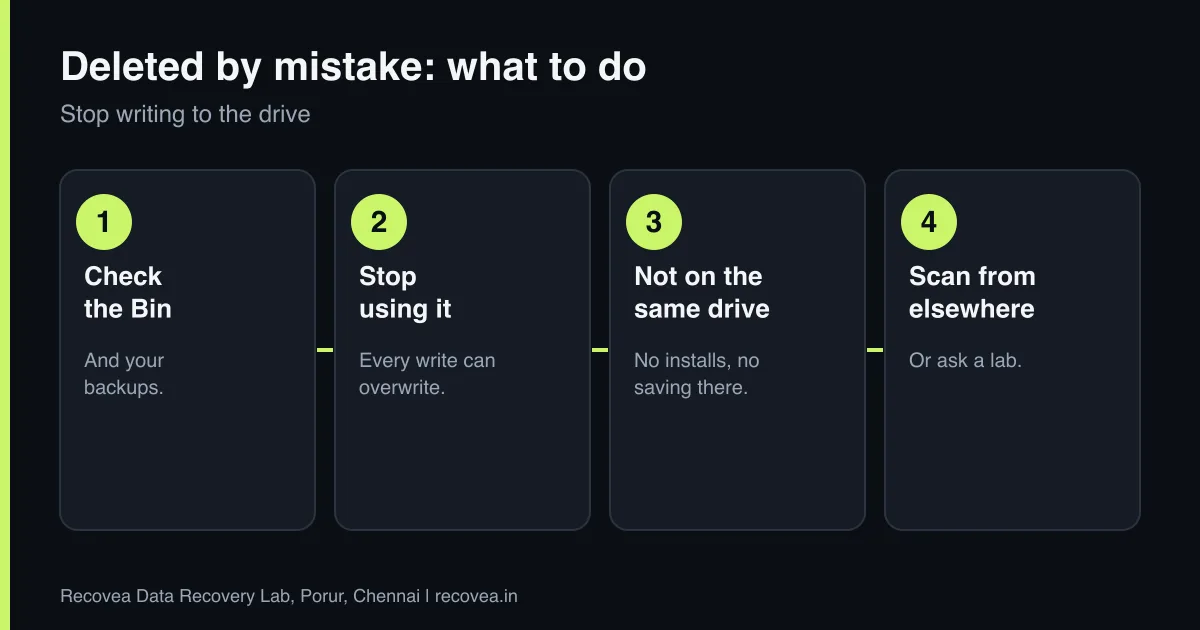
Stop using the drive
Every new file, download, browser cache and system update writes to the drive and may overwrite the space your file used. If the files are on your system drive, shut the computer down, and use another device for what you need. If it is an external drive or card, unplug it.
What not to do
- Do not install recovery software on the same drive.
- Do not save recovered files to the same drive.
- Do not run defrag, cleanup or “optimise” tools.
- Do not keep working “for a few minutes”.
Ask our experts: free diagnosis. Send us a message on WhatsApp and we reply within 30 minutes during working hours (Monday to Saturday, 10:30 to 20:00). Recovery starts from ₹990, physical and complex cases are quoted individually after diagnosis, and if we cannot recover your data, you do not pay.
Chat on WhatsApp | Call +91 79046 79817 | Ask D, free diagnosis
Recovery with software and with a lab
If the drive is healthy and the files are not critical, a careful read-only scan with a reputable tool is a fair first try, from another computer, saving to another drive. If the drive is failing, is an SSD, or the files matter, a lab makes a safe copy first and recovers from it. See our software or lab guide.
Why speed matters after a deletion
The longer the drive stays in use, the lower the chance
Why quick action matters after a deletion.
Cost and time
Diagnosis is free. Logical recoveries commonly take 24 to 72 hours and start from ₹990. You pay only if data is recovered.
What to note before you contact a lab
Tell the engineer the laptop or PC model, the operating system, how the problem started (an update, a crash, a fall, liquid), whether the drive is encrypted with BitLocker or FileVault, and which folders matter most. Keep the encryption recovery key if you have one. Do not reinstall Windows or reset the computer, because that can overwrite your files. If the drive is a hard disk that clicks or is not detected, switch it off and do not try again.
How to prevent it next time
Use File History or Windows Backup, Time Machine on a Mac, or a cloud service for your documents and photos, and keep a second copy on an external drive that is not always connected. Check that backups really finish. Save your BitLocker or FileVault recovery key somewhere safe and separate from the computer. Replace an old hard disk with an SSD before it fails, and keep the laptop away from heat, dust and liquids.
Ask our experts: free diagnosis. Send us a message on WhatsApp and we reply within 30 minutes during working hours (Monday to Saturday, 10:30 to 20:00). Recovery starts from ₹990, physical and complex cases are quoted individually after diagnosis, and if we cannot recover your data, you do not pay.
Chat on WhatsApp | Call +91 79046 79817 | Ask D, free diagnosis
Frequently asked questions
Can I recover files after emptying the Recycle Bin?
Often yes on a hard drive, if nothing has overwritten them.
Can I recover deleted files from an SSD?
Sometimes. TRIM can erase them. Stop using it.
Where do deleted files go?
They are marked free. The data stays until overwritten.
Is free software safe?
On a healthy drive, if used from another drive.
How much does it cost?
Diagnosis is free; recovery starts from ₹990.
Related guides and services
- Deleted files from an SSD: TRIM explained
- Data recovery software or a professional lab
- Formatted SSD or pen drive: recovery chances
- How much does data recovery cost in India?
- Laptop data recovery
- Hard disk data recovery in Chennai
Recovea is a data recovery lab at 2nd Floor, Plot No-4, Thiraviyam Nagar 1st Street, Sai Nagar, Porur, Chennai 600116. We accept drives by pickup or courier from anywhere in India.
